


New Smarthedge EA MT4 v1.16 For Build 1473+
Original price was: $500.00.$14.95Current price is: $14.95.
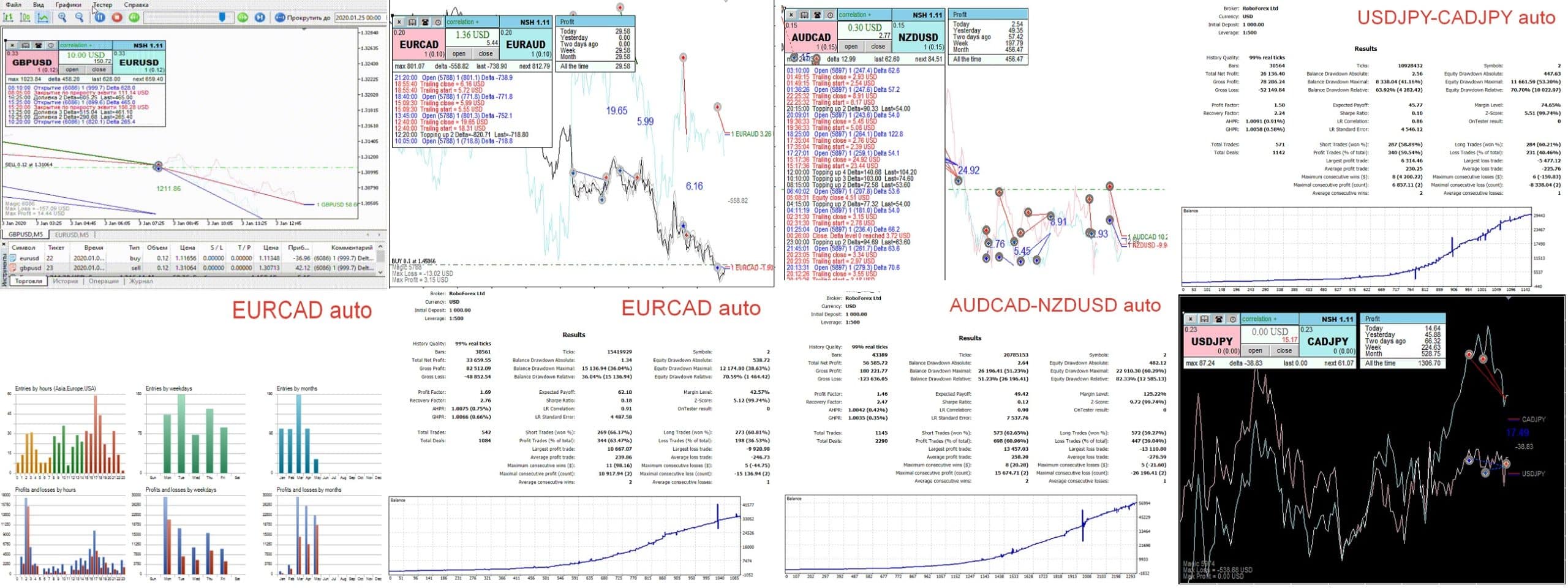
The New Smarthedge EA is an Expert Advisor (robot) for MetaTrader that keeps two highly correlated instruments open at the same time.




Description
New Smarthedge EA: Simple Settings, Paired Trading, Lower Risk
New Smarthedge EA – Why This Paired-Trading Robot Deserves a Closer Look
Table of Contents
- What Is the New Smarthedge EA?
- The Trading Principle in Plain Words
- Key Updates Compared with SMARTHEDGE & SH-2
- Step-by-Step Setup Guide
- Tips for Going Live with the New Smarthedge EA
- Final Thoughts
1. What Is the New Smarthedge EA?
The New Smarthedge EA is an Expert Advisor (robot) for MetaTrader that keeps two highly correlated instruments open at the same time. A win on one side is designed to offset a drawdown on the other side. The idea first appeared in SMARTHEDGE and later SH-2; the new version keeps the core logic yet trims the settings to a few essentials so you can launch it faster.
2. The Trading Principle in Plain Words
- We pick two “drum instruments” (closely moving pairs such as EURUSD & GBPUSD).
- When the Expert Advisor opens a trade on one instrument, it opens another on the second instrument.
- If one trade heads into loss, the other often moves to profit because of their correlation.
- The result: the account equity curve tends to be flatter than if we traded only one side.
Below is the short video that shows the principle at work. (Embed your broker-approved clip here.)
3. Key Updates Compared with SMARTHEDGE & SH-2
| Feature | Earlier EA | New Smarthedge EA | What It Means to You |
|---|---|---|---|
| Spread-based filters | No | Yes | No more guessing point values; EA reads the broker spread. |
| AUTO optimization | Partial | Full | Press AUTO; the robot picks presets for most major pairs. |
| Lot in deposit % | Manual lot | % of balance | Scaling lots is now hands-free when the balance changes. |
| Launch speed | 15-20 min | < 5 min | Faster from install to first trade. |
4. Step-by-Step Setup Guide
- Download from the official MQL5 Market page.
- Copy into
MQL5/Experts/or drag-drop in MetaTrader. - Open two charts: e.g., EURUSD M15 and GBPUSD M15.
- Attach New Smarthedge EA to ONE of the charts only.
- In Inputs choose:
- Mode =
AUTO - Deposit Percent =
2.0(example)
- Mode =
- Enable Algo-Trading.
- Watch the journal for “EA Ready” message.
5. Tips for Going Live with the New Smarthedge EA
- Start on a demo for at least two weeks.
- Avoid Friday evening sessions when spreads widen.
- Do not mix manual trades on the same instruments; the EA tracks its own Magic Number and might get confused.
- Keep VPS latency under 100 ms for best fill price.
- Review account balance monthly and adjust Deposit % only if your risk appetite changes.
6. Final Thoughts
The New Smarthedge EA keeps the paired-hedge method many traders grew to like in SMARTHEDGE, yet it cuts the setup time from minutes to seconds. By trading two correlated instruments side by side, the EA seeks to smooth equity swings and let you use larger volumes with controlled risk. If a lower-stress curve and no-nonsense parameters sound good, the New Smarthedge EA may fit well in your trading toolkit.
Vendor Site – Click Here
| Membership | Yearly Membership |
|---|---|
| Additional Services | Unlock & Decompile |
| Recommended Brokers | Exness Broker, FPMarkets |
| Recommended VPS | FXVM (Low Latency) |
| Youtube Channel | ForexForYou |
| Telegram Channel | Onshoppie Forex EA's & Indicators |
| Telegram Support | Onshoppie Support |
| Installation Guides | Onshoppie Forex Guides |
Brand
ea-mt4
Only logged in customers who have purchased this product may leave a review.
Related products



Products
-
 Perceptrader AI EA MT5 V2.43 + Setfiles For Build 5836+
Original price was: $2,800.00.$14.95Current price is: $14.95.
Perceptrader AI EA MT5 V2.43 + Setfiles For Build 5836+
Original price was: $2,800.00.$14.95Current price is: $14.95.
-
 Quantum Emperor EA MT5 V7.5 For Build 5836+
Original price was: $799.00.$14.95Current price is: $14.95.
Quantum Emperor EA MT5 V7.5 For Build 5836+
Original price was: $799.00.$14.95Current price is: $14.95.
-
 Quantum King EA MT5 V3.1 For Build 5836+
Original price was: $649.00.$14.95Current price is: $14.95.
Quantum King EA MT5 V3.1 For Build 5836+
Original price was: $649.00.$14.95Current price is: $14.95.
-
 Bitcoin Robot Grid EA MT4 V6.0 For Build 1473+
Original price was: $899.00.$14.95Current price is: $14.95.
Bitcoin Robot Grid EA MT4 V6.0 For Build 1473+
Original price was: $899.00.$14.95Current price is: $14.95.
-
 IS PI Scalper EA Virtual Level Final MT4 + SetFiles
$14.95
IS PI Scalper EA Virtual Level Final MT4 + SetFiles
$14.95
-
 ArtQuant Gold EA MT5 V3.0 For Build 5836+
Original price was: $700.00.$14.95Current price is: $14.95.
ArtQuant Gold EA MT5 V3.0 For Build 5836+
Original price was: $700.00.$14.95Current price is: $14.95.
-
 Gold Trap EA MT5 V4.24 + Setfiles For Build 5836+
$19.95
Gold Trap EA MT5 V4.24 + Setfiles For Build 5836+
$19.95
-
 AI X HFT VIP EA MT4 V14 With DLL 1473
$14.95
AI X HFT VIP EA MT4 V14 With DLL 1473
$14.95
Recent reviews
-
 Advanced Dashboard Currency Strength
by Balram
Advanced Dashboard Currency Strength
by Balram
Reviews
There are no reviews yet.