


Gecko EA MT4 v1.2 + SetFiles For Build 1470+
Original price was: $149.00.$14.95Current price is: $14.95.
Gecko EA is an automated trading system designed for MetaTrader 4 (MT4). Watches the market 24/7 looking for orders on your behalf.


Description
Gecko EA: Complete Guide to the Breakout Expert Advisor for EURUSD H1
Gecko EA – A Simple, Proven Breakout Strategy for Safer Automated Trading
Table of Contents
- What Is Gecko EA?
- Key Features at a Glance
- Risk Management & Lot-Size Logic
- Setting Up Gecko EA Step by Step
- Digging Into the Parameters
- Final Thoughts
What Is Gecko EA?
Gecko EA is an Expert Advisor (EA) for MetaTrader that trades breakouts on EURUSD H1 and several other major pairs. Instead of chasing small scalps or resorting to grid or martingale tactics, Gecko EA follows a clean rule set:
- Find recent highs and lows
- Wait for the market to break through those levels
- Enter a trade in the breakout direction
- Manage the trade with strict stop-loss and a mix of advanced trailing tools
Because every trade has a fixed stop-loss and no risky lot multiplying, Gecko EA tries to keep drawdowns small, even when the market misbehaves.
Key Features at a Glance
| Feature | Why It Matters |
|---|---|
| Stop-loss on every trade | Gives you a clear worst-case number |
| H1 chart, not M1 | Cuts down on broker dependency for spread/latency |
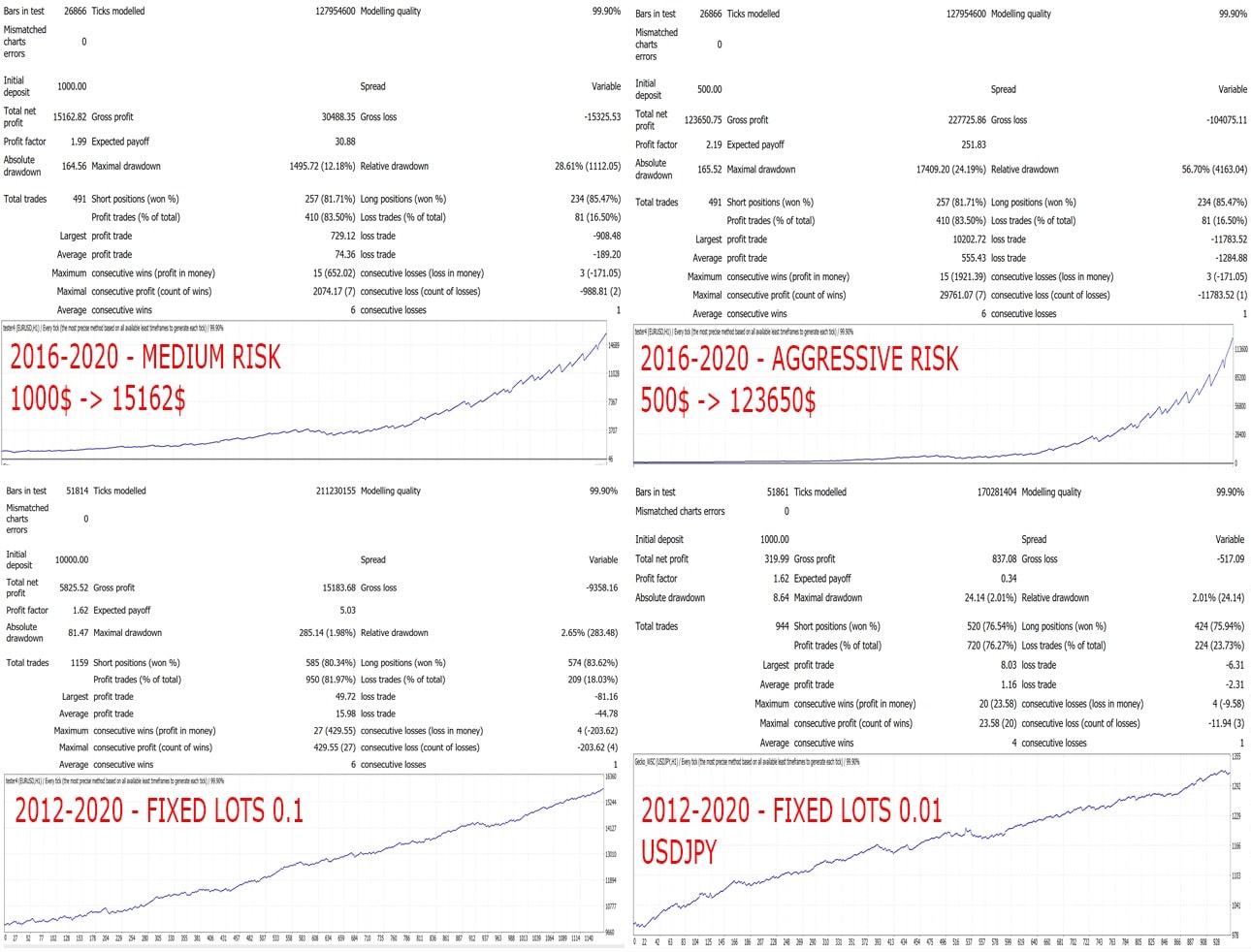
| 80 %+ hit rate in back-tests | Shows the strategy catches most of the runs |
| No optimization curve-fitting | Default set was forward-tested without parameter tweaking |
| Works on EURUSD, GBPUSD, USDJPY, AUDUSD | Same logic, just plug different preset files |
| Virtual SL option | Keep your stop invisible to the broker (if you wish) |
| Stress-tested with 99.9 % tick data | Reduces surprise gaps between back-test and live |
Risk Management & Lot-Size Logic
One common reason automated systems fail is poor money management. Gecko EA offers three simple pre-sets:
| Risk Level | Lots Per Balance | Example on 1 000 $ Account |
|---|---|---|
| Low | 200 | 0.05 lot |
| Medium | 100 | 0.10 lot |
| Aggressive | 50 | 0.20 lot |
If you prefer a percentage-risk method, turn on “RiskPerTrade” in the settings and enter, say, 1 %. The EA then:
- Reads the SL distance on the current setup
- Adjusts lot size so risk equals 1 % of balance
Keep in mind:
- A minimum balance of 100 $ is advised, though more headroom is always better.
- Because Gecko EA is not a scalper, average hold time can be several hours. Make sure your margin can cover the open position.
Setting Up Gecko EA Step by Step
This walk-through uses MetaTrader 4, but MetaTrader 5 is almost identical.
1. Download & Copy Files
- Grab the
.ex4or.ex5file from the official page. - In MetaTrader, click File → Open Data Folder.
- Put the EA in
MQL4/Experts(orMQL5/Experts). - If you downloaded preset files (
.set), store them inPresets.
2. Enable Algorithmic Trading
- Press Ctrl+O (Options).
- Under the Expert Advisors tab, tick Allow Automated Trading.
- Hit OK.
3. Attach EA to Chart
- Open an EURUSD H1 chart.
- Drag Gecko EA onto the chart.
- In the input window, click Load and choose
Gecko_EURUSD_H1.set. - Confirm with OK.
- A small smiley face or green icon in the corner shows the EA is active.
4. Check Key Values
- Magic Number – unique ID, so another EA will not interfere.
- Lots Per Balance OR RiskPerTrade – select one method.
- Max Spread – keep it near twice your average live spread; default is 20 pts (2 pips on 5-digit broker).
5. Let It Run
Leave your platform open, or host it on a VPS for zero downtime. Avoid manual interference unless you plan to disable the EA during high-impact news.
Digging Into the Parameters
Below is a plain-English map of the most used settings. Names can vary slightly between MT4 and MT5 builds.
A. Basic
| Setting | What It Does | Tip |
|---|---|---|
| MagicNumber | Unique tag for this EA | Use different numbers per chart |
| Trade_Comment | Visible in MT4’s “Comment” column | Handy for filtering reports |
| InfoPanel | Show/hide on-screen stats | Off if you want a clean chart |
B. Entry Logic
- EntryModel —
0,1, or2- 0: Candle close breakout
- 1: Pending order at level ± spread
- 2: Timed delay (wait X seconds)
- EntryStrictness — Higher value = needs stronger breakout move.
- EntryTimingSec — Delay before order is placed (EntryModel 2).
C. Stop-Loss & Take-Profit
| Setting | Purpose |
|---|---|
| StopLossPips | Hard distance in pips |
| TakeProfitPips | Static TP |
D. Trailing SL
| Setting | Description |
|---|---|
| Trail_StartPips | When price moves this number of pips into profit, trail begins |
| Trail_PipStep | Size of each SL move |
| HighLowTrail | true = use recent highs/lows |
| Trail_StopAtBE | true = stop trailing once SL hits break-even |
| TimeTrail_Min | Start time-based trailing after X minutes |
E. Break-Even
- BE_StartPips — Profit in pips before moving SL to entry price.
- BE_ExtraPips — Add buffer beyond entry so the trade becomes “better than risk-free”.
F. Spread Filter
| Setting | How It Helps |
|---|---|
| MaxSpreadPoints | Prevents new trades when spreads widen (e.g., around rollover) |
G. Virtual SL
If “VirtualSL” is true, the EA only keeps the SL on its own side, sending a market exit order when price hits that level instead of placing it with the broker.
Final Thoughts
Gecko EA is a straightforward breakout robot that prioritizes capital safety through fixed stop-losses, dynamic trailing, and modest lot sizing. By sticking to the EURUSD H1 template (and using presets for other majors), traders can let the algorithm do the heavy lifting while still knowing exactly where each trade begins and ends.
Before going live, try the EA on a demo or a small-lot micro account. Monitor spread during your broker’s rollover time, and keep risk consistent. If at any stage the equity curve drifts from the historic pattern, pause, review the journal, and adjust only one variable at a time.
Happy trading, and remember: always use money you can afford to risk.
Vendor Site – Click Here
| Membership | Yearly Membership |
|---|---|
| Additional Services | Unlock & Decompile |
| Recommended Brokers | Exness Broker, FPMarkets |
| Recommended VPS | FXVM (Low Latency) |
| Youtube Channel | ForexForYou |
| Telegram Channel | Onshoppie Forex EA's & Indicators |
| Telegram Support | Onshoppie Support |
| Installation Guides | Onshoppie Forex Guides |
Brand
ea-mt4
Only logged in customers who have purchased this product may leave a review.
Related products



Products
-
 Perceptrader AI EA MT5 V2.43 + Setfiles For Build 5836+
Original price was: $2,800.00.$14.95Current price is: $14.95.
Perceptrader AI EA MT5 V2.43 + Setfiles For Build 5836+
Original price was: $2,800.00.$14.95Current price is: $14.95.
-
 Quantum Emperor EA MT5 V7.5 For Build 5836+
Original price was: $799.00.$14.95Current price is: $14.95.
Quantum Emperor EA MT5 V7.5 For Build 5836+
Original price was: $799.00.$14.95Current price is: $14.95.
-
 Quantum King EA MT5 V3.1 For Build 5836+
Original price was: $649.00.$14.95Current price is: $14.95.
Quantum King EA MT5 V3.1 For Build 5836+
Original price was: $649.00.$14.95Current price is: $14.95.
-
 Bitcoin Robot Grid EA MT4 V6.0 For Build 1473+
Original price was: $899.00.$14.95Current price is: $14.95.
Bitcoin Robot Grid EA MT4 V6.0 For Build 1473+
Original price was: $899.00.$14.95Current price is: $14.95.
-
 IS PI Scalper EA Virtual Level Final MT4 + SetFiles
$14.95
IS PI Scalper EA Virtual Level Final MT4 + SetFiles
$14.95
-
 ArtQuant Gold EA MT5 V3.0 For Build 5836+
Original price was: $700.00.$14.95Current price is: $14.95.
ArtQuant Gold EA MT5 V3.0 For Build 5836+
Original price was: $700.00.$14.95Current price is: $14.95.
-
 Gold Trap EA MT5 V4.24 + Setfiles For Build 5836+
$24.95
Gold Trap EA MT5 V4.24 + Setfiles For Build 5836+
$24.95
-
 AI X HFT VIP EA MT4 V14 With DLL 1473
$14.95
AI X HFT VIP EA MT4 V14 With DLL 1473
$14.95
Recent reviews
-
 Advanced Dashboard Currency Strength
by Balram
Advanced Dashboard Currency Strength
by Balram
Reviews
There are no reviews yet.