


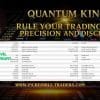
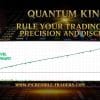
Quantum King EA MT4 V3.1 For Build 1470+
Original price was: $499.00.$14.95Current price is: $14.95.
Discover exclusive Quantum King EA secrets that traders don’t want you to know. Get explosive results with our comprehensive guide and reviews.



Description
Quantum King EA: A Practical Guide to Intelligent, Controlled Trading
Alternative Title
Quantum King EA — Intelligent Power, Refined for Every Trader
Table of Contents
- Introduction to Quantum King EA
- What Is Quantum King EA?
- Why AUDCAD on the M5 Timeframe?
- Minimum Requirements
- Step-by-Step Installation Guide
- Risk Control and Account Safety
- Frequently Asked Questions
- Conclusion
Introduction to Quantum King EA
Rule your trading with precision and discipline. That short phrase sums up what Quantum King aims to deliver. This fully automated trading system blends a structured grid with adaptive recovery logic, allowing both beginners and experienced traders to seek steady, measured growth with less screen time. In the following guide, you will learn what makes the expert advisor special, how it works, and whether it fits your trading style.
What Is Quantum King EA?
Quantum King EA is a software robot that runs inside MetaTrader 4 (commonly called MT4). Once installed, it opens and closes trades for you on the AUDCAD currency pair, specifically on the M5 (five-minute) chart.
Unlike many one-size-fits-all bots, Quantum King is tailored to AUDCAD, a pair known for stable, repeating moves. The goal is not rapid, risky gains but controlled progress over time.
Key points:
- Runs 24/5 without human intervention
- Uses a grid to enter trades at set price gaps
- Applies an adaptive Martingale to manage losing trades calmly
- Fits small or large balances (as low as $200, ideally $500 or more)
- Works best on low-spread ECN or Raw accounts with at least 1:100 leverage
Why AUDCAD on the M5 Timeframe?
Selecting the right market is half the job. The developer chose AUDCAD (Australian dollar vs Canadian dollar) for three main reasons:
- Stable Range PatternsAUDCAD often drifts in repeating side-ways ranges, ideal for grid exits.
- Overlap of Trading SessionsSydney, Tokyo, London, and New York sessions overlap partly, giving smoother price flow.
- Lower SpreadMany brokers quote tight spreads on AUDCAD, cutting trading costs.
Five-minute candles (M5) give enough data for quick reaction but avoid the noise of one-minute charts. Back-tests show that widening the timeframe (e.g., to M15) can reduce trade count significantly, while dropping to M1 can raise broker fees.
Minimum Requirements
- Computer or VPS able to run MT424 hours
- Reliable Internet (99.9 % uptime preferable)
- Fresh AUDCAD M5 chart
- $200+ balance (demo accounts also work for testing)
- Basic understanding of how to load an EA into MetaTrader
- Patience to leave the EA running — no frequent panic stops
Tip: If you are new to VPS hosting, see “Beginner’s Guide to VPS for Forex” on Investopedia for an overview.
Step-by-Step Installation Guide
- Download the EA FileObtain the official
.ex4file from the author. Avoid unofficial sources. - Open MetaTraderGo to
File › Open Data Folder › MQL4 › Experts. - Copy the FilePaste the EA file into the folder. Restart MetaTrader.
- Attach to ChartDrag “Quantum King EA” from the Navigator pane onto an AUDCAD M5 chart.
- Enable AutoTradingClick the “AutoTrading” button so it turns green.
- Set Lot Size and RiskThe default settings fit a $500 account. If your balance is smaller, lower the starting lot.
- Check Journal TabLook for “Quantum King EA started” to confirm smooth launch.
- Let It RunKeep your computer or VPS on. Refrain from manual interventions unless you see critical issues.
Risk Control and Account Safety with Quantum King
Though Quantum King EA includes caps and pause logic, all grid-Martingale hybrids face certain risks. Below are practical ways to keep risk in check:
Use a low-spread accountHigh spreads widen grid gaps and increase drawdown.
Start with a demoObserve the EA for at least two weeks before shifting to live funds.
Withdraw profits regularlyPeriodic withdrawals protect equity should an unusual trend strike.
Set an equity stop-outMany traders pick a 20 – 30 % hard stop to preserve capital.
Monitor newsWhile AUDCAD is less news-sensitive than majors, strong data such as Australian employment or Canadian CPI can speed up price moves. If you prefer, disable the EA during high-impact events.
External reading: Check the Economic Calendar on Forex Factory to plan pauses.
Frequently Asked Questions Regarding Quantum King
Q1. Can I run Quantum King EA on another pair?It is not advised. The logic, lot multipliers, and grid gaps are matched to AUDCAD behavior.
Q2. How often does the EA trade?Expect 5 – 20 positions per day, scaling higher in volatile periods.
Q3. Do I need to keep my computer on 24 hours?Yes, unless you use a VPS. Downtime may leave positions unmanaged.
Q4. What leverage is safest?1:100 is the documented baseline. Lower leverage may stop recovery sequences; higher leverage does not break the EA but raises temptation to over-risk.
Conclusion for Quantum King
Quantum King EA blends the order of a grid with the adaptive mind of a gentle Martingale, making it a balanced option for traders who want steady, hands-off exposure to the AUDCAD market. Set it up once, monitor risk, and let the algorithm do the day-to-day work.
If you value consistent, measured growth and can accept controlled drawdowns, Quantum King EA is worth a spot in your trading toolbox.
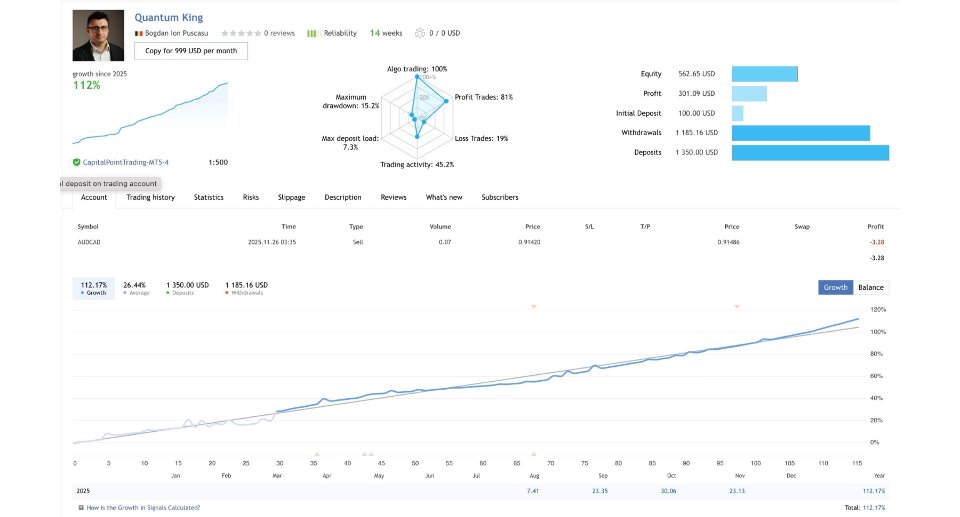
Live Signal: CLICK HERE
Quantum King channel: Click Here
Vendor Site – Click Here
| Membership | Yearly Membership |
|---|---|
| Additional Services | Unlock & Decompile |
| Recommended Brokers | Exness Broker, FPMarkets |
| Recommended VPS | FXVM (Low Latency) |
| Youtube Channel | ForexForYou |
| Telegram Channel | Onshoppie Forex EA's & Indicators |
| Telegram Support | Onshoppie Support |
| Installation Guides | Onshoppie Forex Guides |
Brand
ea-mt4
Only logged in customers who have purchased this product may leave a review.
Related products



Products
-
 Gold Safe EA MT4 v1.1 For Build 1471+
Original price was: $399.00.$14.95Current price is: $14.95.
Gold Safe EA MT4 v1.1 For Build 1471+
Original price was: $399.00.$14.95Current price is: $14.95.
-
 CAPITAL X EA MT5 v1.8 + SetFiles With DLL 5833
$34.95
CAPITAL X EA MT5 v1.8 + SetFiles With DLL 5833
$34.95
-
 BB Return EA MT5 v7.40 For Build 5833+
Original price was: $549.00.$14.95Current price is: $14.95.
BB Return EA MT5 v7.40 For Build 5833+
Original price was: $549.00.$14.95Current price is: $14.95.
-
BB Return EA MT4 v7.40 For Build 1471+
Original price was: $549.00.$14.95Current price is: $14.95.
-
 Gold Strike AI EA MT5 v1.2 For Build 5833+
Original price was: $1,795.00.$14.95Current price is: $14.95.
Gold Strike AI EA MT5 v1.2 For Build 5833+
Original price was: $1,795.00.$14.95Current price is: $14.95.
-
 Chiroptera EA MT5 v3.2 + SetFiles For Build 5833+
Original price was: $899.00.$34.95Current price is: $34.95.
Chiroptera EA MT5 v3.2 + SetFiles For Build 5833+
Original price was: $899.00.$34.95Current price is: $34.95.
-
 TwisterPro Scalper EA MT5 v1.8 + SetFiles For Build 5833+
Original price was: $399.00.$24.95Current price is: $24.95.
TwisterPro Scalper EA MT5 v1.8 + SetFiles For Build 5833+
Original price was: $399.00.$24.95Current price is: $24.95.
-
 Robot De Oro Mr. Y 8.0 ULTRASAFE™ MT5 + SetFiles
Original price was: $347.00.$34.95Current price is: $34.95.
Robot De Oro Mr. Y 8.0 ULTRASAFE™ MT5 + SetFiles
Original price was: $347.00.$34.95Current price is: $34.95.
Recent reviews
-
 Advanced Dashboard Currency Strength
by Balram
Advanced Dashboard Currency Strength
by Balram
Reviews
There are no reviews yet.