


Breakout Lines Indicator MT5 v1.20 For Build 5283+
$9.95
Breakout Lines Indicator MT5 is a dynamic technical analysis tool designed to highlight sudden shifts in market momentum.





Description
Breakout Lines Indicator: Catch Market Momentum Shifts Early
Breakout Lines Indicator: The Trader’s Secret to Spotting Reversals Fast
Table of Contents
- What Is the Breakout Lines Indicator?
- How to Install the Breakout Lines Indicator on MT5
- Frequently Asked Questions
- Final Thoughts
What Is the Breakout Lines Indicator?
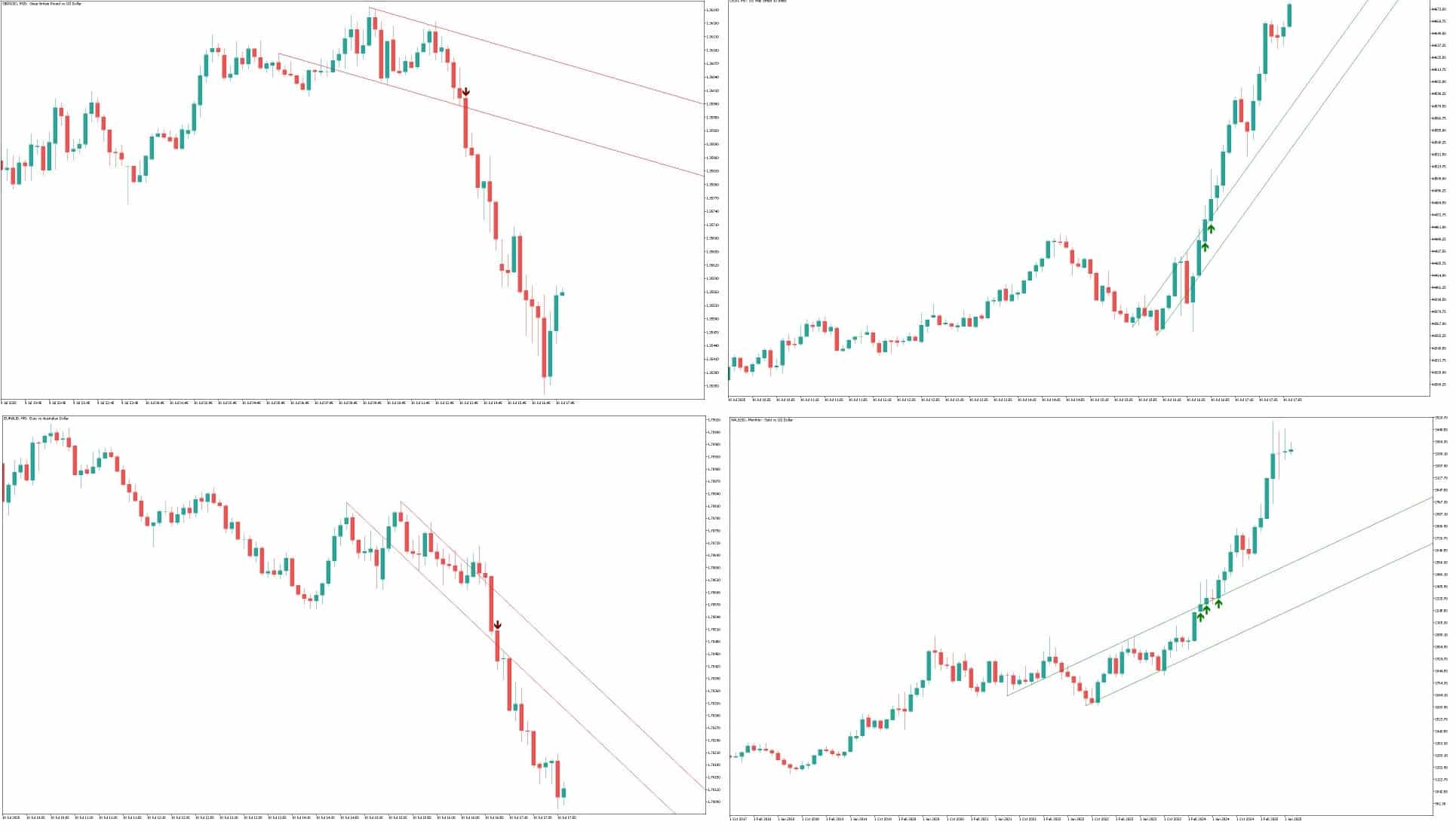
The Breakout Lines Indicator is a lightweight technical analysis tool that draws two simple lines on your price chart:
- Breakout Line – follows price at a fixed angle.
- Parallel Line – runs side-by-side with the Breakout Line, forming a narrow channel.
When price cuts through the Breakout Line, the indicator flags a possible change in direction or the start of a fresh trend. Because it focuses on price acceleration rather than lagging averages, it often points to momentum shifts before they stand out on the chart.
How to Install the Breakout Lines Indicator on MT5
- Download the indicator file (
BreakoutLines.ex5). - In MetaTrader 5, click File → Open Data Folder.
- Navigate to
MQL5 → Indicatorsand paste the file. - Restart MT5 or refresh the Navigator window.
- Drag Breakout Lines Indicator onto your desired chart.
- Adjust the parameters in the pop-up window if needed.
Frequently Asked Questions
Q1: Does the Indicator repaint?A: No. Once the line forms and the candle closes, the Breakout Line stays fixed.
Q2: What time frame works best?A: It works on any chart, but higher time frames reduce noise. Many traders use 15-minute and 1-hour for day trades, and 4-hour for swings.
Q4: Is it free?A: Pricing depends on the vendor. Some versions are free; others are paid. Always download from a trusted source.
Final Thoughts
The Indicator offers a clear, fast way to spot momentum changes without cluttering your chart. By focusing on price acceleration and giving you a simple visual cue—a line break inside a slim channel—it helps you react while the move is still young. Remember to keep the default 20-candle signal window, combine it with solid risk rules, and set up alerts so you never miss a potential setup.
Vendor Site – Click Here
| Membership | Yearly Membership |
|---|---|
| Additional Services | Unlock & Decompile |
| Recommended Brokers | Exness Broker, FPMarkets |
| Recommended VPS | FXVM (Low Latency) |
| Youtube Channel | ForexForYou |
| Telegram Channel | Onshoppie Forex EA's & Indicators |
| Telegram Support | Onshoppie Support |
| Installation Guides | Onshoppie Forex Guides |
Brand
Indicator-mt5
Only logged in customers who have purchased this product may leave a review.
Related products



Products
-
 Quantum Queen X EA MT5 V4.3 MQ5 Source Code
Original price was: $1,799.00.$19.95Current price is: $19.95.
Quantum Queen X EA MT5 V4.3 MQ5 Source Code
Original price was: $1,799.00.$19.95Current price is: $19.95.
-
 Smart Gold Hunter EA MT5 V2.0 MQ5 Source Code
Original price was: $249.00.$28.95Current price is: $28.95.
Smart Gold Hunter EA MT5 V2.0 MQ5 Source Code
Original price was: $249.00.$28.95Current price is: $28.95.
-
 The Gold Reaper EA MQ5 V4.1 Source Code + Setfiles
Original price was: $949.00.$19.95Current price is: $19.95.
The Gold Reaper EA MQ5 V4.1 Source Code + Setfiles
Original price was: $949.00.$19.95Current price is: $19.95.
-
 ATM Alpha BOT MT5 For Build 5984+
$14.95
ATM Alpha BOT MT5 For Build 5984+
$14.95
-
 Pandora Box EA MT5 V1.1 + SetFiles With DLL 5984
$14.95
Pandora Box EA MT5 V1.1 + SetFiles With DLL 5984
$14.95
-
 Bully Max Pro EA MT5 For Build 5984+
$14.95
Bully Max Pro EA MT5 For Build 5984+
$14.95
-
 Trinetra EA MT5 + SetFiles For Build 5984+
$34.95
Trinetra EA MT5 + SetFiles For Build 5984+
$34.95
-
 Strict HedgeZone Final EA MT5 V10 + SetFiles For Build 5984+
$14.95
Strict HedgeZone Final EA MT5 V10 + SetFiles For Build 5984+
$14.95
Recent reviews
-
 Advanced Dashboard Currency Strength
by Balram
Advanced Dashboard Currency Strength
by Balram
Reviews
There are no reviews yet.