

GREEN HAWK EA MT4 V2.2 For Build 1455+
$9.95
Discover the ultimate GREEN HAWK EA trading system with mind-blowing results. Get exclusive insights into this powerful automated trading solution today.



Description
Unleashing the Power of GREEN HAWK EA
Alternative Title: GREEN HAWK EA: The Smart Scalping Solution
Table of Contents
- Introduction
- What is GREEN HAWK EA MT4?
- How It Works
- Setting Up GREEN HAWK EA MT4
- Recommended Trading Parameters
- Tips for Optimal Performance
- Conclusion
Introduction
In the fast-paced world of forex trading, having a reliable and efficient automated trading system can make all the difference. Enter GREEN HAWK EA, a professional scalping expert designed to navigate the complex waters of currency markets. This innovative Expert Advisor (EA) employs smart scalping algorithms to capitalize on short-term price movements, offering traders a powerful tool to enhance their trading strategies.
What is GREEN HAWK EA MT4?
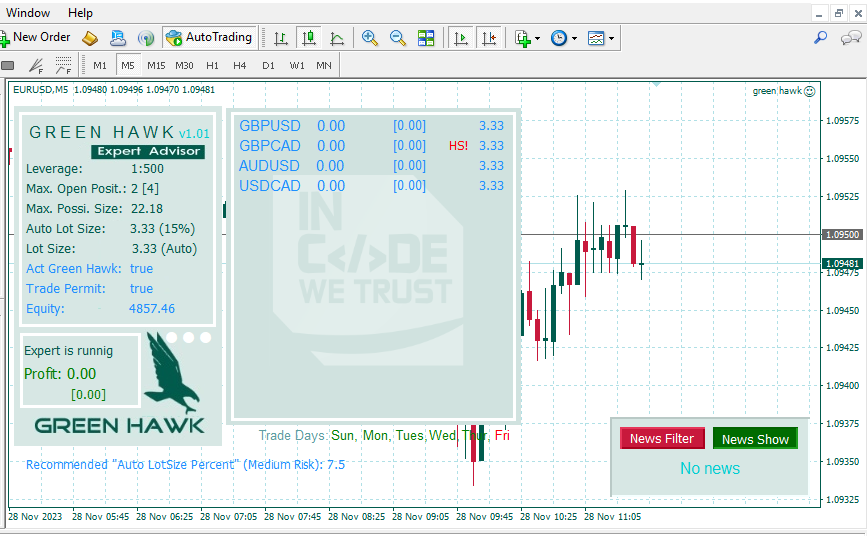
GREEN HAWK EA MT4 is an advanced automated trading system developed for the MetaTrader 4 platform. This EA specializes in scalping, a trading strategy that aims to profit from small price changes in the forex market. Unlike many other EAs, GREEN HAWK doesn’t rely on risky strategies such as grid or martingale. Instead, it uses sophisticated algorithms to identify and exploit short-term price reversals, ensuring all trades are closed within hours.
How It Works
GREEN HAWK EA MT4 operates by analyzing market conditions during specific periods. It identifies potential entry points based on short-term price reversals, opening trades with predefined SL and TP levels. This approach allows for quick profits while minimizing exposure to prolonged market volatility.
The EA’s smart algorithms adapt to various market conditions, ensuring consistent performance across different currency pairs and timeframes. By focusing on short-term price movements, GREEN HAWK can capitalize on market inefficiencies that might be overlooked by longer-term trading strategies.
Setting Up GREEN HAWK EA MT4
- Installation: After purchase, contact the developer for a detailed installation manual.
- Chart Setup: Open an M5 (5-minute) chart for your preferred currency pair.
- Multi-Symbol Mode: To trade multiple pairs, set “Act. Multi Symbol” to true and specify the desired symbols in the EA settings.
- Lot Size Configuration: Enable “Auto Lot Size” for automatic lot calculation based on your account equity.
- Leverage Adjustment: If your account leverage differs from 1:500, adjust the “Auto Lot Size Percent” accordingly.
- DLL Imports: Ensure “Allow DLL imports” is disabled in your MT4 settings.
Recommended Trading Parameters
- Currency Pairs: GBPUSD, EURUSD, USDCAD, EURGBP, EURCHF, USDCHF, AUDCAD, AUDUSD, CADCHF (other pairs can be tested)
- Timeframe: M5 (5-minute charts)
- Minimum Deposit: $100
- Recommended Leverage: 1:500 (1:30 is also acceptable)
- Broker Type: ECN broker with raw/zero spread (especially for GBPUSD)
- Server Time: EET (Eastern European Time) – consult the developer for adjustments if your broker uses a different time zone
Tips for Optimal Performance
- Choose the Right Broker: Opt for a reputable ECN broker with low spreads and fast execution.
- Monitor Spread Levels: The EA’s performance is sensitive to spread, so keep an eye on this metric.
- Start with a Demo: Utilize the free demo to familiarize yourself with the EA’s behavior before live trading.
- Regular Updates: Stay informed about any updates or improvements released by the developer.
- Leverage Responsibly: While higher leverage can amplify profits, it also increases risk. Use it judiciously.
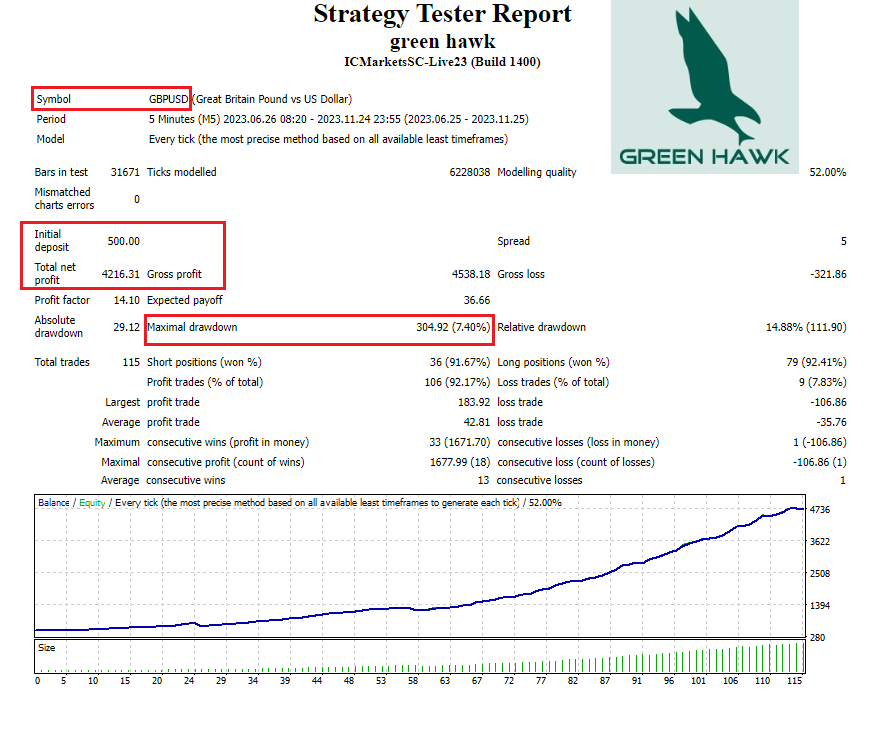
- Backtest and Forward Test: Conduct thorough testing on historical and real-time data to gauge performance.
Conclusion
GREEN HAWK EA offers a sophisticated solution for traders looking to harness the power of automated scalping. By combining smart algorithms, risk management features, and versatile trading options, this EA provides a robust tool for navigating the forex markets. Whether you’re a seasoned trader or just starting, GREEN HAWK EA V2.2 MT4 could be the key to elevating your trading strategy.
Remember, while automated systems like GREEN HAWK can significantly enhance your trading, it’s crucial to understand the risks involved in forex trading. Always trade responsibly and within your means.
| Membership | Yearly Membership |
|---|---|
| Additional Services | Unlock & Decompile |
| Recommended Brokers | Exness Broker, FPMarkets |
| Recommended VPS | FXVM (Low Latency) |
| Youtube Channel | ForexForYou |
| Telegram Channel | Onshoppie Forex EA's & Indicators |
| Telegram Support | Onshoppie Support |
| Installation Guides | Onshoppie Forex Guides |
Brand
ea-mt4
Only logged in customers who have purchased this product may leave a review.
Related products



Products
-
 Quantum Emperor EA MT5 V7.5 For Build 5836+
Original price was: $799.00.$14.95Current price is: $14.95.
Quantum Emperor EA MT5 V7.5 For Build 5836+
Original price was: $799.00.$14.95Current price is: $14.95.
-
 Quantum King EA MT5 V3.1 For Build 5836+
Original price was: $649.00.$14.95Current price is: $14.95.
Quantum King EA MT5 V3.1 For Build 5836+
Original price was: $649.00.$14.95Current price is: $14.95.
-
 Bitcoin Robot Grid EA MT4 V6.0 For Build 1473+
Original price was: $899.00.$14.95Current price is: $14.95.
Bitcoin Robot Grid EA MT4 V6.0 For Build 1473+
Original price was: $899.00.$14.95Current price is: $14.95.
-
 IS PI Scalper EA Virtual Level Final MT4 + SetFiles
$14.95
IS PI Scalper EA Virtual Level Final MT4 + SetFiles
$14.95
-
 ArtQuant Gold EA MT5 V3.0 For Build 5836+
Original price was: $700.00.$14.95Current price is: $14.95.
ArtQuant Gold EA MT5 V3.0 For Build 5836+
Original price was: $700.00.$14.95Current price is: $14.95.
-
 Gold Trap EA MT5 V4.1 For Build 5836+
$24.95
Gold Trap EA MT5 V4.1 For Build 5836+
$24.95
-
 AI X HFT VIP EA MT4 V14 With DLL 1470
$14.95
AI X HFT VIP EA MT4 V14 With DLL 1470
$14.95
-
 Sentinel KMZ EA MT5 v2.5 + SetFiles For Build 5836+
Original price was: $999.00.$14.95Current price is: $14.95.
Sentinel KMZ EA MT5 v2.5 + SetFiles For Build 5836+
Original price was: $999.00.$14.95Current price is: $14.95.
Recent reviews
-
 Advanced Dashboard Currency Strength
by Balram
Advanced Dashboard Currency Strength
by Balram
Reviews
There are no reviews yet.