


Golden Pickaxe EA MT4 V2.19 + Setfiles For Build 1470+
Original price was: $2,800.00.$14.95Current price is: $14.95.
The amazing Golden Pickaxe EA just arrived! Happy users are seeing real results. Discover how you can benefit and boost your trading performance now.





Description
Golden Pickaxe EA: Complete Guide to the Popular Gold Trading Robot
Golden Pickaxe EA – Your In-Depth Manual for Mean-Reversion Grid Trading on XAUUSD
Table of Contents
- What Is Golden Pickaxe EA?
- How the Mean-Reversion Grid Strategy Works
- Hardware & Software Requirements
- Step-by-Step Installation Guide
- Understanding the Five Pre-Defined Set Files
- Best Practices for VPS, Broker Choice & Leverage
- Troubleshooting & FAQ
- Final Thoughts
What Is Golden Pickaxe EA?
Golden Pickaxe EA is a mean-reversion grid trading system designed for Gold (XAUUSD) on the 1-minute chart (M1). The expert advisor (EA) looks for short-term price deviations, then opens a grid of trades when price snaps back toward the mean.Key facts:
- Supported pair: XAUUSD only
- Timeframe: M1
- Five ready-made “set files” (risk profiles)
- Built-in machine learning (ML) filter to avoid low-probability trades
- Advanced news and stock-market-crash filter
Golden Pickaxe EA gained attention because it bridges two popular styles—grid trading and ML filtering—while keeping setup simple.
How the Mean-Reversion Grid Strategy Works
- Identify a Price ChannelThe EA uses Donchian Channels plus a daily EMA. When price touches the channel boundary but the larger trend is flat or sideways, it sees a potential bounce.
- Open the First Trade– Long at lower channel edge or short at upper edge– Lot size follows your chosen risk model (fixed, dynamic, or deposit load)
- Place Grid TradesIf price keeps moving against the first position:
- Space between trades = Trade Distance (in pips or percentage pips)
- Lot size increases based on multipliers (2nd, 3rd–5th, 6th+)
- Exit Rules
- Profit target covers the entire grid.
- Or the news/crash filter forces a close.
The result is frequent small wins. A strong trend can hurt, so risk and the ML filter matter.
Hardware & Software Requirements
| Requirement | Minimum | Recommended |
|---|---|---|
| Platform | MetaTrader 4 | Latest MT build |
| Account Type | Standard, ECN, Raw | ECN with low commission |
| VPS | 1 CPU core, 1 GB RAM | 2 cores, 2 GB RAM, 24/7 uptime |
| Leverage | 1:30 (EU) or higher | 1:100 for more headroom |
| Starting Deposit | $1 000 (significant risk) | $6 000+ (low risk on 1:30) |
Step-by-Step Installation Guide For Golden Pickaxe EA
- Download & Copy Files
- Place
Golden_Pickaxe_EA.ex4intoMQL4/Experts(or MQL5/Experts). - Copy sample set files to
Presets.
- Place
- Attach to XAUUSD M1 Chart
- Open a new M1 chart, right-click → “Template” → choose yours.
- Load a Set File
- Click the EA smiley → “Load” → pick
XAU Risky.setor another.
- Click the EA smiley → “Load” → pick
- Turn On AutoTrading
- Make sure AutoTrading/Algo-Trading is enabled in MT.
- Check the Panel
- A green status in the panel means all filters are active.
That’s it. The EA will now trade XAUUSD 24/5.
Understanding the Five Pre-Defined Set Files
| Set File | Risk Level | Suggested Account | Leverage |
|---|---|---|---|
| XAU Super-Safe | Very Low | $6 000+ | 1:30 or 1:50 |
| XAU Balanced | Medium | $3 000 | 1:50+ |
| XAU Risky (default) | High | $1 000 | 1:100 |
| XAU Intraday | Medium | $2 000 | 1:50 |
| XAU Asian-Session | Low | $4 000 | 1:30 |
Tip: start with Super-Safe on a demo for at least two weeks.
Best Practices for VPS, Broker Choice & Leverage
- Choose an ECN Broker– Lower spreads on Gold (0.15-0.30).– Commission around $6 per lot is fine.
- Use a VPS Near the Broker– 1-5 ms latency is ideal.– Providers: Contabo, ForexVPS.
- Balance Leverage and Lot Size– On 1:30 leverage, avoid “Risky” set file with less than $6 000.– On 1:100 leverage, “Risky” works with $1 000 but keep an eye on margin.
- Keep MT4 Updated– Reboot VPS weekly.– Check the Experts tab for errors.
Troubleshooting & FAQ Regarding Golden Pickaxe EA
Q. Spread filter blocks trades during London open. Normal?A. Gold spreads can widen at session rollover; the filter pauses until spreads shrink.
Q. Can I trade other pairs?A. No. The logic and ML model are tailored to XAUUSD’s tick pattern.
Q. Should I tweak multipliers?A. You can, but always test on demo. Higher multipliers speed recovery but lift drawdown.
Final Thoughts About Golden Pickaxe EA
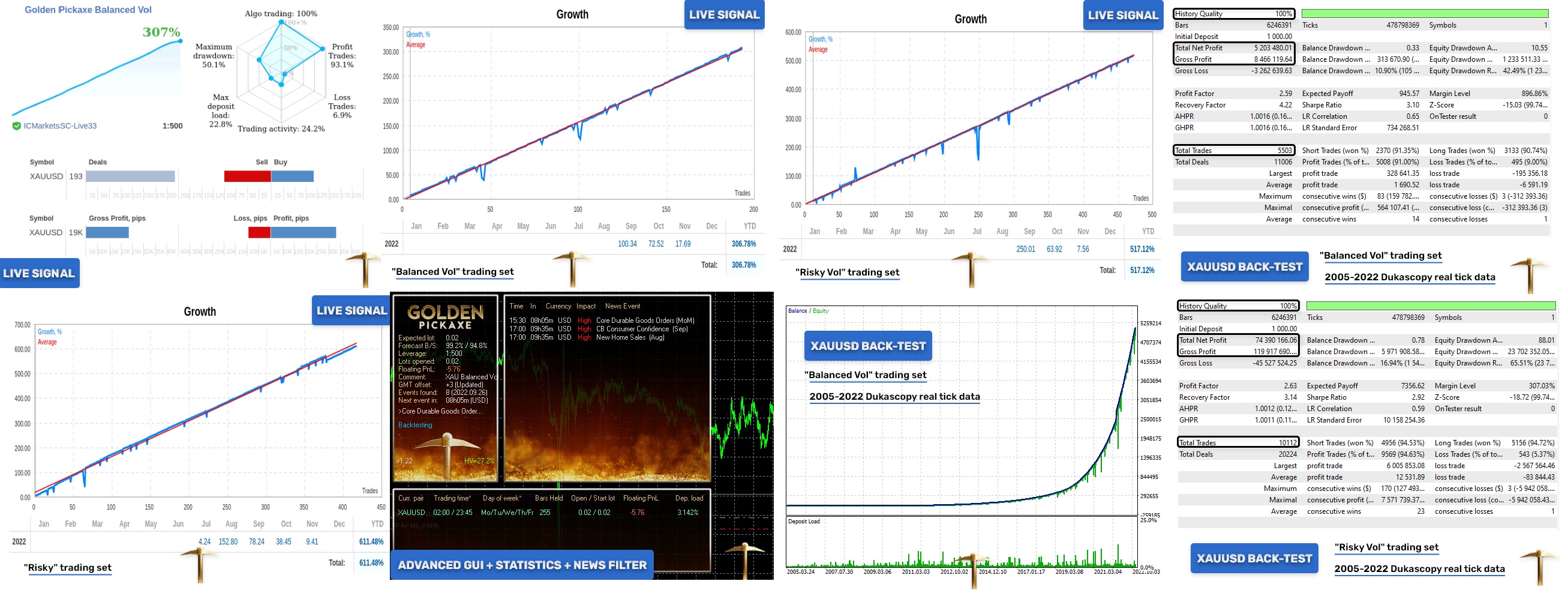
Golden Pickaxe EA combines a mean-reversion grid with machine learning, specific to Gold on the M1 chart. By respecting the risk profiles, running the EA on a solid VPS, and optionally retraining the neural network on your broker’s data, you can mirror its strong backtest results in live trading.
Vendor Site – Click Here
Reviews :
https://www.mql5.com/en/signals/1705257
https://www.mql5.com/en/signals/1751383
https://www.myfxbook.com/members/MischenkoValeria/golden-pickaxe-classic/9804838
https://www.myfxbook.com/members/MischenkoValeria/golden-pickaxe-risky-vol/9804859
https://www.myfxbook.com/members/MischenkoValeria/golden-pickaxe-balanced-vol/9804867
| Membership | Yearly Membership |
|---|---|
| Additional Services | Unlock & Decompile |
| Recommended Brokers | Exness Broker, FPMarkets |
| Recommended VPS | FXVM (Low Latency) |
| Youtube Channel | ForexForYou |
| Telegram Channel | Onshoppie Forex EA's & Indicators |
| Telegram Support | Onshoppie Support |
| Installation Guides | Onshoppie Forex Guides |
Brand
ea-mt4
Only logged in customers who have purchased this product may leave a review.
Related products


Products
-
 GoldWave EA MT5 V2.36 + Setfiles For Build 5833+
Original price was: $999.00.$19.95Current price is: $19.95.
GoldWave EA MT5 V2.36 + Setfiles For Build 5833+
Original price was: $999.00.$19.95Current price is: $19.95.
-
 New Smarthedge EA MT4 v1.16 For Build 1471+
Original price was: $500.00.$14.95Current price is: $14.95.
New Smarthedge EA MT4 v1.16 For Build 1471+
Original price was: $500.00.$14.95Current price is: $14.95.
-
 The Gold Reaper EA MT5 v4.3 + SetFiles For Build 5833+
Original price was: $599.00.$14.95Current price is: $14.95.
The Gold Reaper EA MT5 v4.3 + SetFiles For Build 5833+
Original price was: $599.00.$14.95Current price is: $14.95.
-
 BTC X EA MT5 + SetFiles For Build 5800+
$24.95
BTC X EA MT5 + SetFiles For Build 5800+
$24.95
-
 Roc Jarvis EA MT5 For Build 5800+
$14.95
Roc Jarvis EA MT5 For Build 5800+
$14.95
-
 Liquidity Grabber EA PRO MT5 For Build 5800+
Original price was: $149.00.$14.95Current price is: $14.95.
Liquidity Grabber EA PRO MT5 For Build 5800+
Original price was: $149.00.$14.95Current price is: $14.95.
-
 Gold Zilla AI MT4 v1.1 EA For Build 1471+
Original price was: $189.00.$14.95Current price is: $14.95.
Gold Zilla AI MT4 v1.1 EA For Build 1471+
Original price was: $189.00.$14.95Current price is: $14.95.
-
The Gold Reaper EA MQ4 V4.1 Source Code
Original price was: $599.00.$19.95Current price is: $19.95.
Recent reviews
-
 Advanced Dashboard Currency Strength
by Balram
Advanced Dashboard Currency Strength
by Balram
Reviews
There are no reviews yet.