


Osmosis EA MT5 V1.3 With DLL 5525
$9.95
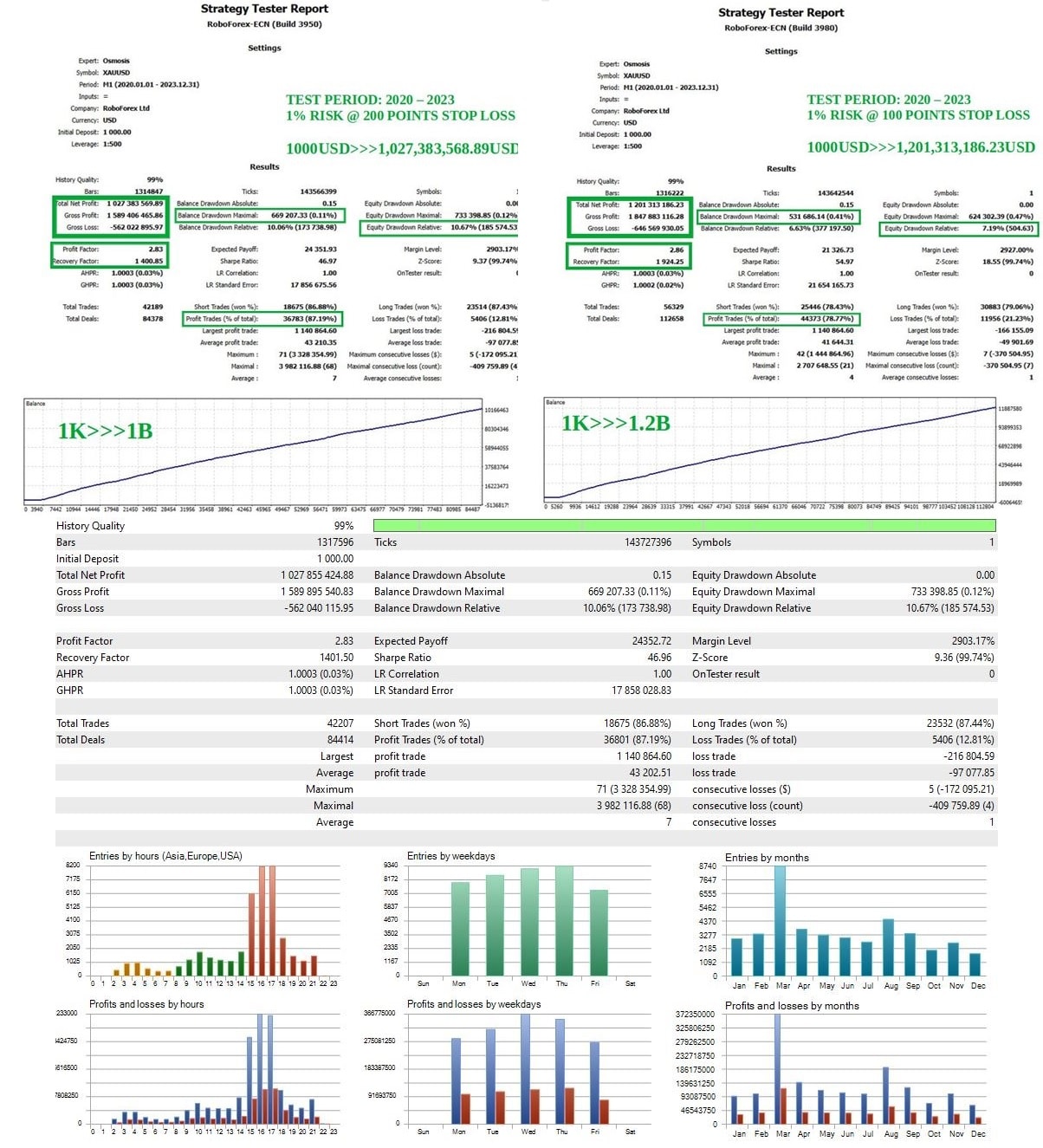
Surging interest in Osmosis EA! Excited traders are seeing powerful results. Find out why this tool is wanted by everyone.


Description
Osmosis EA Explained: A Practical Guide to the Data-Driven Gold Trading Robot
Osmosis EA – Your Guide to a Data-Driven Gold Trading Robot
Table of Contents
- What Is Osmosis EA?
- Key Features at a Glance
- Step-by-Step Installation Guide for MetaTrader 5
- Frequently Asked Questions (FAQ)
- Final Thoughts & Next Steps
What Is Osmosis EA?
Osmosis EA is an advanced, data-driven automated trading robot designed for MetaTrader 5 (MT5). It focuses on trading retracements on Gold (XAUUSD) by combining:
- a dynamic price differential algorithm that looks for the best possible execution price, and
- a market-volume filter that weeds out low-quality entries.
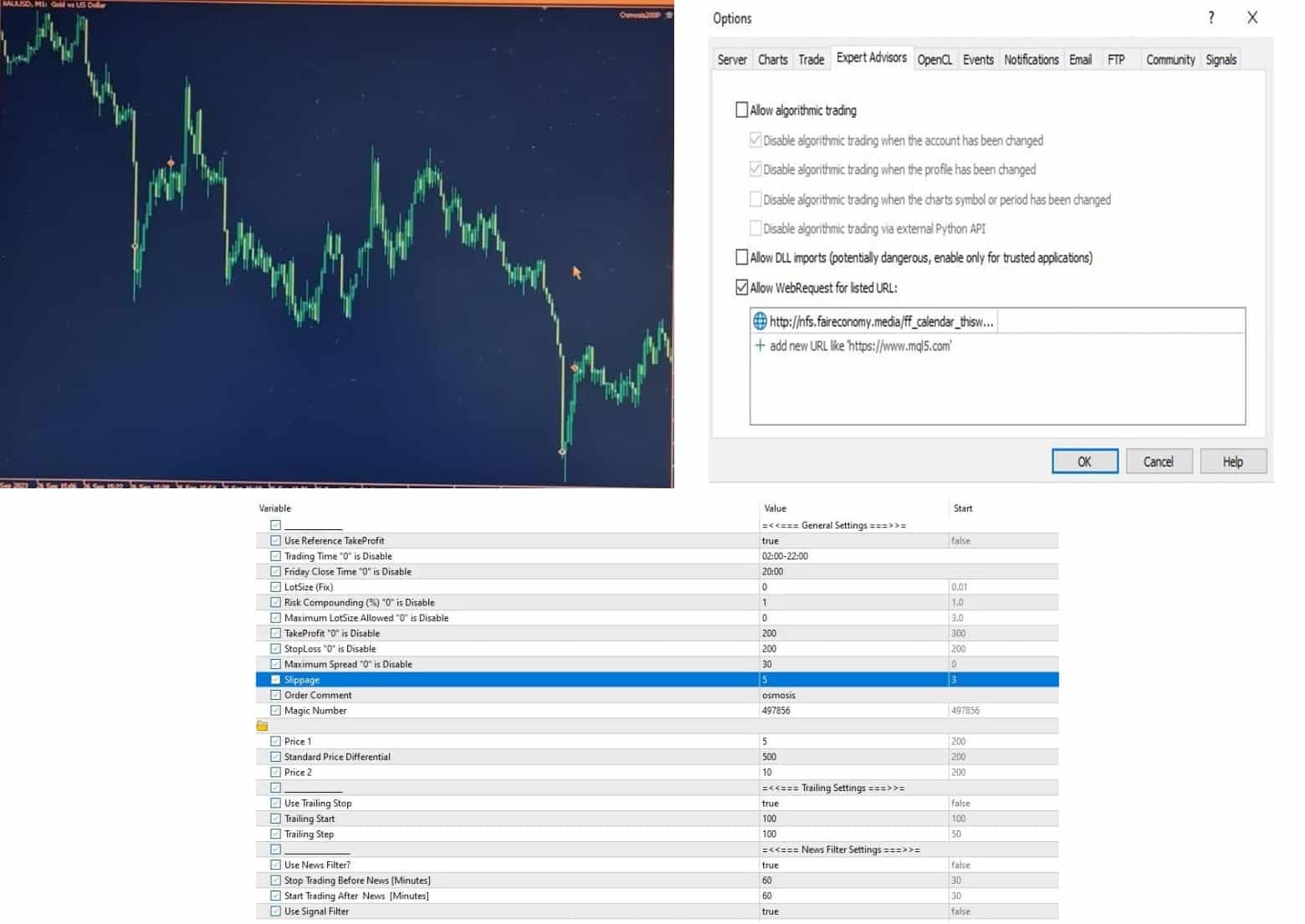
Unlike many robots that stick to fixed entry rules, Osmosis EA adapts to changing price action. It waits, pends, and modifies orders until it finds a price level that matches its built-in logic. The expert advisor also comes with hard stop-loss protection, adjustable take-profit, trailing stop, a news filter, and spread control to avoid trading during high-impact events.
Note: There is no MT4 version right now. If you are new to MT5, the author offers remote help. Simply take a screenshot of your purchase and send a message for guidance.
Key Features at a Glance
| Feature | Description |
|---|---|
| Strategy | Trades Gold (XAUUSD) retracements on M1 using a price differential algorithm |
| Platforms | MetaTrader 5 only |
| Dangerous Methods | None – no martingale, grid, doubling, or averaging |
| Account Types | Hedge; ECN, Raw, or Razor accounts with tight spreads |
| Risk Control | Hard stop-loss, adjustable risk %, max lot limit |
| Filters | News filter, volatility filter, spread & slippage control |
| Prop-Firm Ready | FIFO-compliant; suitable for most prop-firm rules |
| Set Files | Pre-built templates in the comments section for quick setup |
Step-by-Step Installation Guide of Osmosis EA for MetaTrader 5
- Download the EA
- Go to your MT5 Terminal → Market → Search “Osmosis EA”.
- Click Download or Buy.
- Attach to Chart
- Open an XAUUSD M1 chart.
- Drag Osmosis EA onto the chart or double-click its name in the Navigator.
- Input Your Parameters
- General tab: Tick Allow Algo Trading.
- Inputs tab: Load the provided set file or enter values manually.
- Enable AutoTrading
- Press
Ctrl+Eor use the top toolbar to switch on Algo Trading (green play symbol).
- Press
- Verify Panel Info
- You should see:
- EA name and version.
- Spread reading.
- Next high-impact news countdown.
- You should see:
Tip: If you face errors like “init failed”, check that you are logged into the correct MT5 account type (hedge, not netting) and that “Allow DLLs” is enabled.
Frequently Asked Questions (FAQ) Regarding Osmosis EA
Q1: Can I use Osmosis EA on MT4?A: Not right now. Only MT5 is supported. The author can help you set up MT5 remotely if needed.
Q2: Does the EA work on other pairs?A: The logic is fine-tuned for Gold. Running it on EURUSD or other pairs may give random results.
Q3: Is this a scalper or a long-term robot?A: It’s closer to a short-term retracement trader. Trades can last minutes to a few hours.
Q4: How often does it trade?A: On average, 2–10 trades per day, depending on volatility and your spread settings.
Q5: What VPS specs do I need?A: Any modern VPS with 1 CPU, 1 GB RAM, and low latency (<5 ms) to your broker is enough.
Q6: Can I withdraw profits anytime?A: Sure. The EA does not rely on compounding or grid recovery. Just keep enough margin available.
Final Thoughts & Next Steps About Osmosis EA
Osmosis EA offers a clear, structured approach to trading Gold on MT5 with safety nets like hard stop-loss, news filters, and dynamic exits. If you:
- Trade on a low-spread ECN account,
- Keep risk at or below 2 % per trade, and
- Follow the recommended settings,
the EA can be a helpful companion in your trading toolkit.
Vendor Site – Click Here
| Membership | Yearly Membership |
|---|---|
| Additional Services | Unlock & Decompile |
| Recommended Brokers | Exness Broker, FPMarkets |
| Recommended VPS | FXVM (Low Latency) |
| Youtube Channel | ForexForYou |
| Telegram Channel | Onshoppie Forex EA's & Indicators |
| Telegram Support | Onshoppie Support |
| Installation Guides | Onshoppie Forex Guides |
Brand
ea-mt5
Only logged in customers who have purchased this product may leave a review.
Related products



Products
-
 Quantum Emperor EA MT5 V7.5 For Build 5836+
Original price was: $799.00.$14.95Current price is: $14.95.
Quantum Emperor EA MT5 V7.5 For Build 5836+
Original price was: $799.00.$14.95Current price is: $14.95.
-
 Quantum King EA MT5 V3.1 For Build 5836+
Original price was: $649.00.$14.95Current price is: $14.95.
Quantum King EA MT5 V3.1 For Build 5836+
Original price was: $649.00.$14.95Current price is: $14.95.
-
 Bitcoin Robot Grid EA MT4 V6.0 For Build 1473+
Original price was: $899.00.$14.95Current price is: $14.95.
Bitcoin Robot Grid EA MT4 V6.0 For Build 1473+
Original price was: $899.00.$14.95Current price is: $14.95.
-
 IS PI Scalper EA Virtual Level Final MT4 + SetFiles
$14.95
IS PI Scalper EA Virtual Level Final MT4 + SetFiles
$14.95
-
 ArtQuant Gold EA MT5 V3.0 For Build 5836+
Original price was: $700.00.$14.95Current price is: $14.95.
ArtQuant Gold EA MT5 V3.0 For Build 5836+
Original price was: $700.00.$14.95Current price is: $14.95.
-
 Gold Trap EA MT5 V4.24 + Setfiles For Build 5836+
$24.95
Gold Trap EA MT5 V4.24 + Setfiles For Build 5836+
$24.95
-
 AI X HFT VIP EA MT4 V14 With DLL 1473
$14.95
AI X HFT VIP EA MT4 V14 With DLL 1473
$14.95
-
 Sentinel KMZ EA MT5 v2.5 + SetFiles For Build 5836+
Original price was: $999.00.$14.95Current price is: $14.95.
Sentinel KMZ EA MT5 v2.5 + SetFiles For Build 5836+
Original price was: $999.00.$14.95Current price is: $14.95.
Recent reviews
-
 Advanced Dashboard Currency Strength
by Balram
Advanced Dashboard Currency Strength
by Balram
Reviews
There are no reviews yet.