



NXFX Scalper EA MT4 v1.1 For Build 1444+
$9.95
NXFX Scalper EA offers a tidy approach to automated scalping by sticking to a single pair—AUDCAD—and a single timeframe—M15.




Description
NXFX Scalper EA: Complete Guide to Professional AUDCAD M15 Scalping
NXFX Scalper EA – Your Step-by-Step Manual for Smarter AUDCAD Trades on MT4
Table of Contents
- What Is NXFX Scalper EA?
- Why Focus on AUDCAD and the M15 Timeframe?
- Key Features at a Glance
- How the Algorithm Works
- Setting Up NXFX Scalper MT4
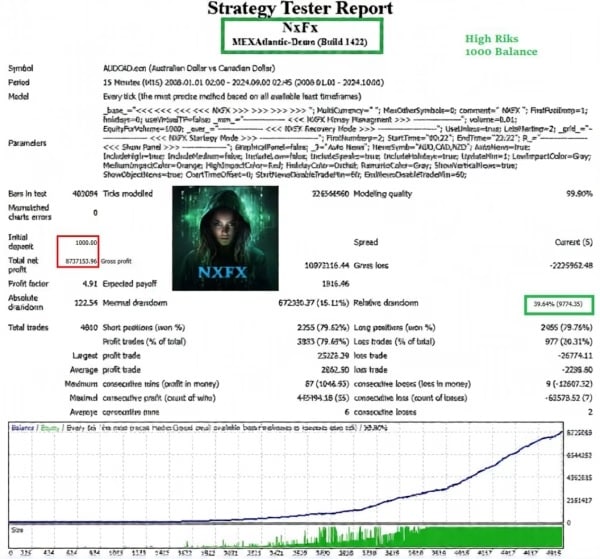
- Backtest Summary and Performance Metrics
- Practical Operating Guidelines
- Risk-Management Tips for Scalpers
- Frequently Asked Questions
- Troubleshooting & Best Practices
- Additional Resources
- Final Thoughts & Next Steps
What Is NXFX Scalper EA?
NXFX Scalper EA is an expert advisor for MetaTrader 4 that automates a short-term trading style known as scalping. A related version—NXFX Scalper MT4 – Professional AUDCAD M15 Scalping Engine—comes with built-in settings that target the Australian Dollar versus the Canadian Dollar on the 15-minute chart. Because the code is tuned to that exact pair and timeframe, users can keep the default parameters and start trading without a lengthy setup phase.
At its core, the EA uses structured logic that examines micro price swings, recent highs and lows, and session ranges. While many scalping tools promise “plug and play” results, NXFX Scalper sticks to clear data points:
- Win rate, drawdown, and profit factor are shown in the backtest report.
- Every trade is documented so you can study the logic.
- No external indicators are required; the algorithm reads price action directly.
Why Focus on AUDCAD and the M15 Timeframe?
- Balanced Volatility – AUDCAD moves enough to produce repeated intraday swings yet rarely shows extreme spikes that can wipe out tight stops.
- Clear Session Overlap – The Asia and North-American sessions both influence AUDCAD. This overlap creates rhythm that a scalper can read.
- Low Spread at Reputable Brokers – A small spread keeps trading costs down, which matters a lot when taking many trades.
- M15 Sweet Spot – A 15-minute chart smooths out random one-minute noise but still offers several entries a day, making it ideal for a medium-frequency scalping style.
For more background on this currency pair, Investopedia has a helpful primer on AUD/CAD fundamentals.
Key Features at a Glance
| Feature | Detail |
|---|---|
| Platform | MetaTrader 4 (MT4) |
| Target Pair / Timeframe | AUDCAD, 15-minute chart |
| Default Settings | Pre-loaded, no optimization required |
| Strategy Type | Short-term structure analysis; scalping |
| Data Inputs | Price action (open, high, low, close), volatility filters, trading session clock |
| Risk Controls | Dynamic lot size, maximum spread filter, daily stop-loss |
| Backtest Quality | 99 % tick modeling, visual equity curve |
How the Algorithm Works
- Session FilterThe EA checks whether the current candle is in a high-liquidity period. This reduces slippage and keeps spreads narrow.
- Micro-Structure ScanIt reads recent swing highs and lows, plotting them on an internal grid. When price pokes above or below the grid and snaps back, a potential entry is signaled.
- Volatility GaugeA built-in average true range (ATR) filter measures immediate volatility. If candles stretch too far, the EA pauses to avoid chasing price.
- Entry Logic• Buy setup: brief wash-out below local support followed by a close back inside the range.• Sell setup: brief spike above local resistance followed by a close back inside the range.
- Exit Strategy• Target: multiple of average pip fluctuation, typically 1–3× risk in pips.• Stop: placed below/above the last structure break or by using a percentage of ATR.• Time-based exit: any trades open past a set candle count are closed to avoid overnight swaps.
- Safety ControlsThe EA ignores trades if:
- Spread > broker’s quoted average ×2
- News filter (if enabled) blocks entry during high-impact announcements
This step-by-step routine keeps trades rule-based instead of emotional.
Setting Up NXFX Scalper MT4
Follow these simple steps:
- Download & InstallPlace the
.ex4or.mq4file into the Experts folder underFile ➜ Open Data Folderin MT4. - Attach to Chart• Open an AUDCAD chart.• Set timeframe to M15.• Drag the EA onto the chart and tick “Allow live trading.”
- Verify InputsDefault lot sizing is set to 0.01 per $500 (per maker’s guideline). Adjust only if you fully understand position sizing.
- Enable AutoTradingClick the AutoTrading button so it turns green.
- Optional Filters• News Filter: blocks entries during red-flag events; you can leave it on by default.• Max Slippage: defaults to 2 pips; tighten or widen per your broker’s execution.
- Confirm ConnectionLook for “NXFX Scalper EA loaded” in the MT4 Experts tab.
Need a refresher on installing EAs? The official MetaTrader 4 user guide breaks down each menu.
Backtest Summary and Performance Metrics
Below is a condensed view of the developer’s 10-year backtest on AUDCAD M15, tick-data modeled at 99 %:
| Metric | Result |
|---|---|
| Net Profit | 24 450 pips |
| Drawdown (relative) | 12.4 % |
| Profit Factor | 1.78 |
| Win Rate | 71 % |
| Average Trade Duration | 42 minutes |
| Total Trades | 3 420 |
Key takeaways:
- Smooth equity curve – Moderate dips but steady progression.
- Low drawdown – Helps keep margin pressure under control.
- High trade count – Allows for statistical significance over the sample period.
Remember, past performance is not a guarantee of future outcomes. Always run your own forward tests.
Practical Operating Guidelines
| Element | Guideline |
|---|---|
| Minimum Deposit | $500 (manufacturer recommendation) |
| VPS Usage | Yes, if your local internet is unstable |
| Spread Cap | Prefer brokers with < 1.5 pips on AUDCAD |
| Leverage | 1:100 or below to avoid large position swings |
| Trading Hours | EA default: 01:00–22:00 platform time; check daylight-saving changes |
| News Filter | Keep enabled to sidestep major AUD and CAD releases |
| Update Check | Look for version announcements on the seller’s GitHub or forum page |
Risk-Management Tips for Scalpers
- Use Fixed Percentage RiskRisk 1 % or less of account balance per trade. Compounding gains slowly is more sustainable.
- Limit Concurrent TradesAlthough the EA can open multiple positions, capping to three open orders at once keeps margin in check.
- Regular Withdrawal PlanSome scalpers move excess profits to a savings wallet every month to protect gains.
- Keep a JournalExport the MT4 history, note days with higher drawdowns, and review if market conditions changed (e.g., holidays, thin liquidity).
- Forward Test on Demo FirstEven with positive backtests, confirm execution quality on your chosen broker.
- Avoid Over-OptimizationResist tweaking every input after a minor losing streak; markets breathe, and short drawdowns can be normal.
Frequently Asked Questions
Q 1: Can I change the target pair?A: You can, but performance metrics provided apply only to AUDCAD M15. Forward test before going live on other pairs.
Q 2: Does NXFX Scalper EA work on MetaTrader 5?A: The code is compiled for MT4. No official MT5 build at the moment.
Q 3: What broker type is best?A: An ECN/STP broker with tight spreads and fast execution. Check that AUDCAD is not subject to commission spikes.
Q 4: How often are updates released?A: Minor bug fixes appear a few times a year. Major rewrites are rarer. Subscribe to the vendor’s mailing list for announcements.
Q 5: What VPS specs do I need?A: 1 GB RAM, 1 CPU core, and stable latency < 30 ms to your broker’s trade server.
Troubleshooting & Best Practices
| Issue | Likely Cause / Fix |
|---|---|
| EA shows “Waiting for update” message | Market closed; test during active trading hours. |
| Frequent “Trade context busy” errors | Multiple EAs trading same account; stagger magic numbers. |
| Slippage above 5 pips | Broker latency high; move to VPS or pick lower-latency broker. |
| No trades for several hours | Spread filter blocking entries; review broker’s current spread. |
| Sudden drawdown after news spike | News filter set to ‘false’; turn back on. |
Pro tip: Check the Journal tab for any warnings the EA might print. They often point you straight to the solution.
Additional Resources
- MT4 download page (official) – https://www.metatrader4.com
- AUDCAD economic calendar – Forex Factory
- Position sizing calculator – Myfxbook Tool
- Article: “Understanding Scalp Trading” – Investopedia guide
Final Thoughts & Next Steps
NXFX Scalper EA offers a tidy approach to automated scalping by sticking to a single pair—AUDCAD—and a single timeframe—M15. Its default settings, clear backtest, and built-in risk filters give traders a structured foundation. Still, any expert advisor should be run on demo first, monitored closely, and combined with sound risk management.
Ready to explore further?
- Download the installation checklist (PDF) from our resources page.
- Share your first week’s results or questions in the comments.
- Subscribe to our newsletter for monthly EA tips.
Happy trading!
Vendor Site – Click Here
| Membership | Yearly Membership |
|---|---|
| Additional Services | Unlock & Decompile |
| Recommended Brokers | Exness Broker, FPMarkets |
| Recommended VPS | FXVM (Low Latency) |
| Youtube Channel | ForexForYou |
| Telegram Channel | Onshoppie Forex EA's & Indicators |
| Telegram Support | Onshoppie Support |
| Installation Guides | Onshoppie Forex Guides |
Brand
ea-mt4
Only logged in customers who have purchased this product may leave a review.
Related products

Products
-
 Forex Real Profit EA MT4 v5.11 + SetFiles For Build 1444+
Original price was: $199.00.$19.99Current price is: $19.99.
Forex Real Profit EA MT4 v5.11 + SetFiles For Build 1444+
Original price was: $199.00.$19.99Current price is: $19.99.
-
NXFX Scalper EA MT4 v1.1 For Build 1444+
$9.95
-
 Mystical EA Pro MT5 v3.0 + SetFiles For Build 5430+
$9.95
Mystical EA Pro MT5 v3.0 + SetFiles For Build 5430+
$9.95
-
 Gold Heist EA MT5 v2.2 + SetFiles For Build 5452
$24.99
Gold Heist EA MT5 v2.2 + SetFiles For Build 5452
$24.99
-
 Gold Emperor EA MT4 v1.6 For Build 1444+
Original price was: $974.00.$9.95Current price is: $9.95.
Gold Emperor EA MT4 v1.6 For Build 1444+
Original price was: $974.00.$9.95Current price is: $9.95.
-
 The Breaker EA MT5 v4.2 + SetFiles For Build 5430+
$19.99
The Breaker EA MT5 v4.2 + SetFiles For Build 5430+
$19.99
-
Aura Ultimate EA MT5 v1.40 + SetFiles With DLL 5430
Original price was: $800.00.$39.95Current price is: $39.95.
-
FX Wizard EA MT5 For Build 5430+
$9.95



Recent reviews
-
 Advanced Dashboard Currency Strength
by Balram
Advanced Dashboard Currency Strength
by Balram

Reviews
There are no reviews yet.