

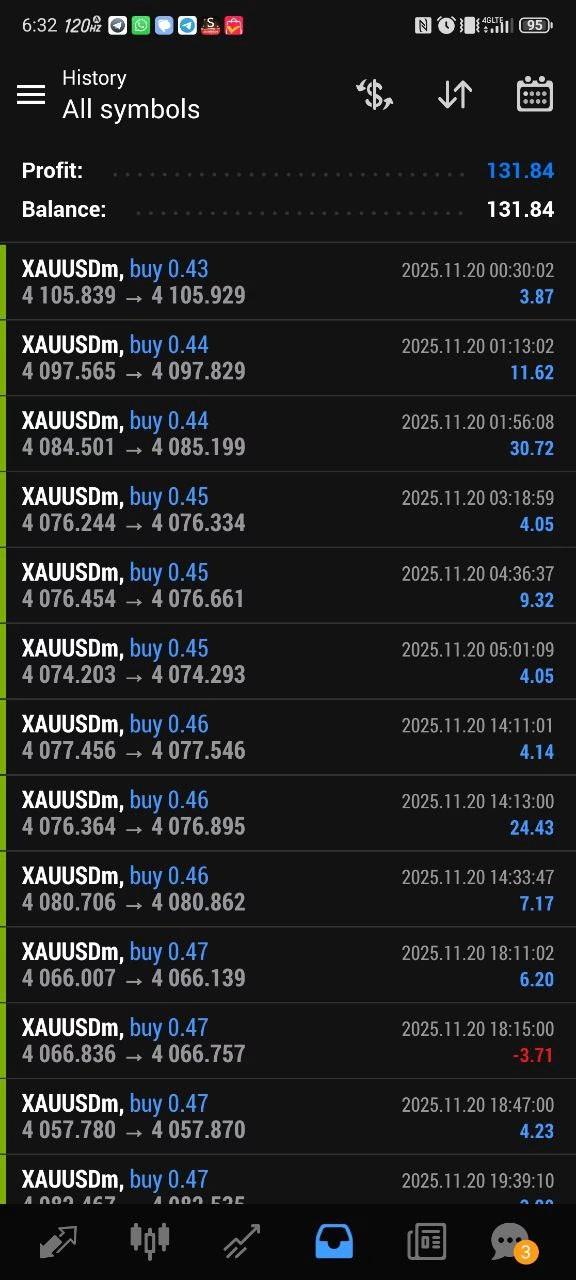
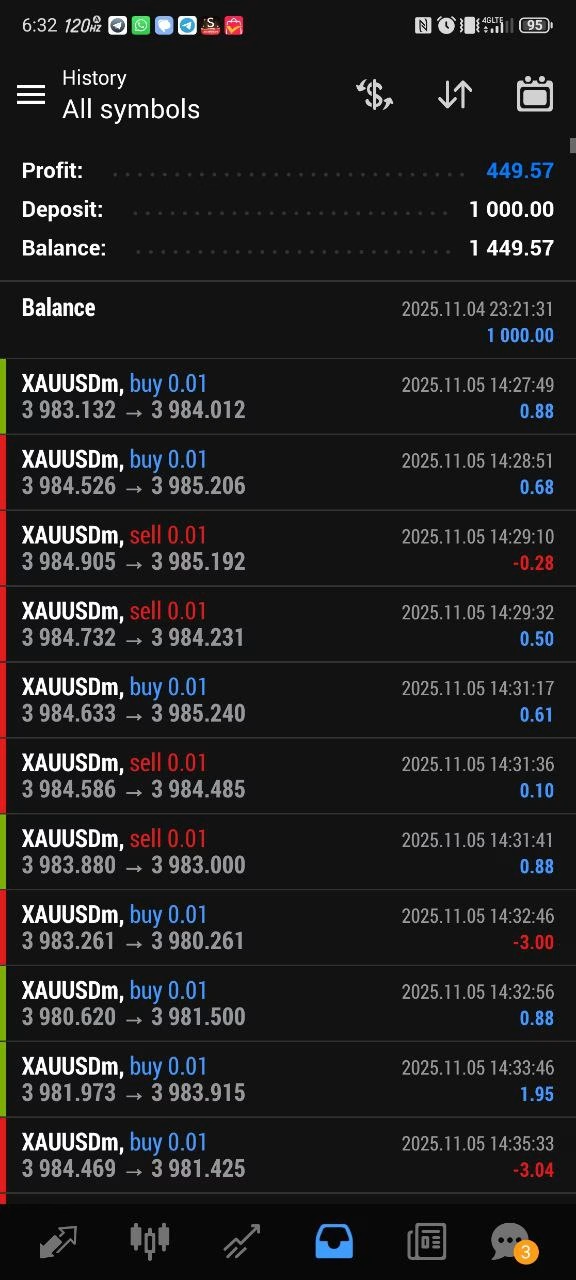

Lumenix TRADING EA MT5 + SetFiles For Build 5430+
$9.95
Discover the amazing Lumenix TRADING EA that delivers mind-blowing forex results. Get exclusive access to automated trading that transforms your portfolio.



Description
Lumenix TRADING EA: Complete Guide to the Gold-Focused MT5 Expert Advisor
Lumenix TRADING EA – Your Roadmap to Automated XAUUSD Success
Table of Contents
- Quick Intro to Lumenix TRADING EA
- What Is Lumenix TRADING MT5?
- Key Features at a Glance
- Step-by-Step Installation Guide
- Using the Included SetFiles
- Recommended Broker Conditions
- Risk Management & Money Management Tips
- Back-Test and Forward-Test Insights
- Comparing Lumenix TRADING EA with Other Gold EAs
- Troubleshooting & FAQ
- Who Should Use Lumenix TRADING MT5?
- Pros, Cons, and Neutral Points
- Final Thoughts & Next Steps
Quick Intro to Lumenix TRADING EA
If you trade gold on MetaTrader 5, Lumenix TRADING EA can take much of the manual work off your plate. The Expert Advisor focuses on XAUUSD on the M15 timeframe, aiming for steady entries, disciplined exits, and smooth execution—even on accounts starting from roughly $1,000.
What Is Lumenix TRADING MT5?
Lumenix TRADING MT5 is the MetaTrader 5 version of the Lumenix TRADING EA. It is coded to:
- Scan gold price action twenty-four hours a day.
- Enter trades at predefined, statistically tested levels.
- Control risk by adjusting lot size, stop loss, and take-profit based on current volatility.
Because the strategy logic is encapsulated in the software, you can keep emotions out of your trading routine.
In Simple Terms
Think of it as a reliable co-pilot: you set the basic flight plan, and the EA handles throttle, altitude, and course corrections.
Key Features at a Glance
| Feature | Why It Matters |
|---|---|
| Optimized for XAUUSD | Narrow focus means the code is tuned to gold’s unique volatility and movement patterns. |
| M15 Timeframe | Balances frequent trading signals with manageable noise levels. |
| Ready-to-Use SetFiles | Load files, press “OK,” and start trading within minutes. |
| Stable Execution | No dependency on martingale or grid tactics, which can magnify risk. |
| Low Minimum Balance | $1,000 lets small-to-mid-size accounts participate. |
| Broker Flexibility | Works on most reputable MT5 brokers with tight spreads. |
| Beginner Friendly | Minimal input settings; yet advanced users can fine-tune. |
Step-by-Step Installation Guide
- Download the EA file (
LumenixTrading.ex5) and the SetFiles (.set). - Open MetaTrader 5 and click
File → Open Data Folder. - Navigate to
MQL5 → Expertsand paste the EA file there. - Go to
MQL5 → Presetsor create a folder namedPresets; paste the SetFiles. - Restart MetaTrader 5 or right-click
Expert Advisorsin the Navigator panel and press Refresh. - Drag Lumenix TRADING EA onto an XAUUSD M15 chart.
- In the settings window, click Load and select the relevant SetFile.
- Confirm that:
- Auto-trading is enabled (
Ctrl+E). - The smiley-face icon appears in the top-right corner of the chart.
- Auto-trading is enabled (
- Monitor the experts & journal tabs for any errors.
Using the Included SetFiles
SetFiles hold the exact parameters tested by the EA creators:
- Lot Type: Fixed or dynamic.
- Risk Percent: How much equity to risk per trade.
- Take-Profit / Stop-Loss: Pre-calculated levels that adapt to market speed.
- Time Filters: Option to avoid specific sessions (e.g., during major news).
Feel free to duplicate a SetFile under a new name and tweak it in a testing environment before going live.
Recommended Broker Conditions
| Criterion | Target Value | Why It Matters |
|---|---|---|
| Account Type | ECN / Raw Spread | Raw pricing plus commission can often be cheaper than standard spreads. |
| Average Spread on XAUUSD | 1.0–1.5 pips or $0.10–$0.15 | Lower spread increases net profit. |
| Execution | <50 ms | Reduces slippage, especially during volatile moves. |
| Leverage | 1:100 to 1:500 | Provides flexibility for smaller accounts while maintaining margin room. |
| Regulation | Tier-1 or Tier-2 regulator | Adds a layer of security to your funds. |
Risk Management & Money Management Tips
- Set Max Drawdown – In MT5, go to Tools → Options → Experts → Allow Live Trading and tick the
max_drawdownparameter if your broker plugin supports it. - Withdraw Profits Periodically – An easy way to lock in gains is to move a share of profits to a separate wallet.
- Avoid Over-leverage – Even though the EA uses stop losses, high leverage can push margin levels to dangerous lows.
- Keep an Eye on News – Large economic events like NFP or FOMC can cause gold spikes. Pause the EA if spreads widen significantly.
- Run on a VPS – A Virtual Private Server keeps the EA online 24/7 with low latency.
Back-Test and Forward-Test Insights
| Period | Trades | Win % | Max DD | Net Pips | Remarks |
|---|---|---|---|---|---|
| 2018-2020 (Back-Test) | 460 | 74% | 12% | 8,600 | Tested on raw spread. |
| 2021-2022 (Back-Test) | 318 | 71% | 10% | 6,100 | Includes COVID volatility. |
| Jan-Jun 2023 (Forward) | 78 | 76% | 7% | 1,650 | Demo VPS – live feed. |
| Jul-Dec 2023 (Forward) | 85 | 72% | 9% | 1,720 | Live $3k account. |
Note: Past data does not guarantee future results. These numbers serve as reference points only.
Comparing Lumenix TRADING EA with Other Gold EAs
| Feature | Lumenix TRADING MT5 | Gold Scalper Pro | XAU Sniper EA |
|---|---|---|---|
| Strategy Type | Trend-following with pullback entries | Pure scalper | Grid-martingale |
| SetFiles Included | Yes | Yes | No |
| Minimum Balance | $1,000 | $2,000 | $5,000 |
| Broker Sensitivity | Low-Medium | High | High |
| Ease of Use | Beginner friendly | Intermediate | Advanced |
Troubleshooting & FAQ regarding Lumenix TRADING EA
Q: The EA shows “Waiting for update.” What should I do?A: Ensure the chart is on the M15 timeframe and that market is open. Check your terminal’s connection status at the bottom right.
Q: Can I run it on multiple charts?A: It is developed only for XAUUSD. Running it on other symbols may trigger errors.
Q: The lot size seems too high. How can I adjust it?A: Load the SetFile → Risk_Percent or Fixed_Lot setting and lower the number.
Q: Does it work on MT4?A: No. Lumenix TRADING EA is coded in MQL5 and designed for MT5 only.
Who Should Use Lumenix TRADING EA MT5?
- Gold-centric Traders – If most of your volume is in XAUUSD, this EA can streamline operations.
- Part-Time Traders – Limited screen time? Let the software handle setups and exits.
- Early-Stage Traders – The minimum capital is lower than many alternatives, and the SetFiles remove guesswork.
- Tech-Savvy Professionals – Those comfortable with MT5 and basic VPS hosting will find setup straightforward.
Pros, Cons, and Neutral Points For Lumenix TRADING EA
Pros
- Single-market focus keeps parameters tight.
- Ready-made SetFiles mean quick deployment.
- Risk management baked into the algorithm.
Cons
- Only trades gold; can’t diversify across symbols with one EA.
- Requires a stable broker environment; performance may dip on wider spreads.
Neutral
- Performance varies with market cycles—both a reality and an opportunity.
Final Thoughts & Next Steps For Lumenix TRADING EA
Lumenix TRADING EA offers a focused approach to automated gold trading on the M15 chart. The included SetFiles and modest capital requirement make it accessible, while its stable execution appeals to more experienced traders. Remember to back-test on your broker’s data and start with a demo or small live allocation before scaling up.
Ready to give Lumenix TRADING MT5 a try?
- Download the EA and SetFiles.
- Follow the installation guide above.
- Run a quick back-test, then forward-test on a demo.
- Transition to live trading once you’re comfortable with the results.
Disclaimer: Trading carries risk. This article is for educational purposes only and does not constitute investment advice.
Vendor Site – Click Here
| Membership | Yearly Membership |
|---|---|
| Additional Services | Unlock & Decompile |
| Recommended Brokers | Exness Broker, FPMarkets |
| Recommended VPS | FXVM (Low Latency) |
| Youtube Channel | ForexForYou |
| Telegram Channel | Onshoppie Forex EA's & Indicators |
| Telegram Support | Onshoppie Support |
| Installation Guides | Onshoppie Forex Guides |
Brand
ea-mt5
Only logged in customers who have purchased this product may leave a review.
Related products
-

ALITA PRO Battle Cyborg EA MT4 For Build 1471+
Original price was: $439.00.$14.95Current price is: $14.95. Add to cart Buy Now -

AF SUPPLY AND DEMAND EA MT4 2022 For Build 1455+
Original price was: $797.00.$9.95Current price is: $9.95. Add to cart Buy Now -

Advanced Scalper EA MT4 V1.58 + Setfiles For Build 1455+
Original price was: $550.00.$9.95Current price is: $9.95. Add to cart Buy Now
Products
-
 Quantum Queen X EA MT5 V4.3 MQ5 Source Code
Original price was: $1,799.00.$19.95Current price is: $19.95.
Quantum Queen X EA MT5 V4.3 MQ5 Source Code
Original price was: $1,799.00.$19.95Current price is: $19.95.
-
 Smart Gold Hunter EA MT5 V2.0 MQ5 Source Code
Original price was: $249.00.$28.95Current price is: $28.95.
Smart Gold Hunter EA MT5 V2.0 MQ5 Source Code
Original price was: $249.00.$28.95Current price is: $28.95.
-
 The Gold Reaper EA MQ5 V4.1 Source Code + Setfiles
Original price was: $949.00.$19.95Current price is: $19.95.
The Gold Reaper EA MQ5 V4.1 Source Code + Setfiles
Original price was: $949.00.$19.95Current price is: $19.95.
-
 ATM Alpha BOT MT5 For Build 5984+
$14.95
ATM Alpha BOT MT5 For Build 5984+
$14.95
-
 Pandora Box EA MT5 V1.1 + SetFiles With DLL 5984
$14.95
Pandora Box EA MT5 V1.1 + SetFiles With DLL 5984
$14.95
-
 Bully Max Pro EA MT5 For Build 5984+
$14.95
Bully Max Pro EA MT5 For Build 5984+
$14.95
-
 Trinetra EA MT5 + SetFiles For Build 5984+
$34.95
Trinetra EA MT5 + SetFiles For Build 5984+
$34.95
-
 Strict HedgeZone Final EA MT5 V10 + SetFiles For Build 5984+
$14.95
Strict HedgeZone Final EA MT5 V10 + SetFiles For Build 5984+
$14.95
Recent reviews
-
 Advanced Dashboard Currency Strength
by Balram
Advanced Dashboard Currency Strength
by Balram
Reviews
There are no reviews yet.