



GENESIS AI EA MT5 V1.2 For Build 5430+
Original price was: $179.00.$9.95Current price is: $9.95.
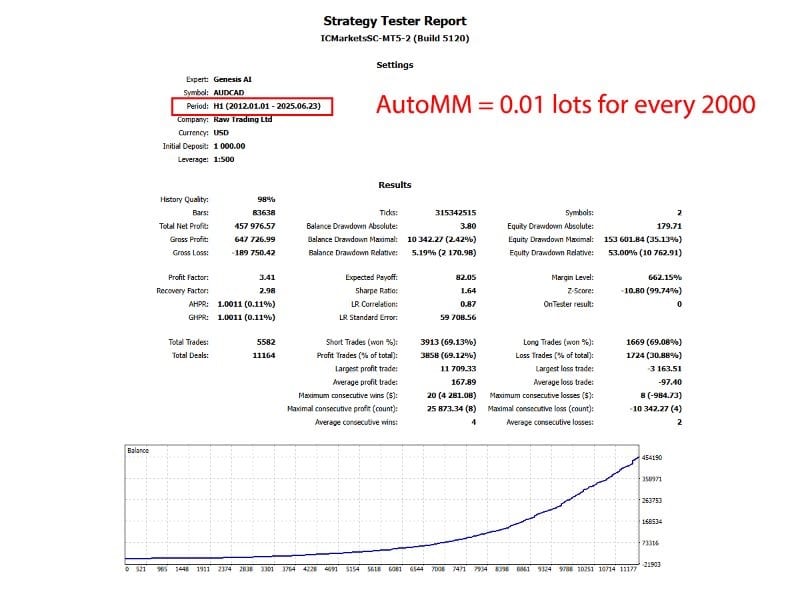
Genesis AI EA uses an adaptive mathematical model that studies current market data, not just past patterns, to find short-term price gaps.




Description
Genesis AI EA: A Practical Guide for Smart Forex Trading
Genesis AI EA – Everything You Need to Know Before You Start
Alternative Title
Genesis AI EA Trading Guide: How This Adaptive Grid Robot Can Fit Into Your Daily Strategy
Table of Contents
- Introduction
- What Is Genesis AI EA?
- Key Features at a Glance
- How the Algorithm Works in Simple Terms
- Account Requirements & Money Management
- Step-by-Step Installation Guide
- Best Practices for Day-to-Day Use
- Risk Management Tips
- Backtesting Tips & Common Pitfalls
- Comparing Genesis AI EA With Other Grid Robots
- Frequently Asked Questions
- Final Thoughts
- Share Your Experience
Introduction To GENESIS AI EA
If you have ever wondered whether a Forex robot can handle market swings without constant tweaking, Genesis AI EA might be the tool you have been looking for. This grid robot uses an adaptive mathematical model that studies current market data, not just past patterns, to find short-term price gaps. Because of this, many traders see it as a practical way to add an automated edge to their AUDCAD or NZDCAD charts. In this article we will break down how the expert adviser works, who it suits, and how you can set it up for everyday use.
What Is Genesis AI EA?
Genesis AI EA is an expert adviser (EA) for MetaTrader platforms that focuses on grid trading. Unlike a fixed-parameter robot, it:
- Adjusts its algorithm to current market conditions using technical indicators and real-time data.
- Trades multiple currency pairs at the same time, helping spread out risk.
- Requires only a basic setup: install on one AUDCAD or NZDCAD chart and let it run.
The underlying goal is simple: tap into small pricing gaps that often appear during normal trading hours, then close trades with modest profit levels before those gaps disappear.
Key Features of GENESIS AI EA at a Glance
| Feature | Why It Matters |
|---|---|
| Adaptive algorithm | Reacts to new market data rather than sticking to a single historical profile. |
| Grid approach | Opens a series of trades at fixed price intervals, aiming to capture mean reversion. |
| Multi-pair support | Diversifies between pairs to smooth out equity curves. |
| Moderate spread sensitivity | Works on most ECN accounts; better fills still help. |
| Simple deployment | No complex inputs for beginners; advanced tweaks remain hidden for those who want them. |
| Affordable entry price | Lower upfront cost than many premium EAs in the same category. |
How the Algorithm of GENESIS AI EA Works in Simple Terms
- Market ScanThe robot watches price feeds for pairs you allow—mainly AUDCAD and NZDCAD by default, but any supported pairs can be added.
- Indicator BlendWhen certain volatility and trend indicators line up, the EA opens an initial position.
- Grid PlacementIf price moves against the first entry, a new order opens at a set distance, forming a grid. The EA calculates distances based on current volatility so grids remain adaptive.
- Dynamic Take-ProfitRather than a one-size-fits-all target, the EA uses a sliding take-profit that widens or shrinks with average true range (ATR).
- Real-Time Risk ControlThe adviser checks margin level. If drawdown hits a preset line, it can pause new entries until the market calms down.
- Exit LogicOnce the basket of trades reaches an overall profit, the EA closes all positions, starts a new cycle, and logs the session.
Account Requirements & Money Management for GENESIS AI EA
Before installing Genesis AI EA, review the following guidelines:
Minimum & Recommended Deposit
- Minimum balance: 1,000 USD
- Recommended balance: 2,000 USD or more
A higher balance gives the grid more room to breathe before margin becomes tight.
Leverage
- Recommended: 1:100
- If your broker offers only 1:30 (common in Europe and Australia), keep at least 5,000 USD in the account and lower the lot size inside the EA input.
Spread & Slippage
Genesis AI EA is not overly sensitive here, yet tighter spreads help improve net profit. ECN or RAW accounts are preferable.
24/7 Operation
Because the grid relies on continuous monitoring, install the adviser on a reliable VPS. Popular options include:
- ForexVPS.net – quick setup for MetaTrader
- Amazon Lightsail – scalable cloud servers
Broker Types
An STP or ECN broker with reasonable commission is suitable. Examples (not endorsed, shown for reference):
- IC Markets
- Pepperstone
- FXTM
Step-by-Step Installation Guide
- Download the EAObtain the .ex4 or .ex5 file from the official vendor portal or the MQL5 marketplace page.
- Copy to TerminalIn MetaTrader:
- Click
File→Open Data Folder - Navigate to
MQL4/Experts(orMQL5/Experts) - Paste the EA file.
- Click
- Restart MetaTraderClose and reopen the platform. The EA will appear in the Navigator panel.
- Open a ChartLoad an AUDCAD or NZDCAD H1 chart (the robot’s default test environment). Other timeframes work, but H1 is recommended.
- Attach the EADrag Genesis AI EA onto the chart.
- Check “Allow live trading”.
- Under
Inputs, set your preferred Lot Size, Max Spread, and Risk Percent if available.
- Enable AutoTradingClick the green “Algo Trading” button (MetaTrader 5) or “AutoTrading” (MetaTrader 4).
- Verify SmileyA smiling face or green icon in the upper right corner confirms the EA is active.
Best Practices for Day-to-Day Use
- Monitor equity daily, but avoid the urge to interfere with open grids unless margin becomes an issue.
- Stick to the recommended pairs until you fully understand how the EA reacts. Adding extra pairs increases risk.
- Check broker time zone. Keeping the EA on a broker with standard GMT+2 or GMT+3 helps align with tested data.
- Update regularly. Follow the vendor’s Telegram or MQL5 blog for version updates.
- Journal settings. If you tweak Input parameters, write them down so you can track what works.
Risk Management Tips
- Never risk more than you can stand to lose. Forex is unpredictable; EAs are tools, not guarantees.
- Use a personal percentage cap. A common approach is capping total grid exposure at 20 %–25 % of account balance.
- Withdraw profit on schedule. Many traders pull out a portion of monthly gains, keeping the principal intact.
- Split capital across brokers. If you run several EAs, separate them to reduce single-point risk.
- Plan for news events. Though Genesis AI EA often trades through news, consider lowering lot size before high-impact releases like Non-Farm Payrolls.
Backtesting Tips & Common Pitfalls
Proper backtesting helps you see how Genesis AI EA behaves under different conditions.
Do
- Use tick data (quality 99 % if possible) when testing in MetaTrader 4.
- Test at least 5–10 years of history to cover varied markets.
- Check slippage and spread simulation. Tools like Birt’s TDS or Tickstory help.
- Run multi-currency tests where supported.
Avoid
- Dashboard option during backtest. It adds unnecessary load and slows the process.
- Ignoring swap fees. Overnight swap can affect long grids.
- Curve-fitting. Do not adjust each setting until past data looks perfect; real market conditions differ.
Comparing Genesis AI EA With Other Grid Robots
| Criteria | Genesis AI EA | Fixed-Parameter Grid EA | Martingale Grid EA |
|---|---|---|---|
| Algorithm adaptability | Uses live market data | Static distances | Often static |
| Risk growth | Linear (adjustable lot) | Linear | Exponential (doubling lots) |
| Pairs supported | Multi-pair (focus on AUDCAD, NZDCAD) | Usually one or two pairs | Varies |
| User input needed | Low | Medium | High |
| Price | Lower than many | Medium | Medium–High |
While no robot is perfect, the adaptive distance and risk control help Genesis AI EA stand out against traditional fixed grids that are tuned only for backtest perfection.
Frequently Asked Questions
Q1: Can I run Genesis AI EA on a 500 USD account?A: You can try, but the vendor suggests at least 1,000 USD. Lower balances raise the chance of margin calls.
Q2: Does the EA need to trade 24 hours?A: Yes, keeping the terminal connected 24/7 improves the algorithm’s ability to manage open positions.
Q3: Which time frame works best?A: H1 is the recommended default. Some users test M30, yet results vary.
Q4: How often should I update the EA?A: Whenever a new version is released; updates often include bug fixes and improved logic.
Q5: Is it allowed on prop firm accounts?A: Many prop firms restrict grid and martingale approaches. Check each firm’s rules before using the EA.
Final Thoughts
Genesis AI EA offers a balanced approach to automated Forex trading by mixing an adaptive algorithm with grid principles. When used on a suitable account—preferably 2,000 USD or more at 1:100 leverage—the robot can handle everyday market swings while limiting drawdowns through real-time checks. Remember that no expert adviser removes market risk entirely. Follow the money management tips above, keep an eye on your VPS, and review performance monthly.
Thanks for reading, and trade safely!
Vendor Site – Click Here
| Membership | Yearly Membership |
|---|---|
| Additional Services | Unlock & Decompile |
| Recommended Brokers | Exness Broker, FPMarkets |
| Recommended VPS | FXVM (Low Latency) |
| Youtube Channel | ForexForYou |
| Telegram Channel | Onshoppie Forex EA's & Indicators |
| Telegram Support | Onshoppie Support |
| Installation Guides | Onshoppie Forex Guides |
Brand
ea-mt5
Only logged in customers who have purchased this product may leave a review.
Related products



Products
-
 IS PI Scalper Adaptive EA MT4 + Setfiles For Build 1444+
$9.95
IS PI Scalper Adaptive EA MT4 + Setfiles For Build 1444+
$9.95
-
 Aura Scalper Engine EA MQ4 Source Code For Build 1444+
$349.99
Aura Scalper Engine EA MQ4 Source Code For Build 1444+
$349.99
-
 Innovative EA MT4 v9.996.3 For Build 1444+
$19.99
Innovative EA MT4 v9.996.3 For Build 1444+
$19.99
-
 VELOX SCALPER EA MT5 v4.7 (XAU) For Build 5430+
$19.99
VELOX SCALPER EA MT5 v4.7 (XAU) For Build 5430+
$19.99
-
 Buster Barbar EA MT5 v27 For Build 5430+
$19.99
Buster Barbar EA MT5 v27 For Build 5430+
$19.99
-
 FXStabilizer PRO EA MT4 V2 For Build 1444+
Original price was: $739.00.$9.95Current price is: $9.95.
FXStabilizer PRO EA MT4 V2 For Build 1444+
Original price was: $739.00.$9.95Current price is: $9.95.
-
 ARCHANGEL X EA MT5 V3.4 With DLL 5430
$9.95
ARCHANGEL X EA MT5 V3.4 With DLL 5430
$9.95
-
 VISERYS II EA MT4 V1.0 + SETFILES
Original price was: $1,500.00.$19.99Current price is: $19.99.
VISERYS II EA MT4 V1.0 + SETFILES
Original price was: $1,500.00.$19.99Current price is: $19.99.

Recent reviews
-
 Advanced Dashboard Currency Strength
by Balram
Advanced Dashboard Currency Strength
by Balram

Reviews
There are no reviews yet.