



GALAXY AI GOLD EA MT5 For Build 5430+
Original price was: $3,500.00.$9.95Current price is: $9.95.
GALAXY AI GOLD EA is a MetaTrader 5 expert advisor built solely for trading Gold (XAUUSD). Controlled averaging approach rather than a classic martingale.


Description
GALAXY AI GOLD EA: A Straight-Talk Guide for Consistent XAUUSD Trading
GALAXY AI GOLD EA – The Practical Road to Low-Stress Gold Automation
Table of Contents
- What Is GALAXY AI GOLD EA?
- How the Fixed-Lot Progression Works
- Basket-Level TP & SL Logic Explained
- Risk Control: Why Capped Exposure Matters
- Intraday Strategy: Riding Gold’s Daily Swings
- Key Settings You Should Know
- Performance Snapshot: Verified Results
- Install & Set-Up Checklist
- Frequently Asked Questions
- Final Thoughts & Next Steps
What Is GALAXY AI GOLD EA?
GALAXY AI GOLD EA is a MetaTrader 5 expert advisor built solely for trading Gold (XAUUSD). It follows a controlled averaging approach rather than a classic martingale. In plain English, the robot adds trades in a measured way and keeps lot sizes fixed, so the position size doesn’t balloon out of control.
Key points:
- Works only on XAUUSD.
- Uses a fixed-lot scaling method.
- Caps risk per basket.
- Aims for regular small profits instead of big one-off wins.
You might also see it called Galaxy AI Gold MT5 in forums and on Myfxbook. Both names refer to the same EA.
How the Fixed-Lot Progression Works
Traditional grid EAs often double or triple position size to claw back losses. That can end in a margin call. GALAXY AI GOLD EA does the opposite:
- Starts with a predefined lot (for example, 0.01 lot per $1 000).
- If price moves against the position by a set step, it opens another trade of the same size.
- This repeats until either the basket profit target is reached or the basket stop is hit.
Because lot sizes are the same, your exposure grows in a straight line rather than a steep curve.
Why This Matters
- Predictable drawdown curves.
- Easier to plan how much capital to allocate.
- No sudden surprises when you check your account.
Basket-Level TP & SL Logic Explained
Instead of managing every trade one by one, GALAXY AI GOLD EA treats the group of trades as one basket:
- Basket Take Profit (TP): A small, predefined dollar or pip goal. When the sum of open trades reaches that target, the EA closes everything.
- Basket Stop Loss (SL): A maximum loss limit for the entire basket. If the limit is hit, all trades close together to keep the hit manageable.
Benefits:
- Cleaner trade history.
- Consistent profit targets that match Gold’s intraday volatility.
- Fewer partial closures, reducing swap and spread costs.
Risk Control: Why Capped Exposure Matters
Even with fixed lots, runaway exposure is still possible if you never stop adding trades. GALAXY AI GOLD EA sets a hard cap on the number of trades or total lots per basket. Once reached, the EA waits until the basket closes before opening new orders.
Risk tools built in:
| Feature | What It Does |
|---|---|
| Max Total Lots | Limits total open lot size, e.g. 1 lot per $10 000. |
| Equity Stop | Closes all positions if account equity falls below a set percentage. |
| News Filter | Optional pause during high-impact events. |
| Spread Filter | Blocks entries when Gold spreads widen, often around rollover. |
Intraday Strategy: Riding Gold’s Daily Swings
Gold is active nearly 24 hours a day, but certain sessions offer clearer moves. GALAXY AI GOLD EA focuses on those windows:
- London Open to New York Lunch: When liquidity is highest.
- Brief Asian Session Pullbacks: Often calmer, offering smaller range trades.
It skips hours with poor volume or abnormal spreads (for example, around 5 pm EST rollover).
Controlled Averaging in Action
- The EA identifies a short-term trend using simple price action filters.
- Opens a base trade.
- Adds fixed-lot positions at set step distances if price pulls back.
- Closes the entire basket at a modest profit target, usually within the same day.
Key Settings You Should Know
Below are the most-edited parameters. Changing them without a plan can upset the risk profile, so use a demo first.
| Setting | Default | What It Means |
|---|---|---|
| Base Lot | 0.01 | First trade size. |
| Step Points | 350 | Distance in points before adding another trade. |
| Basket TP $ | 15 | Dollar profit to close all trades. |
| Basket SL $ | 60 | Dollar loss to close all trades. |
| Max Trades | 7 | Total trades per basket. |
| Trading Hours | 07:00–20:00 server time | When the EA is allowed to trade. |
Tip: Keep Basket SL roughly 3-4 times the TP. This ratio lets the EA absorb normal pullbacks while still locking in profits frequently.
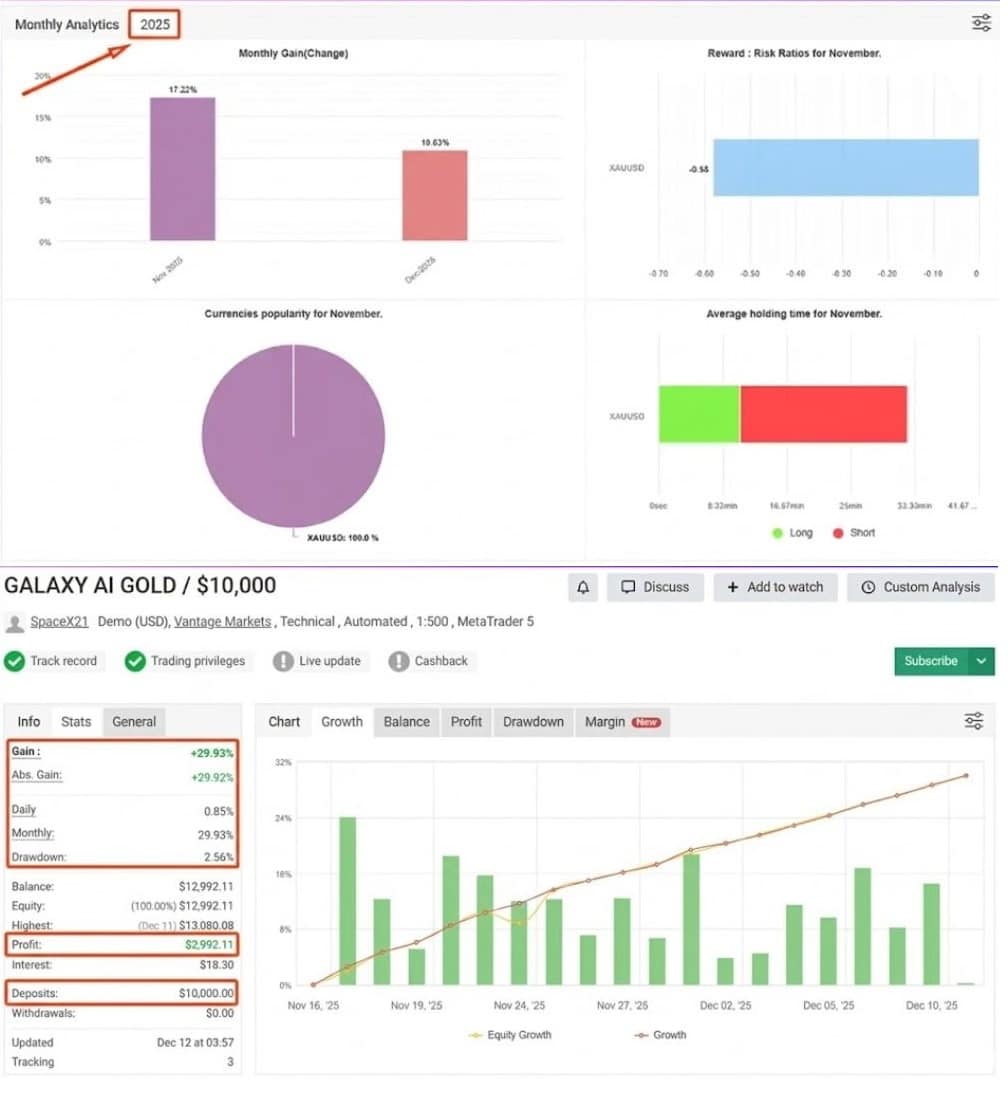
Performance Snapshot: Verified Results of GALAXY AI GOLD EA
On Myfxbook (external link: https://www.myfxbook.com), GALAXY AI GOLD EA shows the following averages over a two-year period:
- Monthly Return: 4 %–7 %
- Max Drawdown: 8 %
- Win Rate: 85 %
- Average Trade Length: 4 hours
These numbers are based on live, real-money data. No backtest curve fitting. Drawdown staying under 10 % for such a long stretch signals the EA’s controlled approach is working.
Equity Curve Example
Start: $5 000
After 24 Months: $8 700
Total Return: 74 %
Worst Peak-to-Trough: 8.9 %
Not a get-rich-quick system, but a steady growth curve with limited stress.
Install & Set-Up Checklist for GALAXY AI GOLD EA
Follow these steps to get GALAXY AI GOLD EA running without headaches:
- Download the EA file from the official vendor site.
- Open MetaTrader 5, click
File → Open Data Folder. - Drop the .ex5 file into
MQL5/Experts. - Restart MT5.
- Attach the EA to an XAUUSD M15 or M30 chart (timeframe has little impact, but vendor suggests M15).
- Enable Algo Trading (top toolbar).
- Review inputs – most users stick to the default or change only the lot size.
- Confirm that your broker allows small lot Gold trading (0.01 lot).
- Let it run on a VPS to avoid downtime.
For a deeper platform walk-through, see our internal guide “How to Set Up an MT5 VPS.”
Frequently Asked Questions Regarding GALAXY AI GOLD EA
1. Can I use GALAXY AI GOLD EA on MetaTrader 4?
No. It is coded for MT5 only. MT4 uses different order handling, so the EA would have to be rebuilt.
2. Is it true there’s no martingale?
Correct. Lot sizes remain fixed. The EA still opens multiple trades, but exposure grows in a straight line.
3. How much capital should I start with?
The vendor suggests $1 000 per 0.01 lot. Smaller accounts may over-leverage quickly.
4. Does it hold trades over the weekend?
By default, no. The EA aims to close baskets by Friday close. If positions remain open, a filter blocks new trades until Monday.
5. What brokers are best for Gold?
Look for:
- Raw or low spreads on XAUUSD.
- 1:500 leverage (or at least 1:100).
- No FIFO or trade size restrictions.See our broker comparison list: “Top MT5 Brokers for Gold.”
Final Thoughts & Next Steps For GALAXY AI GOLD EA
GALAXY AI GOLD EA offers a straight-forward way to trade Gold without the drama of classic grid robots. The fixed-lot progression, basket-level targets, and hard exposure caps aim to grow an account gradually while keeping drawdown small.
If steady, risk-aware XAUUSD automation sounds good, GALAXY AI GOLD EA may fit your toolbox.
Vendor Site – Click Here
| Membership | Yearly Membership |
|---|---|
| Additional Services | Unlock & Decompile |
| Recommended Brokers | Exness Broker, FPMarkets |
| Recommended VPS | FXVM (Low Latency) |
| Youtube Channel | ForexForYou |
| Telegram Channel | Onshoppie Forex EA's & Indicators |
| Telegram Support | Onshoppie Support |
| Installation Guides | Onshoppie Forex Guides |
Brand
ea-mt5
Only logged in customers who have purchased this product may leave a review.
Related products



Products
-
 ORACLE Gold Scalper EA MT4 v6.1 For Build 1444+
$19.99
ORACLE Gold Scalper EA MT4 v6.1 For Build 1444+
$19.99
-
PipsHunterFx-AI EA MT5 For Build 5452+
Original price was: $1,500.00.$69.99Current price is: $69.99.
-
RTX-CHIPERCORE EA V.FINAL MT5 + SetFiles For Build 5430+
$19.99
-
Market Master EA MT5 v1.1 For Build 5452+
Original price was: $299.00.$29.99Current price is: $29.99.
-
Final Boss EA MT5 v1.73 + SetFiles For Build 5452+
Original price was: $999.00.$29.99Current price is: $29.99.
-
Forex Real Profit EA MT4 v5.11 + SetFiles For Build 1444+
Original price was: $199.00.$9.95Current price is: $9.95.
-
NXFX Scalper EA MT4 v1.1 For Build 1444+
$9.95
-
Mystical EA Pro MT5 v3.0 + SetFiles For Build 5430+
$9.95








Recent reviews
-
 Advanced Dashboard Currency Strength
by Balram
Advanced Dashboard Currency Strength
by Balram

Reviews
There are no reviews yet.