

FTMO AI Crusher EA MT4 + Setfiles For Build 1476+
$14.95
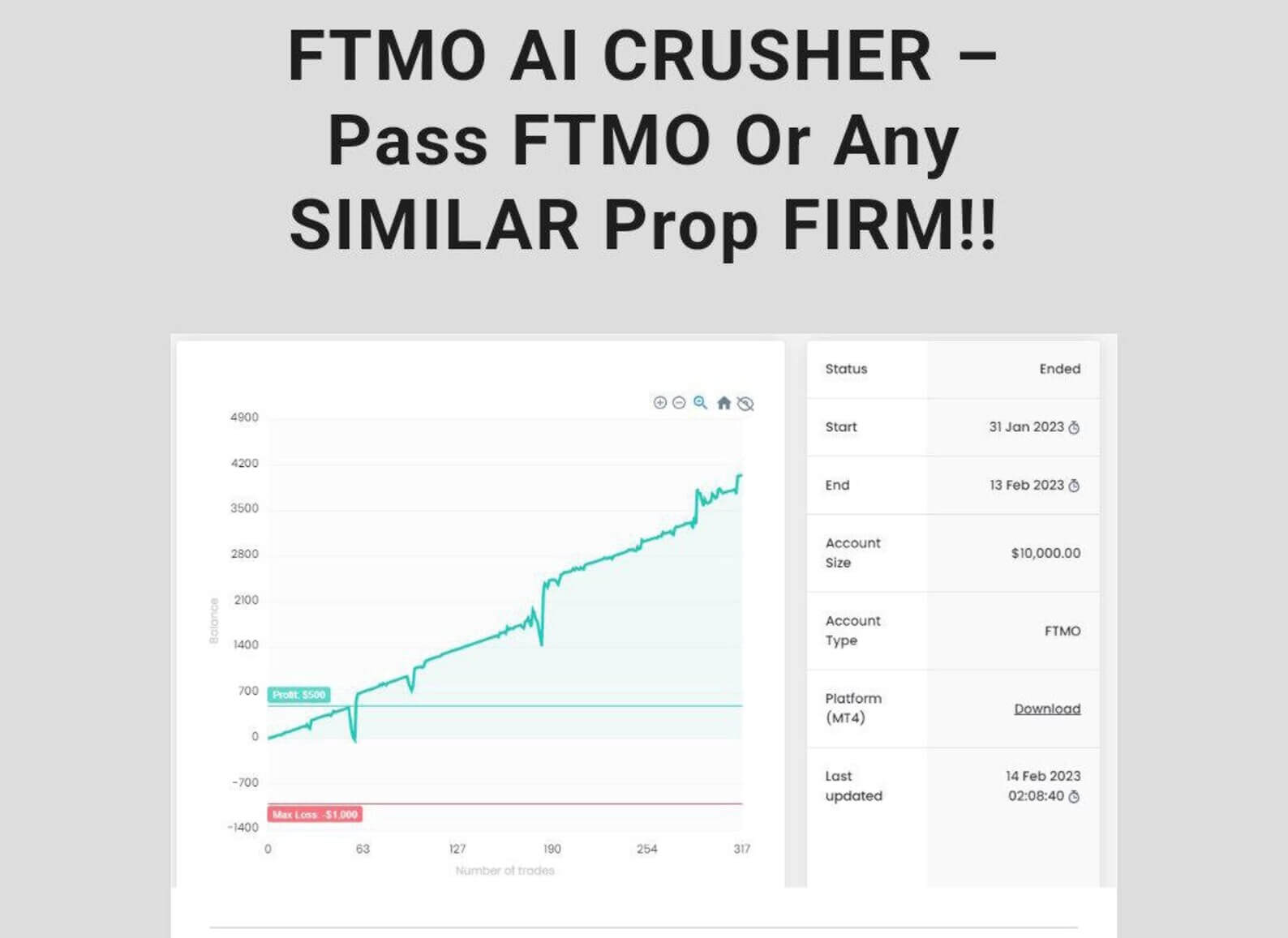
The FTMO AI Crusher EA is your ultimate edge in trading. Proven, exciting, and powerful — this thrilling tool simplifies your path to financial freedom.

Description
FTMO AI Crusher EA – The Complete “Set-and-Forget” Pack for Prop Firm Tests
Table of Contents
- What Is this EA?
- How the “Set-and-Forget” Pack Works
- Step-by-Step Setup Guide
- Common Questions Answered
- Final Thoughts
What Is this EA?
The FTMO AI Crusher EA is an automate trading system to help traders pass the FTMO Challenge and other prop-firm evaluations. Instead of manual trading, the EA (Expert Advisor) handles entries, exits and risk controls according to pre-define rules.
- A true “Set-and-Forget” solution – once installed, you can let it run with minimal oversight.
- Two professional EAs in one bundle – both programmed to complement each other.
- Custom SET files included – ready-made settings matched to FTMO’s trading objectives.
How the “Set-and-Forget” Pack Works for FTMO AI Crusher EA
“This is SET-AND-FORGET Pack where you get all instructions on how to set the FTMO AI Crusher EA and just leave it running.”That line sums up the core idea:
- Pre-configured logic – The developers have optimized the robots for typical FTMO parameters (10% max loss, 5% daily drawdown, 5% profit target during the challenge).
- Complementary styles – One EA focuses on short-term scalping; the other looks for medium-term moves.
- Round-the-clock operation – Together they aim to find opportunities day and night, so you do not miss an edge while asleep or at work.
Because the heavy lifting is automated, you can focus on high-level tasks like withdrawing profits, preparing for the Verification stage, and managing psychology.
Step-by-Step Setup Guide for
Preparing Your MT4 Platform
- Open your FTMO demo or evaluation account credentials.
- Download MetaTrader 4 from FTMO’s official site.
- Log in with the account details provided by FTMO.
- Set your server time correctly (check bottom right of the terminal).
- Enable “AutoTrading” (green icon on the top toolbar).
Tip: A VPS close to FTMO’s servers can reduce latency. FTMO suggests keeping ping under 50 ms.
Loading the Robots
- Go to File → Open Data Folder.
- Navigate to MQL4 → Experts.
- Paste both EA files
- Restart MetaTrader.
- Open Navigator (Ctrl+N); you should see both robots under Expert Advisors.
Applying the Custom SET Files
- Drag FTMO AI Crusher EA onto EURUSD M15 chart and on H1 Chart.
- Load
Setfiles. - Check that Allow live trading is ticked.
- Press OK and verify a smiling face appears in the chart corner.
Your “Set-and-Forget” pack is now running.
Common Questions Answered regarding FTMO AI Crusher EA
Q: Does the pack work on indices or gold? Default SET files are tuned for major currency pairs. You can experiment but you must optimize before risking an evaluation account.
Final Thoughts About FTMO AI Crusher EA
This EA offers a ready-made path for traders who prefer automation over manual chart watching. By combining two professional robots with tested SET files, the pack aims to meet FTMO’s strict drawdown and profit targets while keeping setup simple.
Use the “Set-and-Forget” approach, but stay involved: monitor drawdown, read FTMO emails, and adapt risk once you move to a live account. If used as intended, this strategy can give you a steady way to pass your FTMO test and trade funded capital with confidence.
| Membership | Yearly Membership |
|---|---|
| Additional Services | Unlock & Decompile |
| Recommended Brokers | Exness Broker, FPMarkets |
| Recommended VPS | FXVM (Low Latency) |
| Youtube Channel | ForexForYou |
| Telegram Channel | Onshoppie Forex EA's & Indicators |
| Telegram Support | Onshoppie Support |
| Installation Guides | Onshoppie Forex Guides |
Brand
ea-mt4
Only logged in customers who have purchased this product may leave a review.
Related products



Products
-
 Quantum Queen X EA MT5 V4.3 MQ5 Source Code
Original price was: $1,799.00.$19.95Current price is: $19.95.
Quantum Queen X EA MT5 V4.3 MQ5 Source Code
Original price was: $1,799.00.$19.95Current price is: $19.95.
-
 Smart Gold Hunter EA MT5 V2.0 MQ5 Source Code
Original price was: $249.00.$28.95Current price is: $28.95.
Smart Gold Hunter EA MT5 V2.0 MQ5 Source Code
Original price was: $249.00.$28.95Current price is: $28.95.
-
 The Gold Reaper EA MQ5 V4.1 Source Code + Setfiles
Original price was: $949.00.$19.95Current price is: $19.95.
The Gold Reaper EA MQ5 V4.1 Source Code + Setfiles
Original price was: $949.00.$19.95Current price is: $19.95.
-
 ATM Alpha BOT MT5 For Build 5984+
$14.95
ATM Alpha BOT MT5 For Build 5984+
$14.95
-
 Pandora Box EA MT5 V1.1 + SetFiles With DLL 5984
$14.95
Pandora Box EA MT5 V1.1 + SetFiles With DLL 5984
$14.95
-
 Bully Max Pro EA MT5 For Build 5984+
$14.95
Bully Max Pro EA MT5 For Build 5984+
$14.95
-
 Trinetra EA MT5 + SetFiles For Build 5984+
$34.95
Trinetra EA MT5 + SetFiles For Build 5984+
$34.95
-
 Strict HedgeZone Final EA MT5 V10 + SetFiles For Build 5984+
$14.95
Strict HedgeZone Final EA MT5 V10 + SetFiles For Build 5984+
$14.95
Recent reviews
-
 Advanced Dashboard Currency Strength
by Balram
Advanced Dashboard Currency Strength
by Balram
Reviews
There are no reviews yet.