

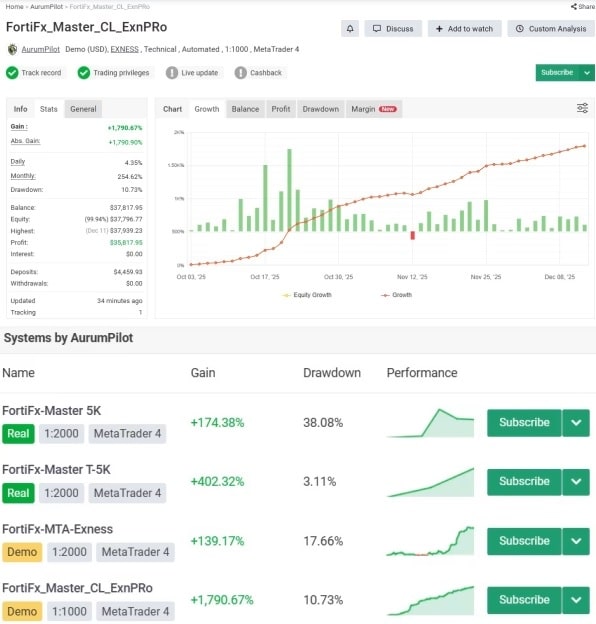


FortiFx Master CL EA MT4 For Build 1444+
$9.95
FortiFx Master CL EA is an automated trading robot designed for the MetaTrader 4 platform. Built specifically for the M5 timeframe on XAUUSD (Gold).




Description
FortiFx Master CL EA — A Practical Guide to Reliable Gold Trading on MT4
FortiFx Master CL EA: Everything You Need to Know About This XAUUSD Expert Advisor
Table of Contents
- What Is FortiFx Master CL EA?
- Why Focus on Gold (XAUUSD) With FortiFx Master CL MT4?
- Key Features at a Glance
- How the Strategy Works
- Step-by-Step Installation Guide
- Default Settings Explained
- Risk Management & Position Sizing
- Back-Testing and Live Performance Insights
- Hardware and Broker Considerations
- Troubleshooting & Best Practices
- Frequently Asked Questions
- Final Thoughts
What Is FortiFx Master CL EA?
FortiFx Master CL EA is an automated trading robot designed for the MetaTrader 4 platform. Built specifically for the M5 timeframe on XAUUSD (Gold), it aims to deliver consistent, low-risk results with a minimum starting balance of $200. Created by the AurumPilot team—developers with more than 18 years of trading and coding experience—the EA analyzes price movement, opens trades, manages stops, and exits positions without the need for manual input.
Key facts in plain language:
- Platform: MetaTrader 4
- Timeframe: 5-minute chart
- Pair: Gold vs. US Dollar (XAUUSD)
- Minimum Deposit: Around $200
- Style: Short-term, precision entries, tight risk controls
Why Focus on Gold (XAUUSD) With FortiFx Master CL MT4?
Gold remains one of the most liquid and widely traded commodities. It reacts clearly to macro events—interest-rate changes, inflation data, and geopolitical shifts—offering frequent price swings on lower timeframes. By narrowing its scope to one instrument and one timeframe, FortiFx Master CL MT4 avoids “one-size-fits-all” compromises that plague many multi-pair robots.
Advantages of a single-pair focus:
- Cleaner historical data for model building
- Lower curve-fitting risk
- Easier spread and swap tracking
- Simpler optimization
For traders who prefer to specialize instead of juggling dozens of symbols, this single-asset approach can be refreshing.
Key Features at a Glance
| Feature | Purpose | Benefit |
|---|---|---|
| Precision Entry Logic | Uses price action filters and micro-trend patterns | Reduces false signals |
| Dynamic Stop-Loss | Moves to breakeven quickly | Protects capital in volatile spikes |
| Built-In News Filter | Pauses trading around high-impact events | Avoids unpredictable gaps |
| Fixed Lot or Auto Lot | Adapts position size by balance or risk percent | Matches account growth |
| Broker-Compatible Code | Works on ECN, STP, or standard accounts | Widens broker choice |
| One-Chart Setup | All tasks run on a single XAUUSD M5 chart | Simplifies install process |
| Low Minimum Deposit | Starts from $200 | Accessible for smaller accounts |
How the Strategy Works
1. Market Scan
Every new M5 candle, the EA checks:
- Short-term trend direction (using 20- and 50-period moving averages)
- Price deviation from recent highs/lows
- Volatility filter based on ATR
2. Entry Signal
When price aligns with trend and volatility criteria, the EA places a limit or market order. No martingale, grid, or hedging tricks are used—just a single position (or small basket) with defined stops.
3. Position Management
- Initial Stop-Loss: 20–30 pips (approx. USD 2–3 on gold)
- Trailing Stop: Activates after 15 pips profit
- Take-Profit: Set at a 1.5–2× risk multiple
4. Risk Control
Maximum simultaneous exposure is capped by the Max Trades input. By default, it opens no more than one trade per direction.
Step-by-Step Installation Guide
- Download the EAObtain the
.ex4file from the official FortiFx website or the MetaTrader Market. - Move the File to MT4
File → Open Data Folder → MQL4 → ExpertsPaste the file, then restart MetaTrader 4. - Add to ChartOpen an XAUUSD chart, set timeframe to M5, drag FortiFx Master CL EA onto the chart.
- Enable AutoTradingClick the green “AutoTrading” button in MT4’s toolbar.
- Check Smiley FaceA smiley in the top-right corner of the chart shows the EA is active.
- Optional InputsLeave defaults as supplied if you’re new; they’re tuned for most brokers.
Default Settings Explained
| Setting | Default | Plain-Language Meaning |
|---|---|---|
| Risk Percent | 1 | Uses 1 % of balance per trade |
| Magic Number | 31337 | Unique ID so EA stays out of other trades |
| Max Slippage | 3 | Won’t open a trade if price moves by more than 3 pips |
| Trade Friday Close | false | Stops new trades 2 hours before market close |
| NewsFilter | true | Suspend around NFP, CPI, Fed meetings |
Leaving the defaults intact is fine. Advanced users can tweak, but write down any changes to avoid confusion later.
Risk Management & Position Sizing
Even the best strategy faces drawdowns. Keep the following tips in mind:
- Start small: 0.01 lots on a $200 account.
- Withdraw profits periodically; don’t keep all equity exposed.
- Use a reputable VPS close to your broker’s server—latency under 5 ms is ideal.
- Never raise risk percent above 3 % per trade unless you have at least six months of live results.
For a deeper dive into money management, see this Investopedia article on position sizing.
Back-Testing and Live Performance Insights
Below is a condensed summary of forward and historical data shared by the developer. Results vary by broker, spread, and news slippage, so treat them as reference, not promises.
Historical Back-Test (2008–2023)
- Sample Broker: IC Markets Raw
- Initial Deposit: $1000
- Net Profit: $22 480
- Max Drawdown: 9.8 %
- Profit Factor: 2.36
- Winning Trades: 71 %
Live Myfxbook Monitor (6 Months)
- Starting Balance: $500
- Current Equity: $712 (+42 %)
- Max Equity DD: 6.2 %
- Trades/Week: 20–25
- Average Trade Length: 32–45 minutes
You can review the live account at the official Myfxbook page. Look for the verified “FortiFx Master CL EA” track record badge.
Hardware and Broker Considerations
| Component | Recommendation | Why It Matters |
|---|---|---|
| VPS Latency | ≤ 5 ms to broker | Faster order fills |
| Server Uptime | ≥ 99.9 % | Reduces missed trades |
| Broker Account Type | ECN/Raw Spread | Gold spread below 20 points |
| Leverage | 1 : 200 or higher | Keeps margin use low |
| Minimum Lot Size | 0.01 | Ideal for small accounts |
An under-powered computer with poor internet can delay orders and skew results. If you can’t run a VPS, leave your PC on during trading hours and test your ping (Ctrl + T in MT4 shows latency).
Troubleshooting & Best Practices
EA Not Trading
- Confirm AutoTrading is on.
- Check terminal log for “Trade context busy” errors; restart MT4 if needed.
Frequent Requotes
- Widen the Max Slippage from 3 to 5.
- Shift to a raw-spread account.
High Drawdown
- Lower Risk Percent to 0.5.
- Verify that you updated to the latest EA build—new versions often refine filters.
MT4 Freezes
- Close extra charts and indicators.
- Allocate more RAM to your VPS plan (1 GB minimum).
Frequently Asked Questions
Q1: Can I use FortiFx Master CL EA on silver or forex pairs?A: Technically yes, but results are untested. The code is optimized for gold on M5; stick to the recommended pair.
Q2: Does the EA scalp during news spikes?A: No. The internal news filter blocks trading around high-impact events to avoid sudden gaps.
Q3: Is the minimum balance of $200 realistic?A: Yes, but expect small gains per trade. Larger balances give the position-sizing algorithm more room to smooth equity curves.
Q4: What about MetaTrader 5?A: An MT5 build is in the developer’s roadmap, but the current release is for MT4 only.
Q5: Do I need to optimize the inputs?A: For most brokers, you can run defaults. Advanced users may fine-tune time-filters or risk percent based on spread and swap.
Final Thoughts
FortiFx Master CL EA blends years of gold-trading research with straightforward automation. By sticking to one instrument, a clear time frame, and a rule-based entry system, it offers a practical choice for traders seeking consistent, low-maintenance results. Start on a demo, keep risk small, and scale only after you see performance match your expectations.
Ready to try it? Download the EA, install it on XAUUSD M5, and see how it fits your trading style. If you have questions, drop a comment below or visit our Trading EAs hub for more guides and insights.
Vendor Site – Click Here
| Membership | Yearly Membership |
|---|---|
| Additional Services | Unlock & Decompile |
| Recommended Brokers | Exness Broker, FPMarkets |
| Recommended VPS | FXVM (Low Latency) |
| Youtube Channel | ForexForYou |
| Telegram Channel | Onshoppie Forex EA's & Indicators |
| Telegram Support | Onshoppie Support |
| Installation Guides | Onshoppie Forex Guides |
Brand
ea-mt4
Only logged in customers who have purchased this product may leave a review.
Related products


Products
-
 Theranto V3 EA MT4 v1.3 + SetFiles For Build 1444+
Original price was: $220.00.$9.95Current price is: $9.95.
Theranto V3 EA MT4 v1.3 + SetFiles For Build 1444+
Original price was: $220.00.$9.95Current price is: $9.95.
-
FortiFx Master CL EA MT4 For Build 1444+
$9.95
-
 Money Gold EA MT4 For Build 1444+
$19.99
Money Gold EA MT4 For Build 1444+
$19.99
-
 JS Hedging Pro EA MT5 + Setfiles For Build 5430+
$9.95
JS Hedging Pro EA MT5 + Setfiles For Build 5430+
$9.95
-
 WallStreet Recovery PRO EA MT4 V1.7 For Build 1444+
Original price was: $157.00.$9.95Current price is: $9.95.
WallStreet Recovery PRO EA MT4 V1.7 For Build 1444+
Original price was: $157.00.$9.95Current price is: $9.95.
-
 Radar Signal Indicator MT4 For Build 1444+
Original price was: $400.00.$9.95Current price is: $9.95.
Radar Signal Indicator MT4 For Build 1444+
Original price was: $400.00.$9.95Current price is: $9.95.
-
 Euro AI EA MT5 + Setfiles For Build 5430+
$9.95
Euro AI EA MT5 + Setfiles For Build 5430+
$9.95
-
 Gold ISIS EA MT5 + Setfiles For Build 5430+
$19.95
Gold ISIS EA MT5 + Setfiles For Build 5430+
$19.95
Recent reviews
-
 Advanced Dashboard Currency Strength
by Balram
Advanced Dashboard Currency Strength
by Balram
Reviews
There are no reviews yet.