



Forex Real Profit EA MT4 v5.11 + SetFiles For Build 1444+
Original price was: $199.00.$19.99Current price is: $19.99.
Forex Real Profit EA (FRPEA) is an automated trading program—also called a Forex Real Profit Expert Advisor. Independently monitored systems on the market.


Description
Forex Real Profit EA: 7-Year Verified Results & Practical Guide
Forex Real Profit EA – Why This Expert Advisor Stands Out for Consistent Live Trading
Table of Contents
- Forex Real Profit EA Quick Overview
- What Makes Forex Real Profit EA Different?
- Core Strategies Inside the Robot
- Supported Currency Pairs
- Key Features at a Glance
- Frequently Asked Questions
- Step-by-Step Installation & Setup
- Risk Management & Lot Size Examples
- Back-Testing and Forward Testing Tips
- Live Trading – Only Real Money Accounts
- Common Mistakes to Avoid
- Final Thoughts
- Get Started Today
Quick Overview
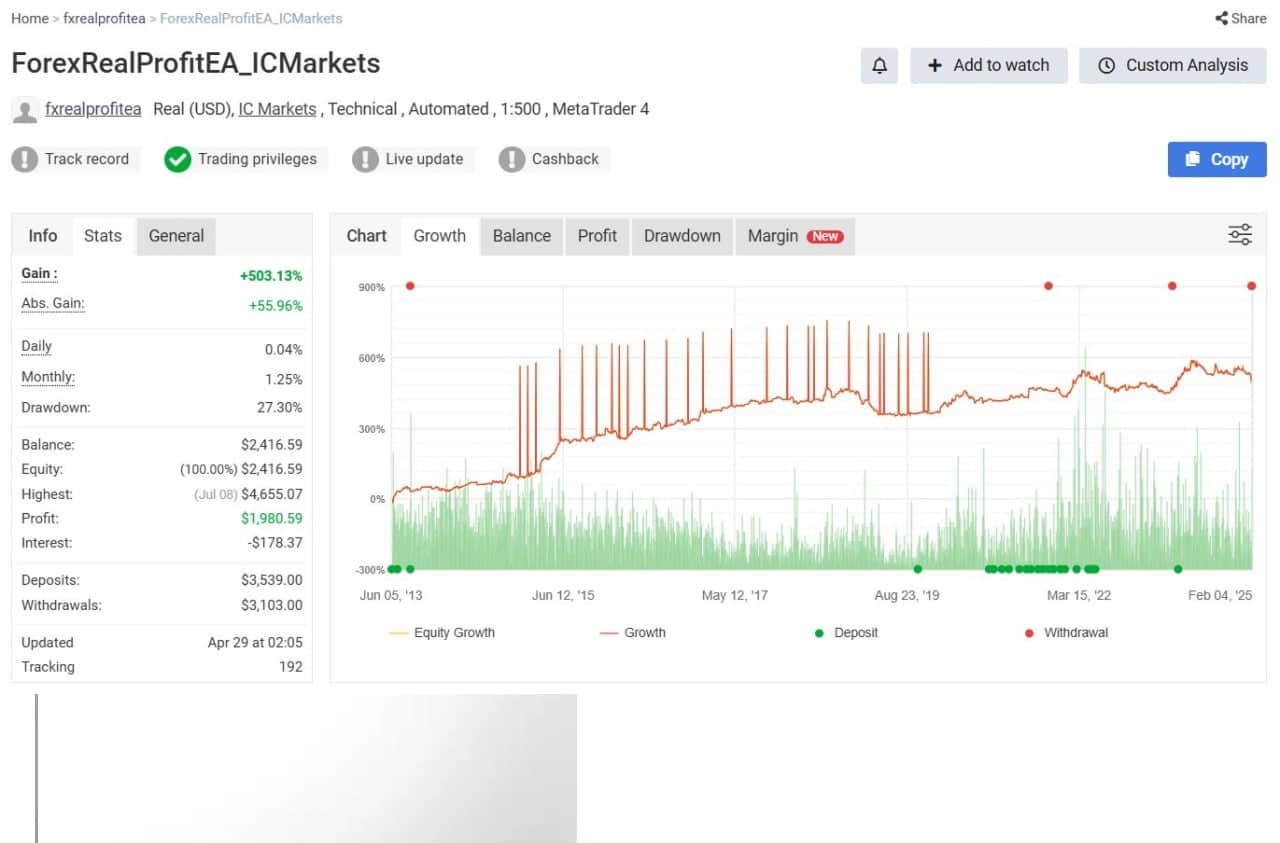
Forex Real Profit EA (FRPEA) is an automated trading program—also called a Forex Real Profit Expert Advisor—that has been trading live real money accounts for more than 92 months. Third-party verification of those results puts the robot among the longest-running, independently monitored systems on the market.
- Primary platform: MetaTrader 4
- Timeframe: M15
- Strategies: Six independent methods (Asian scalping, trend scalping, breakout)
- Average annual return (optimal risk): 40 % – 120 %
- No martingale, no grid, no recovery mode
What Makes Forex Real Profit EA Different?
1. Length of Verified Track Record
Most robots show only back-tests. FRPEA brings 7+ years of live, real-money data verified by a third party. That length of time covers different market conditions—range, trend, high and low volatility—helping traders see how the system copes in the real world.
2. Six Complementary Strategies
Instead of relying on a single idea, FRPEA mixes six logic modules. This diversity aims to reduce the risk that one approach stops working. We break these down later in the article.
3. Built-In Broker Protection
Invisible mode hides stop loss (SL) and take profit (TP) levels from brokers, especially useful on non-ECN accounts. Slippage, spread, and news filters add another layer of safety.
4. Flexibility
You can run the robot on micro, mini, or standard lots. Parameters are open for editing, so advanced users can fine-tune while beginners can keep default settings.
Core Strategies Inside the Robot
FRPEA divides its trades across six algorithms:
| Strategy Type | Number of Logics | Session | Main Idea |
|---|---|---|---|
| Scalping (Asian) | 2 | Late U.S. / Asian | Small quick moves in low volatility |
| Scalping (Trend) | 2 | All day | Follows short-term momentum with tight stops |
| Breakout | 2 | All day | Detects range breaks after consolidation |
Each trade carries a dynamic stop loss and take profit. That means the robot adapts exit levels to market conditions rather than using a fixed distance.
Supported Currency Pairs
Out of the box, FRPEA focuses on five pairs:
- EURAUD
- EURUSD
- GBPUSD
- USDCHF
- USDJPY
The FAQ states additional pairs that you may test—EURAUD, EURCAD, EURCHF, EURGBP, EURUSD, GBPCHF, GBPUSD, USDCAD, USDCHF, USDJPY. Before adding a new symbol, run a thorough back-test and then forward-test on a demo or small live account.
Key Features at a Glance
| Feature | Benefit in Plain Words |
|---|---|
| Money Management or fixed lots | Choose between automatic risk control or manual lot size |
| Invisible Mode | Prevents broker stop-hunting by hiding SL/TP |
| Dynamic SL/TP | Adapts to volatility; avoids one-size-fits-all exits |
| News Filter | Pauses trading near high-impact releases |
| Spread & Slippage Filter | Skips trades when conditions are poor |
| 4- and 5-Digit Support | Works with most MT4 quotes |
| NFA Compliance | Compatible with FIFO and no-hedging brokers |
| Automatic GMT Offset | No manual changes during DST |
Frequently Asked Questions
What timeframe should I use?
FRPEA is designed for the M15 chart. Using a different timeframe is not advised unless you fully re-test.
Can I modify settings?
Yes. All parameters—including risk, news filter, magic number, and strategy enables—are described in the PDF user guide. Beginners are encouraged to stick with defaults.
How do I set the magic number?
Keep the default unless you run several Expert Advisors on the same account. If you do, make sure each EA has a unique number to avoid trade mix-ups.
What happens during Daylight Saving Time?
The robot reads the current GMT offset from the internet at MT4 start and the first tick on Monday. No manual work is required.
Step-by-Step Installation & Setup
- Download the Forex Real Profit EA file (.ex4) and the PDF manual from the official site.
- Open MetaTrader 4 → File → Open Data Folder → MQL4 → Experts → paste the .ex4 file.
- Restart MT4 or refresh the Navigator window.
- Drag the EA onto each M15 chart you want to trade (EURUSD, GBPUSD, etc.).
- In the pop-up settings window:
- Allow live trading
- Confirm GMT auto detection is enabled
- Choose Money Management or fixed lot
- Press OK. You should see a smiley icon in the upper-right corner of the chart.
- Keep your platform running 24/5 or use a VPS.
Risk Management & Lot Size Examples
A rule of thumb from the manual:
- Account balance $150-$500 → 0.01 lot
- Balance $2 000 → 0.05 lot
- Balance $5 000 → 0.10 lot
If you prefer percentage risk, turn on Money Management and set risk percent per trade. Always start smaller than you think; you can scale up once comfortable.
Back-Testing and Forward Testing Tips
- Use quality data (99 % tick) for at least 10 years.
- Test each pair separately, then portfolio test all enabled pairs.
- Note drawdown periods and ensure they fit your risk tolerance.
- After back-test success, run a demo for 4-8 weeks.
- Move to live with micro lots. Scale only after you see execution quality.
Useful external tools:
- Tickstory Lite for high-quality history data
- Myfxbook for tracking forward tests
Live Trading – Only Real Money Accounts
The vendor highlights that all public results come from real money accounts, not demo. This removes the common gap between demo fills and live slippage. You can view detailed statements and charts on third-party sites:
- Myfxbook verified system link (look for FRPEA)
- FXBlue reports
Such openness is rare in the Expert Advisor space and can help traders build confidence before committing capital.
Common Mistakes to Avoid
- Running the EA on wrong timeframe (anything other than M15)
- Using huge lot size expecting to “double the account fast”
- Turning off news filter to chase extra pips
- Disabling Invisible Mode on a broker known for stop-hunting
- Ignoring VPS; power outages can close the MT4 terminal and interrupt trades
Final Thoughts
Forex Real Profit EA has stood the test of time with more than seven years of verified live trading. Six diversified strategies, strict risk controls, and broker-side protections make it a practical choice for traders who prefer a hands-off approach yet want transparency.
Plan your lot size, keep default settings while you learn, and monitor performance through an independent tracking site. Consistency beats speed in trading; let the robot do its job while you manage risk.
Get Started Today
Ready to put Forex Real Profit Expert Advisor on your charts?
- Download the latest version from the official website.
- Read the PDF quick-start guide (5 minutes).
- Attach it to a demo or small live account and track results on Myfxbook.
Need more help? Check our internal tutorials:
- How to Choose a Reliable Forex VPS
- Understanding MT4 Expert Advisor Settings
For broader reading, see the Wikipedia entry on foreign exchange market.
Happy trading, and stay disciplined!
Vendor Site – Click Here
| Membership | Yearly Membership |
|---|---|
| Additional Services | Unlock & Decompile |
| Recommended Brokers | Exness Broker, FPMarkets |
| Recommended VPS | FXVM (Low Latency) |
| Youtube Channel | ForexForYou |
| Telegram Channel | Onshoppie Forex EA's & Indicators |
| Telegram Support | Onshoppie Support |
| Installation Guides | Onshoppie Forex Guides |
Brand
ea-mt4
Only logged in customers who have purchased this product may leave a review.
Related products


Products
-
Forex Real Profit EA MT4 v5.11 + SetFiles For Build 1444+
Original price was: $199.00.$19.99Current price is: $19.99.
-
 NXFX Scalper EA MT4 v1.1 For Build 1444+
$9.95
NXFX Scalper EA MT4 v1.1 For Build 1444+
$9.95
-
 Mystical EA Pro MT5 v3.0 + SetFiles For Build 5430+
$9.95
Mystical EA Pro MT5 v3.0 + SetFiles For Build 5430+
$9.95
-
 Gold Heist EA MT5 v2.2 + SetFiles For Build 5452
$24.99
Gold Heist EA MT5 v2.2 + SetFiles For Build 5452
$24.99
-
 Gold Emperor EA MT4 v1.6 For Build 1444+
Original price was: $974.00.$9.95Current price is: $9.95.
Gold Emperor EA MT4 v1.6 For Build 1444+
Original price was: $974.00.$9.95Current price is: $9.95.
-
 The Breaker EA MT5 v4.2 + SetFiles For Build 5430+
$19.99
The Breaker EA MT5 v4.2 + SetFiles For Build 5430+
$19.99
-
Aura Ultimate EA MT5 v1.40 + SetFiles With DLL 5430
Original price was: $800.00.$39.95Current price is: $39.95.
-
FX Wizard EA MT5 For Build 5430+
$9.95



Recent reviews
-
 Advanced Dashboard Currency Strength
by Balram
Advanced Dashboard Currency Strength
by Balram

Reviews
There are no reviews yet.