


Aurum Apex EA MT4 V1.60 For Build 1455+
Original price was: $399.00.$9.95Current price is: $9.95.
Aurum Apex EA review reveals thrilling results. See how this powerful automated trading system transforms your forex portfolio with proven strategies.




Description
Aurum Apex EA: A Practical Guide to 100 % Automated Gold Trading on MT4
Aurum Apex EA – Everything You Need To Know Before You Click “Start”
Table of Contents
1. Why Traders Are Talking About Aurum Apex EA
Gold (symbol XAUUSD) remains one of the most watched assets in the world. But following every tick—especially on the one-minute chart—can feel like a full-time job. Aurum Apex EA steps in as a 100 % automated trading tool tailor-made for the MetaTrader 4 (MT4) platform.
What makes it stand out?
- Real-time market analysis that scans the XAUUSD chart 24 hours a day, five days a week.
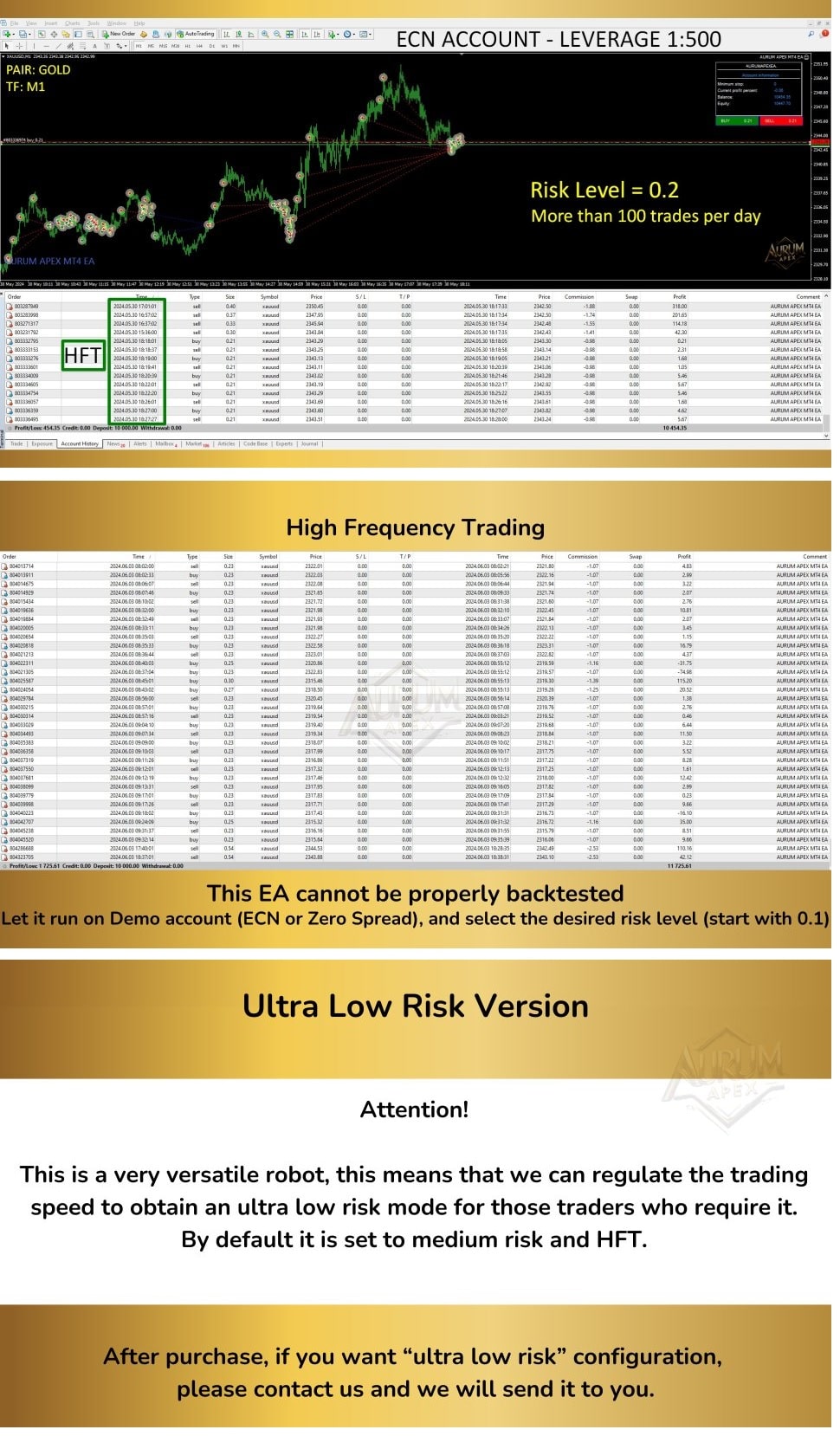
- A built-in High-Frequency Trading (HFT) engine that can place around 100 trades in a single day.
- Three easy-to-use risk settings so beginners and seasoned traders can choose an approach that suits them.
For anyone looking to trade gold without babysitting every position, Aurum Apex EA aims to do the heavy lifting.
2. Step-by-Step Installation on MT4
Below is a straightforward guide. No advanced coding knowledge needed.
- Download the
AurumApex.ex4file. - Open MT4 →
File→Open Data Folder. - Navigate to
MQL4→Experts. - Copy/paste the EA file.
- Restart MT4.
- Drag Aurum Apex EA onto a XAUUSD M1 chart.
- In the settings window:
- Under Common, check “Allow live trading.”
- Under Inputs, adjust only the Risk value.
- Click OK.
- Make sure the AutoTrading button (top toolbar) is green.
3. Frequently Asked Questions
Q1: Can I use this EA on currency pairs?It has been coded and back-tested only for gold. Running it on EURUSD or GBPUSD may deliver random results.
Q2: What broker type works best?An ECN broker with low spreads on XAUUSD.
4. Final Thoughts: Is Aurum Apex EA for You?
If you:
- Prefer automated trading to manual chart-watching.
- Have at least 1 000 USD to start in an ECN account.
- Feel comfortable letting an algorithm place many small trades.
…then this EA could be a solid fit. Choose a risk mode that matches your comfort level and stick to the default settings.
Vendor Site – Click Here
| Membership | Yearly Membership |
|---|---|
| Additional Services | Unlock & Decompile |
| Recommended Brokers | Exness Broker, FPMarkets |
| Recommended VPS | FXVM (Low Latency) |
| Youtube Channel | ForexForYou |
| Telegram Channel | Onshoppie Forex EA's & Indicators |
| Telegram Support | Onshoppie Support |
| Installation Guides | Onshoppie Forex Guides |
Brand
ea-mt4
Only logged in customers who have purchased this product may leave a review.
Related products



Products
-
 Quantum Queen X EA MT5 V4.3 MQ5 Source Code
Original price was: $1,799.00.$19.95Current price is: $19.95.
Quantum Queen X EA MT5 V4.3 MQ5 Source Code
Original price was: $1,799.00.$19.95Current price is: $19.95.
-
 Smart Gold Hunter EA MT5 V2.0 MQ5 Source Code
Original price was: $249.00.$28.95Current price is: $28.95.
Smart Gold Hunter EA MT5 V2.0 MQ5 Source Code
Original price was: $249.00.$28.95Current price is: $28.95.
-
 The Gold Reaper EA MQ5 V4.1 Source Code + Setfiles
Original price was: $949.00.$19.95Current price is: $19.95.
The Gold Reaper EA MQ5 V4.1 Source Code + Setfiles
Original price was: $949.00.$19.95Current price is: $19.95.
-
 ATM Alpha BOT MT5 For Build 5984+
$14.95
ATM Alpha BOT MT5 For Build 5984+
$14.95
-
 Pandora Box EA MT5 V1.1 + SetFiles With DLL 5984
$14.95
Pandora Box EA MT5 V1.1 + SetFiles With DLL 5984
$14.95
-
 Bully Max Pro EA MT5 For Build 5984+
$14.95
Bully Max Pro EA MT5 For Build 5984+
$14.95
-
 Trinetra EA MT5 + SetFiles For Build 5984+
$34.95
Trinetra EA MT5 + SetFiles For Build 5984+
$34.95
-
 Strict HedgeZone Final EA MT5 V10 + SetFiles For Build 5984+
$14.95
Strict HedgeZone Final EA MT5 V10 + SetFiles For Build 5984+
$14.95
Recent reviews
-
 Advanced Dashboard Currency Strength
by Balram
Advanced Dashboard Currency Strength
by Balram
Reviews
There are no reviews yet.