


Alpha EA Incubator MT4 + Setfiles For Build 1470+
$14.95
Discover the ultimate secrets of Alpha EA Incubator exposed here. Learn proven strategies that successful traders use to maximize profits today.


Description
Alpha EA Incubator: An In-Depth Guide to This Forex Trading Robot
Alpha EA Incubator – Reliable Automated Trading for MT4
Table of Contents
- What Is Alpha EA Incubator?
- Key Features at a Glance
- How Alpha EA Incubator Works
- Platform & Account Requirements
- Step-by-Step Setup Guide
- Risk Management & Drawdown Control
- Do’s and Don’ts for Smooth Operation
- Frequently Asked Questions
- Final Thoughts & Next Steps
What Is Alpha EA Incubator?
Alpha EA Incubator is an automated trading robot—also called an Expert Advisor (EA)—built for MetaTrader 4. The software follows technical rules to look for high-probability trades and opens or closes positions without manual help. Because the program can be attached to any chart and timeframe, traders can use it on major, minor, and even exotic forex pairs.
Key Features at a Glance
| Feature | Short Description |
|---|---|
| Designed by pro traders | Rules coded by full-time market participants. |
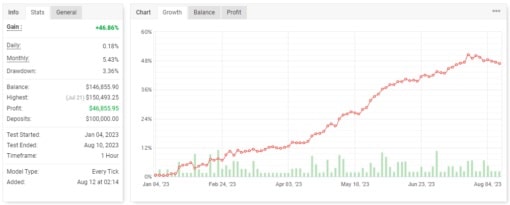
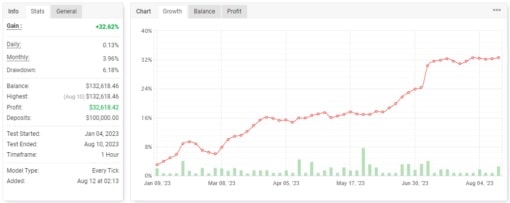
| 8–20 % average monthly profit | Based on historical tests shared by the team. |
| Works on any pair & timeframe | Flexible enough for scalping, swing, or long-term trades. |
| Custom lot & risk inputs | Users can choose fixed lots or percent-of-balance. |
| Low average drawdown | Under 5 % when the low-risk template is used. |
| Lifetime license | No limit on accounts; install on as many MT4 terminals as you need. |
| Quick setup | Ready in about two minutes; default settings provided. |
How Alpha EA Incubator Works
- Market Scan – The EA keeps an eye on price action, support and resistance, and other technical signals.
- Trade Filter – Only trades that reach a pre-set accuracy score (over 90 % based on back-tests) are taken.
- Position Management – An internal money-management module decides stop-loss, take-profit, or step-by-step exits.
- Flexible Logic – Because the strategy is written for all timeframes, you can use it on M5 for day trading or H4/D1 for swing setups.
- Data Feedback – The team reviews real account data and tweaks settings, which they share inside their VIP Telegram group.
Platform & Account Requirements
• Trading platform: MetaTrader 4.• Account size: Minimum $500 (or equivalent in CAD, GBP, EUR).• Account type: Standard accounts; avoid Cent or Mini because the tick value structure differs.• Compatible brokers: Works with prop-firm funded accounts, ECN, STP, or classic retail brokers.• 24/7 connection: A VPS keeps MT4 online when your computer is off.
Step-by-Step Setup Guide
| Step | Action |
|---|---|
| 1 | Download the EA File after purchase. |
| 2 | Download the ZIP package that contains the indicator file (.ex4) and the EA file (.ex4). |
| 3 | Unzip the files; place them in MQL4/Experts and MQL4/Indicators. |
| 4 | Restart MetaTrader. |
| 5 | Drag the indicator onto any chart first. |
| 6 | Drag Alpha EA Incubator onto the same chart. |
| 7 | Check “Allow Algo Trading” → click OK. |
| 8 | Make sure the Auto-Trading button at the top of MT4/5 is green. |
| 9 | Keep the terminal running or connect it to a VPS. |
Need visuals? A full video walk-through is pinned in the Telegram channel.
Risk Management & Drawdown Control With Alpha EA Incubator
Alpha EA Incubator uses a smart lot algorithm:• Fixed lot – Good for funded or prop accounts that limit daily drawdown.• Percentage of balance – The EA adjusts position size as the account grows.• Maximum open trades – Caps the number of trades to avoid overexposure.
On low-risk mode, back tests show:• 5 % maximum equity drawdown.• 1-to-3 average risk-to-reward ratio.
Tip: Pair the EA with a reputable VPS that offers low latency (<10 ms). We like Vultr and ForexVPS.
Do’s and Don’ts for Smooth Operation With Alpha EA Incubator
Do:
- Keep MetaTrader running 24/7 on a VPS.
- Check the Telegram group every Monday for updated presets.
- Record your results in a journal (equity curve, lot size, pairs traded).
Don’t:
- Close trades manually unless you stop the EA first.
- Add other robots or manual trades on the same account.
- Trade on balances below $500.
- Ignore VPS or internet outages; the EA needs a constant feed.
Frequently Asked Questions Regarding Alpha EA Incubator
1. Can I use Alpha EA Incubator on other assets like indices or crypto?Yes, as long as the broker provides the asset on MT4 and the spread is reasonable.
3. Can I change computers without losing my license?Yes, the license is not hardware-locked. Install on any terminal you own.
4. What happens if I lose internet?Trades remain open, but the EA cannot manage orders. A VPS avoids this risk.
5. What leverage works best?1:100 is the usual choice. Anything between 1:50 and 1:200 is acceptable.
Final Thoughts & Next Steps About Alpha EA Incubator
Alpha EA Incubator offers a simple way to add algorithmic trading to a MetaTrader 4 account. With a short setup time, flexible risk tools, many traders see it as an easy addition to their forex workflow. Test it on a demo, stick to the settings provided, and let the EA run without interference.
External resources
- MetaTrader official site: https://www.metatrader5.com/
- Investopedia article on Risk Management
Vendor Site – Click Here
| Membership | Yearly Membership |
|---|---|
| Additional Services | Unlock & Decompile |
| Recommended Brokers | Exness Broker, FPMarkets |
| Recommended VPS | FXVM (Low Latency) |
| Youtube Channel | ForexForYou |
| Telegram Channel | Onshoppie Forex EA's & Indicators |
| Telegram Support | Onshoppie Support |
| Installation Guides | Onshoppie Forex Guides |
Brand
ea-mt4
Only logged in customers who have purchased this product may leave a review.
Related products



Products
-
 Perceptrader AI EA MT5 V2.43 + Setfiles For Build 5836+
Original price was: $2,800.00.$14.95Current price is: $14.95.
Perceptrader AI EA MT5 V2.43 + Setfiles For Build 5836+
Original price was: $2,800.00.$14.95Current price is: $14.95.
-
 Quantum Emperor EA MT5 V7.5 For Build 5836+
Original price was: $799.00.$14.95Current price is: $14.95.
Quantum Emperor EA MT5 V7.5 For Build 5836+
Original price was: $799.00.$14.95Current price is: $14.95.
-
 Quantum King EA MT5 V3.1 For Build 5836+
Original price was: $649.00.$14.95Current price is: $14.95.
Quantum King EA MT5 V3.1 For Build 5836+
Original price was: $649.00.$14.95Current price is: $14.95.
-
 Bitcoin Robot Grid EA MT4 V6.0 For Build 1473+
Original price was: $899.00.$14.95Current price is: $14.95.
Bitcoin Robot Grid EA MT4 V6.0 For Build 1473+
Original price was: $899.00.$14.95Current price is: $14.95.
-
 IS PI Scalper EA Virtual Level Final MT4 + SetFiles
$14.95
IS PI Scalper EA Virtual Level Final MT4 + SetFiles
$14.95
-
 ArtQuant Gold EA MT5 V3.0 For Build 5836+
Original price was: $700.00.$14.95Current price is: $14.95.
ArtQuant Gold EA MT5 V3.0 For Build 5836+
Original price was: $700.00.$14.95Current price is: $14.95.
-
 Gold Trap EA MT5 V4.2.3 + Setfiles For Build 5836+
Original price was: $499.00.$19.95Current price is: $19.95.
Gold Trap EA MT5 V4.2.3 + Setfiles For Build 5836+
Original price was: $499.00.$19.95Current price is: $19.95.
-
 AI X HFT VIP EA MT4 V14 With DLL 1473
$14.95
AI X HFT VIP EA MT4 V14 With DLL 1473
$14.95
Recent reviews
-
 Advanced Dashboard Currency Strength
by Balram
Advanced Dashboard Currency Strength
by Balram
Reviews
There are no reviews yet.