


MHD Scalper Pro EA MT5 V9.1 For Build 5836+
Original price was: $1,200.00.$14.95Current price is: $14.95.
Looking for a reliable Forex tool? MHD Scalper Pro EA offers an amazing edge with proven algorithms. Start trading smarter and grow your wealth right now!



Description
MHD Scalper Pro EA: A Practical Guide to Fast Gold Scalping on MetaTrader
Table of Contents
- Why Scalping Gold Needs a Dedicated EA
- What Is the MHD Scalper Pro EA?
- Quick Installation & First-Time Set-Up
- Key Trading Features
- Frequently Asked Questions
- Best Practices for Consistent Results
- Final Thoughts & Next Steps
Why Scalping Gold Needs a Dedicated EA
Gold (XAUUSD) can jump 150–300 points in seconds. If you trade manually, reacting after the spread widens or a candle spikes often means you miss the best price. A dedicated expert advisor (EA) such as MHD Scalper Pro EA solves three core challenges:
- Speed – An EA sends orders immediately when conditions are met, something the human eye and hand can’t match.
- Consistency – Pre-defined rules reduce emotional decisions.
- Risk Control – Automation of stops, profit targets, and drawdown limits prevents a single mistake from wiping a chunk of your balance.
When you scalp on the 1-minute (M1) chart, these factors often decide whether you end the day green or red.
What Is the MHD Scalper Pro EA?
In simple terms, the MHD Scalper Pro EA is an execution panel that bolts onto MetaTrader 5. You can think of it as a co-pilot that:
- Reads price zones and multi-timeframe RSI on your behalf
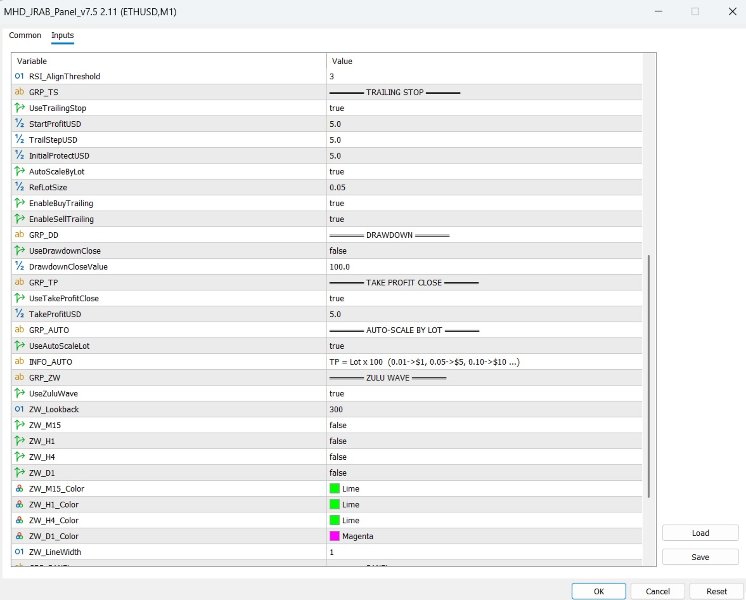
- Auto-places trailing stops and take-profits scaled to lot size
- Monitors drawdown and closes trades if a hard limit is hit
- Filters entries with a proprietary Zulu Wave momentum check
- Gives a real-time dashboard—spreads, P/L, progress bars—all on one screen
Quick Installation & First-Time Set-Up
- Download the EA file (
MHD_Scalper_Pro.ex5). - In MetaTrader, open File ▸ Open Data Folder ▸ MQL5 ▸ Experts and paste the file.
- Restart MetaTrader or right-click Navigator ▸ Experts ▸ Refresh.
- Drag the EA onto an XAUUSD chart (we recommend M1).
- Tick Allow Algo Trading and Allow DLL Imports.
- Set the following defaults (you can edit later):
- Hard Drawdown:
$100 - Initial Trailing Step:
$5.00 - TP Auto-Close:
Lot × 100
- Hard Drawdown:
- Press OK. A clean panel appears on the right side of the chart.
Tip: Keep the chart background simple (white or dark) so the panel text stays readable.
Key Trading Features of MHD Scalper Pro EA
1. Instant Zone & RSI Clarity
- LF Channel removes the need to draw manual lines.
- Multi-timeframe RSI (14) prints on the panel, not the chart.
- When RSI M1 > 70 and price in Upper LF Channel, you know a short scalp is off the table.
2. Smart Trailing Stop Built for Volatility
- Default is
$5.00on a 0.05 lot; the EA auto-multiplies or divides by lot size. - Trail steps tighten only when price moves in your favor, avoiding premature stops.
3. Take-Profit Auto-Close
- Formula:
TP = Lot × 100.- 0.01 lot →
$1target - 0.20 lot →
$20target
- 0.01 lot →
- Ideal for traders who prefer many quick wins over one large swing.
4. Built-In Drawdown Protection
- Toggle Hard DD Close and enter a dollar value.
- Example: With
$1,000equity, a$100hard stop means you risk max 10 %.
5. Zulu Wave Filter
- Looks back 300 candles on M1, M5, and M15.
- Confirms that the short-term impulse aligns with the broader wave.
6. Auto-Scale Logic
- All dollar-based settings (TP, Trailing, DD) respond to lot size.
- No mental math when you change from 0.03 to 0.07 lots.
Frequently Asked Questions Regarding MHD Scalper Pro EA
Q: Can I use the EA on Silver or Forex pairs?A: Technically yes, but settings are tuned for gold’s tick size and spread. Performance may vary.
Q: Does it conflict with other EAs?A: If the other EA also manages stops on the same symbol, you may get mixed signals. Best to run MHD Scalper Pro EA in isolation or on a dedicated chart.
Q: Is there a minimum deposit?A: No hard rule. Many users start with $100–$200, but lower balances mean smaller lot sizes, so profits will be modest.
Best Practices for Consistent Results With MHD Scalper Pro EA
- Back-test weekly – Use MT5’s Strategy Tester with tick data to fine-tune trail and TP values.
- Start on demo – Familiarise yourself with button positions and color codes.
- Document trades – Screenshot panel and chart every 20 trades; look for patterns in wins vs. losses.
- Sync with news – Check an economic calendar like https://www.forexfactory.com/calendar before each session.
- Limit screen time – Scalping for more than 2–3 hours straight can lead to fatigue and mistakes.
- Review spread – Don’t open new trades if spread > 300 pts; wait for normal conditions.
- Update promptly – When version 9.6 or later arrives, install it; updates often fix bugs and improve trailing logic.
Final Thoughts & Next Steps For MHD Scalper Pro EA
The MHD Scalper Pro EA is not a magic bullet, but it gives you the structure and speed gold scalping demands. By pairing rapid execution with clear risk limits—trailing stops, auto-TP, and hard drawdown—you keep control in a market known for wild swings.
Trade safe, stay disciplined, and let the MHD Scalper Pro EA handle the heavy lifting while you focus on clear decisions.
Vendor Site – Click Here
| Membership | Yearly Membership |
|---|---|
| Additional Services | Unlock & Decompile |
| Recommended Brokers | Exness Broker, FPMarkets |
| Recommended VPS | FXVM (Low Latency) |
| Youtube Channel | ForexForYou |
| Telegram Channel | Onshoppie Forex EA's & Indicators |
| Telegram Support | Onshoppie Support |
| Installation Guides | Onshoppie Forex Guides |
Brand
ea-mt5
Only logged in customers who have purchased this product may leave a review.
Related products



Products
-
 Quantum Queen X EA MT5 V4.3 MQ5 Source Code
Original price was: $1,799.00.$19.95Current price is: $19.95.
Quantum Queen X EA MT5 V4.3 MQ5 Source Code
Original price was: $1,799.00.$19.95Current price is: $19.95.
-
 Smart Gold Hunter EA MT5 V2.0 MQ5 Source Code
Original price was: $249.00.$28.95Current price is: $28.95.
Smart Gold Hunter EA MT5 V2.0 MQ5 Source Code
Original price was: $249.00.$28.95Current price is: $28.95.
-
 The Gold Reaper EA MQ5 V4.1 Source Code + Setfiles
Original price was: $949.00.$19.95Current price is: $19.95.
The Gold Reaper EA MQ5 V4.1 Source Code + Setfiles
Original price was: $949.00.$19.95Current price is: $19.95.
-
 ATM Alpha BOT MT5 For Build 5984+
$14.95
ATM Alpha BOT MT5 For Build 5984+
$14.95
-
 Pandora Box EA MT5 V1.1 + SetFiles With DLL 5984
$14.95
Pandora Box EA MT5 V1.1 + SetFiles With DLL 5984
$14.95
-
 Bully Max Pro EA MT5 For Build 5984+
$14.95
Bully Max Pro EA MT5 For Build 5984+
$14.95
-
 Trinetra EA MT5 + SetFiles For Build 5984+
$34.95
Trinetra EA MT5 + SetFiles For Build 5984+
$34.95
-
 Strict HedgeZone Final EA MT5 V10 + SetFiles For Build 5984+
$14.95
Strict HedgeZone Final EA MT5 V10 + SetFiles For Build 5984+
$14.95
Recent reviews
-
 Advanced Dashboard Currency Strength
by Balram
Advanced Dashboard Currency Strength
by Balram
Reviews
There are no reviews yet.