

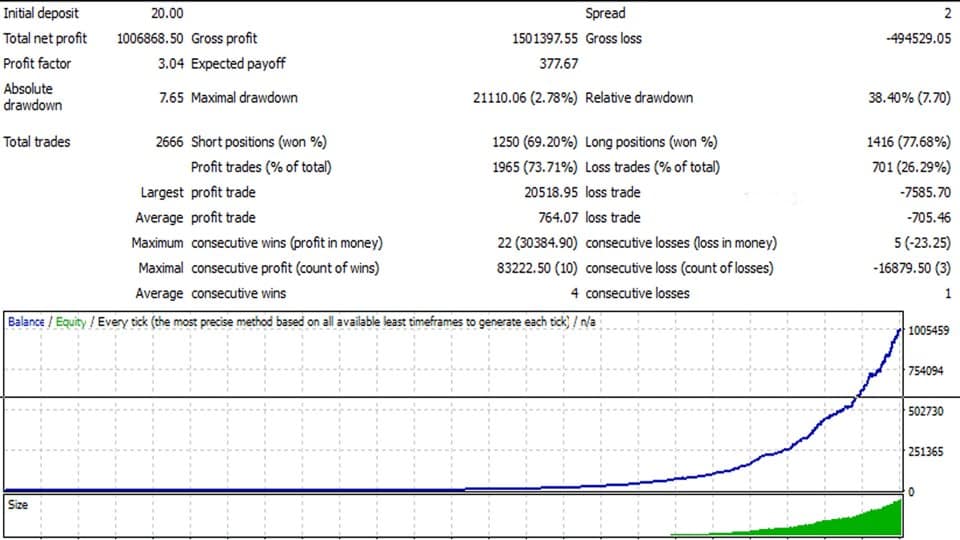

Aurus Gold EA MT4 v1.11 For Build 1455+
Original price was: $967.00.$9.95Current price is: $9.95.
Discover the ultimate Aurus Gold EA that delivers jaw-dropping trading results. Actually transform your forex experience with this powerful automated system.




Description
Aurus Gold EA: A Complete Guide to Hands-Off Forex Trading
Aurus Gold EA — Is This Automated Strategy the Right Choice for You?
Table of Contents
- What Is Aurus Gold EA?
- How Does the Robot Work?
- Installation & Setup Walk-Through
- Frequently Asked Questions
- Final Thoughts
What Is Aurus Gold EA?
Aurus Gold EA is an expert advisor (EA) designed for the foreign exchange market (Forex). In plain words, it is a program that studies the price of currency pairs and opens trades automatically.
Unlike manual trading—where a person has to watch charts for hours—this robot follows pre-set rules 24/7. Its main goal is to maximize profit while reducing risk for the trader.
Key idea: The EA focuses on “no grid, no Martingale” logic, so it tries to avoid the snowball effect of adding bigger positions when the market moves the wrong way.
How Does the Robot Work?
Aurus Gold EA works through four core steps:
- Market Scan – The EA runs technical indicators on multiple timeframes.
- Signal Confirmation – It checks that enough conditions line up (trend direction, volatility, spread, and news filter if enabled).
- Order Execution – Once rules are met, it places a trade with a defined stop loss and take profit.
- Management & Exit – A dynamic stop (trailing stop) follows price, locking in gains or cutting losses.
Because the code is stored inside the MetaTrader platform, all actions run automatically without human emotion.
Installation & Setup Walk-Through
Below is a step-by-step outline. Screenshots are available in the official user guide bundled with the purchase.
- Download the EA file (
AurusGold.ex4). - Open MetaTrader →
File→Open Data Folder. - Navigate to
MQL4/Expertsand paste the file. - Restart MetaTrader.
- Drag Aurus Gold EA onto the chart you want to trade.
- Check the Common tab:
- Tick “Allow live trading.”
- Tick “Allow DLL imports” if required by the EA.
- Click OK. A smiley face in the upper-right corner of the chart signals that the EA is active.
Tip: If you are unsure about any input, start with the default values. They are pre-optimized for low-risk settings.
Frequently Asked Questions regarding Aurus Gold EA
Q1: Do I need to know programming to use Aurus Gold EA?No. You only need to copy the file into MetaTrader and adjust the inputs. Programming is optional for advanced edits.
Q2: What lot size should I start with?Many users begin with 0.01 lot or 1 % risk per trade. Test on a demo account first.
Q5: Can I run other EAs on the same account?Yes, but monitor margin levels. Too many robots at once may overlap trades.
Final Thoughts About Aurus Gold EA
Aurus Gold EA provides a straightforward way to dip into automated Forex trading. It aims to balance opportunity and protection by avoiding risky systems like Martingale while using dynamic stops to lock in profit. Still, no robot is a magic solution. Proper risk management and broker choice remain critical.
If you are curious, start on a demo or a small cent account. Track the results, tweak settings, and decide if Aurus Gold EA fits your trading style.
Risk Warning: Trading foreign exchange involves significant risk and may not be suitable for all investors. Past performance does not guarantee future results.
Vendor Site – Click Here
| Membership | Yearly Membership |
|---|---|
| Additional Services | Unlock & Decompile |
| Recommended Brokers | Exness Broker, FPMarkets |
| Recommended VPS | FXVM (Low Latency) |
| Youtube Channel | ForexForYou |
| Telegram Channel | Onshoppie Forex EA's & Indicators |
| Telegram Support | Onshoppie Support |
| Installation Guides | Onshoppie Forex Guides |
Brand
ea-mt4
Only logged in customers who have purchased this product may leave a review.
Related products



Products
-
 Perceptrader AI EA MT5 V2.43 + Setfiles For Build 5836+
Original price was: $2,800.00.$14.95Current price is: $14.95.
Perceptrader AI EA MT5 V2.43 + Setfiles For Build 5836+
Original price was: $2,800.00.$14.95Current price is: $14.95.
-
 Quantum Emperor EA MT5 V7.5 For Build 5836+
Original price was: $799.00.$14.95Current price is: $14.95.
Quantum Emperor EA MT5 V7.5 For Build 5836+
Original price was: $799.00.$14.95Current price is: $14.95.
-
 Quantum King EA MT5 V3.1 For Build 5836+
Original price was: $649.00.$14.95Current price is: $14.95.
Quantum King EA MT5 V3.1 For Build 5836+
Original price was: $649.00.$14.95Current price is: $14.95.
-
 Bitcoin Robot Grid EA MT4 V6.0 For Build 1473+
Original price was: $899.00.$14.95Current price is: $14.95.
Bitcoin Robot Grid EA MT4 V6.0 For Build 1473+
Original price was: $899.00.$14.95Current price is: $14.95.
-
 IS PI Scalper EA Virtual Level Final MT4 + SetFiles
$14.95
IS PI Scalper EA Virtual Level Final MT4 + SetFiles
$14.95
-
 ArtQuant Gold EA MT5 V3.0 For Build 5836+
Original price was: $700.00.$14.95Current price is: $14.95.
ArtQuant Gold EA MT5 V3.0 For Build 5836+
Original price was: $700.00.$14.95Current price is: $14.95.
-
 Gold Trap EA MT5 V4.2.3 + Setfiles For Build 5836+
Original price was: $499.00.$19.95Current price is: $19.95.
Gold Trap EA MT5 V4.2.3 + Setfiles For Build 5836+
Original price was: $499.00.$19.95Current price is: $19.95.
-
 AI X HFT VIP EA MT4 V14 With DLL 1473
$14.95
AI X HFT VIP EA MT4 V14 With DLL 1473
$14.95
Recent reviews
-
 Advanced Dashboard Currency Strength
by Balram
Advanced Dashboard Currency Strength
by Balram
Reviews
There are no reviews yet.