




Crown Prince FX EA MT4 With SETFILES
Original price was: $599.00.$9.95Current price is: $9.95.
Crown Prince FX EA may fit your style. Built as MT4, it checks fresh data every few seconds, and makes calm, calculated decisions.




Description
Main Title
Crown Prince FX EA Review: A Simple Guide for GBPUSD Traders on MT4
Alternative Title
Crown Prince FX EA – Everything You Need to Know Before Installing It on MetaTrader 4
Table of Contents
- What Is Crown Prince FX EA?
- Why Focus on GBPUSD?
- Core Features at a Glance
- 3.1 Advanced Risk Management
- 3.2 Customizable Parameters
- 3.3 Trailing and Filtering Tools
- 3.4 Flexible Order Management
- 3.5 Verified Performance Data
- In-Depth Look at Key Settings
- 4.1 Risk Controls
- 4.2 Time-Based Filters
- 4.3 Order Limits
- 4.4 Trailing Logic
- Backtest and Live Results
- 5.1 Backtest Summary
- 5.2 Live MyFXBook Findings
- Step-by-Step Installation Guide for MT4
- Best Practices for Using Crown Prince FX EA
- Common Questions and Answers
- Final Thoughts
- Call to Action
What Is Crown Prince FX EA?
Crown Prince FX EA is a fully automated trading system built for the MetaTrader 4 platform. It is designed to trade the GBPUSD currency pair with a focus on keeping drawdowns low while aiming for steady returns. The expert advisor (EA) uses clear, rule-based logic, so you do not need to monitor each trade by hand.
If you are looking for an Introduction to Crown Prince FX EA for MT4, here are the basics:
- Platform: MetaTrader 4
- Pair: GBPUSD
- Style: Short-term trades with a protective stop-loss and take-profit
- Release Site: CheaperForex.com
Why Focus on GBPUSD?
GBPUSD is one of the most liquid currency pairs. High liquidity often means:
- Tighter spreads
- Quick order execution
- Plenty of intraday movement for short-term strategies
By centering on one pair, Crown Prince FX EA can fine-tune its settings around a single market’s behavior, rather than spreading its logic thin across many pairs.
Core Features at a Glance
3.1 Advanced Risk Management
- Auto MM Risk Percent: Adjusts lot sizes based on your account balance.
- TakeProfitPercent: A profit cap expressed as a percentage of risk per trade.
- Stop-loss & Take-profit: Built-in values to keep every trade protected.
3.2 Customizable Parameters
- Trailing Stop & Trailing Step: Shift the stop-loss closer as price moves in your favor.
- Max Orders: Limit the number of open trades, reducing over-exposure.
- Start/End Trading Hours: Schedule trading only during your chosen market hours.
3.3 Trailing and Filtering Tools
- Dynamic TrailingStop: Updates stop-losses in real time.
- Time Filters: Trade during London or New York only, if you prefer.
- Spread Protection: Avoid trading when spreads widen.
3.4 Flexible Order Management
- Support for Stop Orders: Place stop orders instead of immediate market orders.
- Delayed Deletion: Allows pending orders to stay alive during short-term volatility.
3.5 Verified Performance Data
- Live MyFXBook Link: Users can see a public, third-party track record.
- Rigorously Backtested: Historical tests show low drawdown and a high win rate.
In-Depth Look at Key Settings
4.1 Risk Controls
| Setting | Purpose | Typical Range |
|---|---|---|
| Auto MM Risk Percent | Scales lot size by account size | 0.5% – 2% |
| TakeProfitPercent | Locks in profit target | 1% – 3% |
| Fixed SL | Caps loss per trade | 10 – 50 pips |
Tips:
- Start on a demo account with 0.5% risk to see how it behaves.
- Increase risk in small steps only after you feel comfortable.
4.2 Time-Based Filters
- StartHour: When the EA can begin opening trades.
- EndHour: When the EA stops opening new trades.
- Ideal for traders who wish to avoid low-liquidity periods, such as the final hours on Friday.
4.3 Order Limits
- Max Orders: Controls the number of trades.
- Max Trades Per Day: Stops the EA from over-trading in rapid markets.
4.4 Trailing Logic
- TrailingStop (pips): Distance between price and stop-loss.
- TrailingStep (pips): Minimum move before the stop is updated again.
- Smaller steps secure gains quickly, but can also stop out early. Test before finalizing.
Backtest and Live Results
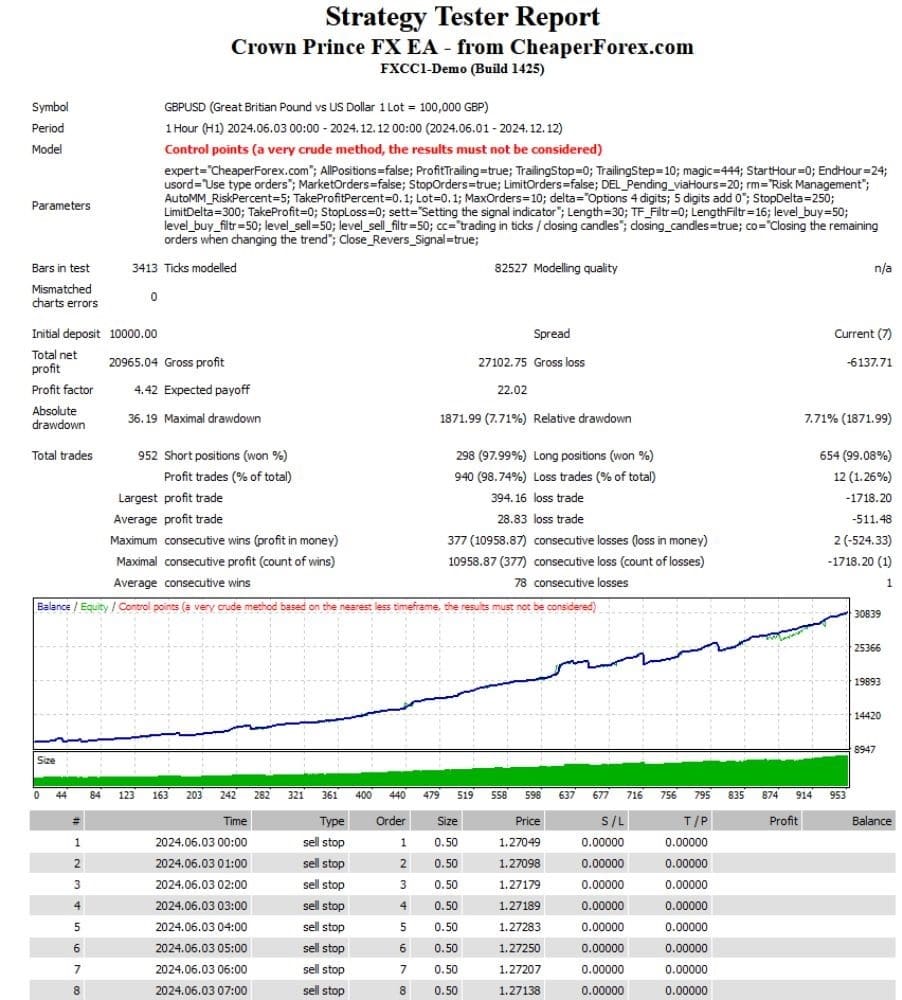
5.1 Backtest Summary
- Symbol: GBPUSD
- Initial Deposit: $10,000
- Net Profit: $20,965.04
- Profit Factor: 4.42
- Absolute Drawdown: 7.71%
- Win Rate: 98.74%
- Largest Profit Trade: $394.16
Interpretation:
A profit factor above 2.0 is generally considered good. At 4.42, this EA demonstrated strong profitability in historical data. The drawdown stayed well below 10%, which helps protect capital.
5.2 Live MyFXBook Findings
A link to the live account is available on CheaperForex’s product page. Highlights include:
- Smooth equity curve with limited dips.
- Consistent month-over-month growth.
- No extreme spikes, indicating steady risk control.
(Tip: Always check that the MyFXBook record is set to “Track Record Verified” and “Trading Privileges Verified.”)
Step-by-Step Installation Guide for MT4
- Download the EA– Purchase and download Crown Prince FX EA from CheaperForex.com.
- Copy the File– Move the
.ex4or.mq4file toMQL4 > Expertsinside your MT4 data folder. - Restart MT4– Close and reopen MetaTrader 4 so the platform can detect the new EA.
- Attach to GBPUSD Chart– Open a GBPUSD chart on the M15 timeframe (or the timeframe recommended by the seller).
- Enable AutoTrading– Click the AutoTrading button in MT4’s toolbar.
- Load Preset or Set Inputs Manually– Right-click on the chart → Expert Advisors → Properties → Input tab.– Load the provided
.setfile or adjust each parameter. - Check Journal and Experts Tabs– Confirm that there are no error messages.
- Run on Demo First– Use a demo account for at least two weeks to make sure the EA behaves as expected.
Best Practices for Using Crown Prince FX EA
- Start Small– Begin with the lowest risk setting.
- Use a VPS– An always-on connection keeps the EA running 24/5.
- Monitor Spread– GBPUSD usually has tight spreads, but news events can widen them.
- Keep MT4 Updated– MetaQuotes updates can impact EA performance; stay current.
- Regularly Export Statements– Review monthly performance in a spreadsheet to spot trends.
- Adjust to Market Conditions– Revisit risk settings during major economic events like Bank of England announcements.
Common Questions and Answers
Q1: Does Crown Prince FX EA use martingale or grid tactics?A: No. It uses fixed stop-losses and does not increase lot sizes after a loss.
Q2: What account types work best?A: ECN or raw-spread accounts are recommended because of tighter spreads.
Q3: Can I use it on other pairs?A: The EA is optimized for GBPUSD. Running it on other pairs is not advised unless you test it first.
Q4: How often are updates released?A: Updates are provided on an as-needed basis, often when market conditions change or MetaTrader gets a major update.
Q5: Is a minimum balance required?A: While the backtest used $10,000, many users start with as little as $500. Just scale risk down.
Final Thoughts
Crown Prince FX EA offers a structured, rule-based way to trade GBPUSD on MT4. Its blend of risk management tools, flexible settings, and verified performance data make it a solid option for traders who want steady results without watching charts around the clock. As always, test on a demo account first, monitor performance, and scale up only when you feel comfortable.
Call to Action
Ready to give Crown Prince FX EA a try?
- Visit CheaperForex.com for the official download.
- Run the EA on a demo account using the steps above.
- Share your results or questions in the comments below—let’s learn together!
Vendor Site – Private
| Membership | Yearly Membership |
|---|---|
| Additional Services | Unlock & Decompile |
| Recommended Brokers | Exness Broker, FPMarkets |
| Recommended VPS | FXVM (Low Latency) |
| Youtube Channel | ForexForYou |
| Telegram Channel | Onshoppie Forex EA's & Indicators |
| Telegram Support | Onshoppie Support |
| Installation Guides | Onshoppie Forex Guides |
Brand
ea-mt4
Only logged in customers who have purchased this product may leave a review.
Related products


Products
-
 Perceptrader AI EA MT5 V2.43 + Setfiles For Build 5836+
Original price was: $2,800.00.$14.95Current price is: $14.95.
Perceptrader AI EA MT5 V2.43 + Setfiles For Build 5836+
Original price was: $2,800.00.$14.95Current price is: $14.95.
-
 Quantum Emperor EA MT5 V7.5 For Build 5836+
Original price was: $799.00.$14.95Current price is: $14.95.
Quantum Emperor EA MT5 V7.5 For Build 5836+
Original price was: $799.00.$14.95Current price is: $14.95.
-
 Quantum King EA MT5 V3.1 For Build 5836+
Original price was: $649.00.$14.95Current price is: $14.95.
Quantum King EA MT5 V3.1 For Build 5836+
Original price was: $649.00.$14.95Current price is: $14.95.
-
 Bitcoin Robot Grid EA MT4 V6.0 For Build 1473+
Original price was: $899.00.$14.95Current price is: $14.95.
Bitcoin Robot Grid EA MT4 V6.0 For Build 1473+
Original price was: $899.00.$14.95Current price is: $14.95.
-
 IS PI Scalper EA Virtual Level Final MT4 + SetFiles
$14.95
IS PI Scalper EA Virtual Level Final MT4 + SetFiles
$14.95
-
 ArtQuant Gold EA MT5 V3.0 For Build 5836+
Original price was: $700.00.$14.95Current price is: $14.95.
ArtQuant Gold EA MT5 V3.0 For Build 5836+
Original price was: $700.00.$14.95Current price is: $14.95.
-
 Gold Trap EA MT5 V4.24 + Setfiles For Build 5836+
$24.95
Gold Trap EA MT5 V4.24 + Setfiles For Build 5836+
$24.95
-
 AI X HFT VIP EA MT4 V14 With DLL 1473
$14.95
AI X HFT VIP EA MT4 V14 With DLL 1473
$14.95
Recent reviews
-
 Advanced Dashboard Currency Strength
by Balram
Advanced Dashboard Currency Strength
by Balram
Reviews
There are no reviews yet.