

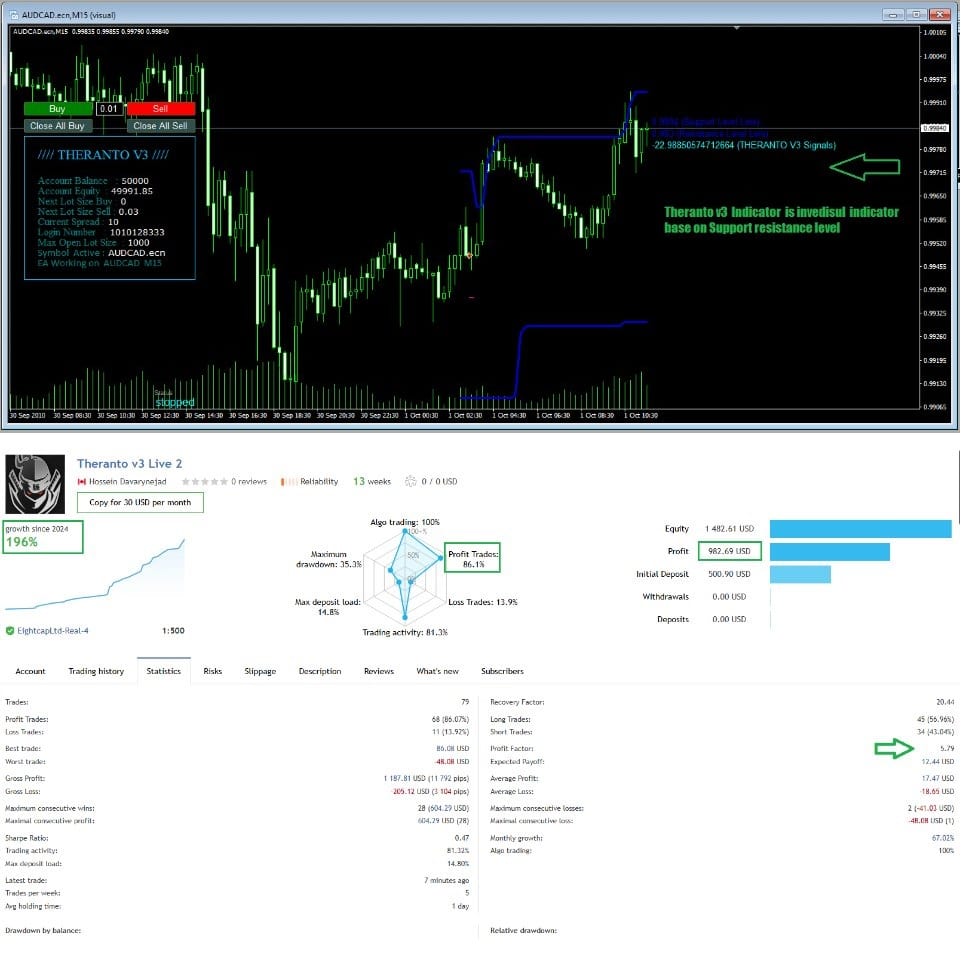
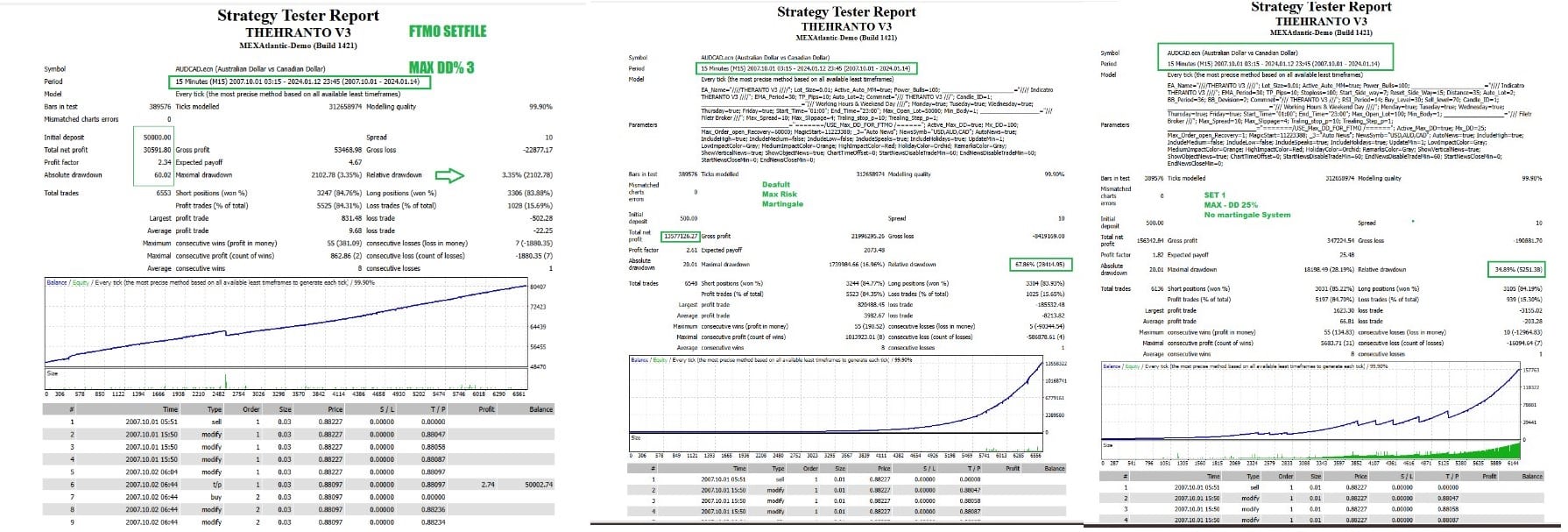

Theranto V3 EA MT4 v1.3 + SetFiles For Build 1455+
Original price was: $220.00.$9.95Current price is: $9.95.
Theranto V3 EA is a fully automated Forex robot designed for M15 charts.It focuses on pullback scalping across AUD and CAD pairs.



Description
Theranto V3 EA: A Practical Guide to Pullback Scalping With Built-In News Filtering
Theranto V3 EA – Everything You Need to Know Before You Press “Start”
Table of Contents
-
- What Is Theranto V3 EA?
- How the Pullback Strategy Works
- Core Tools Inside Theranto V3 EA
- RSI
- ATR
- Candle Patterns
- The Role of Sentiment Analysis
- Why the News Filter Matters
- Time Frame, Working Hours, and Pairs
- Risk Controls: Stop-Loss and Max Drawdown
- Back-Testing Tips and Common Mistakes
- Live Signals vs. Historical Results
- Installation and First-Run Checklist
- Ongoing Monitoring and Fine-Tuning
- Frequently Asked Questions
- Key Takeaways
1. What Is Theranto V3 EA?
Theranto V3 EA is a fully automated Forex robot designed for M15 charts.It focuses on pullback scalping across AUD and CAD pairs. The algorithm is active 24 hours a day, five days a week, and makes decisions based on technical indicators, sentiment readings, and an internal news filter.
2. How the Pullback Strategy Works
- Sharp Move – Price rushes in one direction.
- Return Phase – Liquidity dries up and price “pulls back.”
- Entry – Theranto EA seeks that moment when the market starts returning to the main trend.
- Exit – It aims for small, quick gains while controlling risk through built-in stop-loss rules.
Pullbacks are common in trending markets, especially on AUD and CAD pairs, making them ideal for this strategy.
3. Core Tools Inside Theranto V3 EA
RSI (Relative Strength Index)
- Identifies overbought and oversold zones.
- Helps the EA time entries during a pullback.
ATR (Average True Range)
- Measures current volatility.
- Sets dynamic stop-loss and take-profit distances.
Candle Patterns
- Confirms price rejection at key levels.
- Adds an extra layer of entry validation.
By combining RSI, ATR, and candle patterns, Theranto EA filters out weaker signals and focuses on high-probability trades.
4. The Role of Sentiment Analysis
Theranto EA reads sentiment data to judge whether the crowd is leaning long or short. If extreme sentiment aligns with a technical pullback, the robot may either reduce position size or skip the trade entirely. This extra step can improve win rates during choppy sessions.
5. Why the News Filter Matters
• High-impact events can blow through stop-loss levels.• The professional News Filter pauses trading shortly before and after red-flag events.• It uses an online calendar to catch surprises like rate decisions and jobs reports.
Important: Always activate the news filter. Back-tests ignore it by default, so you must enable it manually.
6. Time Frame, Working Hours, and Pairs for Theranto V3 EA
| Setting | Value |
|---|---|
| Chart Time Frame | M15 |
| Trading Schedule | 24 hours, Monday–Friday |
| Focus Pairs | AUD-USD, AUD-JPY, CAD-JPY |
| Market Session Bias | Favors Asian and London overlap |
While the EA runs all day, the majority of entries appear during low-medium volatility windows, which often occur in Asian trade for these pairs.
7. Risk Controls: Stop-Loss and Max Drawdown
• Each position has a hard stop-loss.• Global “Max DD” shuts down trading if equity drawdown reaches a preset level.• Position size is derived from ATR and account balance.
These controls protect the account against a string of losing trades or a sudden news shock that the filter might miss.
8. Back-Testing Tips and Common Mistakes
- Use tick-by-tick data for spread accuracy.
- Enable “Use Date” and run at least three years of history.
- Tick the “Allow News Filter” box; otherwise, back-test results won’t match live performance.
- Compare fixed-spread vs. variable-spread results to see how spread spikes affect scalping.
Many users skip point 3, causing a mismatch between simulation and reality.
9. Live Signals vs. Historical Results of Theranto V3 EA
Back-tests help you understand the logic, but live signals are the real benchmark. Factors such as slippage, latency, and variable spreads can widen the gap between ideal and actual performance. Monitor the EA on a small account or demo first, then scale gradually.
External resource: MetaTrader Economic Calendar
10. Installation and First-Run Checklist for Theranto V3 EA
- Download “TherantoEA.ex4” or “TherantoEA.ex5” and place it in
MQL4/ExpertsorMQL5/Experts. - Restart MetaTrader.
- Drag the EA onto an AUD or CAD M15 chart.
- In “Common,” tick:
- Allow live trading
- Allow DLL imports
- In “Inputs,” double-check:
- Risk percent
- Max DD shutdown
- News filter ON
- Press “OK” and confirm a smiley face appears in the corner.
For a visual guide, see the platform manual: MT4 User Guide PDF
11. Ongoing Monitoring and Fine-Tuning
- Review trade journal logs every morning.
- Check the economic calendar for new events that might not be in the default filter.
- Once a week, export trading history and note win rate, average loss, and profit factor.
- If Max DD triggers, pause and analyze before resuming.
- Consider updating the EA quarterly, as brokers can change symbol names or data feeds.
12. Frequently Asked Questions
Q: Can I run Theranto V3 EA on other pairs?A: The code is optimized for AUD and CAD pullbacks. You can test other majors but expect lower accuracy.
Q: What VPS latency is acceptable?A: Under 20 ms is recommended for scalping.
Q: How do I know the news filter is active?A: The chart will display “NEWS—PAUSE” and skip new trades during the blocked window.
Q: Is hedging required?A: No. The EA opens single-direction trades only.
13. Key Takeaways
• Theranto EA targets pullbacks on M15 AUD and CAD charts.• The built-in News Filter is essential; switch it on before live trading.• RSI, ATR, and candle patterns work together for timing.• Hard stop-loss and a global Max Drawdown cap protect capital.• Back-tests provide clues, but confirm with live signals on a small account.
Vendor Site – Click Here
| Membership | Yearly Membership |
|---|---|
| Additional Services | Unlock & Decompile |
| Recommended Brokers | Exness Broker, FPMarkets |
| Recommended VPS | FXVM (Low Latency) |
| Youtube Channel | ForexForYou |
| Telegram Channel | Onshoppie Forex EA's & Indicators |
| Telegram Support | Onshoppie Support |
| Installation Guides | Onshoppie Forex Guides |
Brand
ea-mt4
Only logged in customers who have purchased this product may leave a review.
Related products


Products
-
 The Gold Reaper EA MT5 v4.3 + SetFiles For Build 5833+
Original price was: $599.00.$14.95Current price is: $14.95.
The Gold Reaper EA MT5 v4.3 + SetFiles For Build 5833+
Original price was: $599.00.$14.95Current price is: $14.95.
-
 BTC X EA MT5 + SetFiles For Build 5800+
$24.95
BTC X EA MT5 + SetFiles For Build 5800+
$24.95
-
 Roc Jarvis EA MT5 For Build 5800+
$44.95
Roc Jarvis EA MT5 For Build 5800+
$44.95
-
 Liquidity Grabber EA PRO MT5 For Build 5800+
$14.95
Liquidity Grabber EA PRO MT5 For Build 5800+
$14.95
-
The Gold Reaper EA MQ4 V4.1 Source Code
Original price was: $599.00.$24.95Current price is: $24.95.
-
 Algo Gold Scalper MT4 EA For Build 1470+
$14.95
Algo Gold Scalper MT4 EA For Build 1470+
$14.95
-
 ZYPHRON EA MT5 For Build 5660+
$14.95
ZYPHRON EA MT5 For Build 5660+
$14.95
-
 Currency Pros Gold EA MT5 v1.03 For Build 5660+
Original price was: $1,497.00.$44.95Current price is: $44.95.
Currency Pros Gold EA MT5 v1.03 For Build 5660+
Original price was: $1,497.00.$44.95Current price is: $44.95.
Recent reviews
-
 Advanced Dashboard Currency Strength
by Balram
Advanced Dashboard Currency Strength
by Balram
Reviews
There are no reviews yet.