


Bitcoin Robot Grid EA MT4 v6.0 For Build 1455+
Original price was: $599.00.$9.95Current price is: $9.95.
Bitcoin often jumps hundreds of dollars in minutes, a well-spaced grid can capture small profits many times per day with Bitcoin Robot Grid EA.


Description
Bitcoin Robot Grid EA: A Practical Guide for Automated BTCUSD Grid Trading
Bitcoin Robot Grid EA – The Ultimate Hands-On Manual for Worry-Free Bitcoin Grid Trading
Table of Contents
- Quick Introduction Bitcoin Robot Grid EA
- What Is a Grid Trading Strategy?
- How Bitcoin Robot Grid EA Works on MT4 & MT5
- Main Features at a Glance
- Detailed Parameter Guide
- Step-by-Step Setup Tutorial
- Back-Testing the EA in MetaTrader 4
- Risk Management Best Practices
- Choosing a Broker, VPS, and Account Type
- Pros and Cons Summary
- Frequently Asked Questions
- Final Thoughts & Call to Action
Quick Introduction to Bitcoin Robot Grid EA
Automated Bitcoin trading no longer belongs only to programmers. Bitcoin Robot Grid EA puts a ready-made grid strategy inside MetaTrader 4 or MetaTrader 5 so traders can take advantage of Bitcoin’s price swings 24/7. Unlike manual grid trading, the EA watches the market, places layered buy and sell orders, and closes them with pre-set Take Profit and Stop Loss levels. Because the robot is designed for the BTCUSD pair on the H1 chart, even part-time traders can stay in the market while working, studying, or sleeping.
Bitcoin Robot Grid MT4 is an intelligent trading system designed to automate BTCUSD trading using the grid trading strategy. The robot continuously monitors market conditions and executes trades according to its preset parameters, allowing for consistent market engagement without manual intervention.
What Is a Grid Trading Strategy?
Grid trading is simple in concept:
- The trader defines several price levels above and below the current price.
- Buy orders are placed below the market; sell orders above.
- As the price moves, individual orders close when their Take Profit is reached.
- New orders can be added, building a “grid” of positions that profit from volatility.
Because Bitcoin often jumps hundreds of dollars in minutes, a well-spaced grid can capture small profits many times per day. The challenge is keeping track of dozens of open trades—something that Bitcoin Robot Grid EA does automatically.
Why Bitcoin + Grid Makes Sense
- High volatility provides frequent price retracements.
- 24/7 market hours match an always-on robot.
- BTCUSD spreads at popular brokers have fallen, reducing cost.
How Bitcoin Robot Grid EA Works on MT4 & MT5
The EA installs like any other expert advisor:
- Copy the
.ex4or.ex5file into the Experts folder. - Attach it to a BTCUSD H1 chart.
- Enable AutoTrading.
Once active, the robot:
- Creates an initial buy or sell order based on its logic.
- Places limit orders at predefined intervals (grid steps).
- Applies an ADX filter to avoid weak trends.
- Checks a built-in news filter; 60 minutes before and after high-impact news, it pauses.
- Calculates Take Profit and Stop Loss for every position.
- Monitors MaxDD % to cap drawdown.
The EA is available in two versions—one for MetaTrader 4, another for MetaTrader 5—so users of both platforms can trade with the same strategy.
Main Features of Bitcoin Robot Grid EA at a Glance
| Feature | Why It Matters |
|---|---|
| ADX Filter | Trades only when the trend strength fits grid logic. |
| News Filter (60 min pre/post) | Protects the account during high-impact events. |
| Free Updates | No extra fees for future enhancements. |
| Works 7 days a week | Bitcoin never sleeps, neither does the robot. |
| Quick Setup | Only three core inputs must be changed. |
| Fully Documented | Manual in nine languages: EN, ZH, JA, DE, KO, FR, ES, IT, AR. |
| Private Support Group | Direct help from developers and fellow users. |
| Take Profit & Stop Loss on Every Order | Built-in risk control. |
| Works with Any Broker | Raw, ECN, Standard, Cent, Micro, Hedging accounts supported. |
Detailed Parameter Guide
Below is a plain-language explanation of every setting you will see when you open the Inputs tab.
Lot Size Controls
- Lots (fixed) – Opens every trade at exactly the size you specify, e.g.,
0.01lot. - Lots (percent) – Calculates lot size based on account balance percentage.
Exit Settings
- Take Profit – Pre-set; leave unchanged for recommended performance.
- Stop Loss – Pre-set; only adjust after forward testing.
Identification
- Magic Number – Unique ID so the EA can track its own trades. Change if you run multiple robots.
- Trade Comment – Custom text that appears in the MT4/MT5 history tab. Helpful for filtering reports.
Protective Filters
- News Filter – Turn on (
true) to block new trades around scheduled news. - Report For USD – Include only U.S. news or all major currency events.
- doNotTradeBefore/AfterInMinutes – Default
60/60; adjust the pause window. - MaxDD % – Maximum drawdown allowed before the EA stops opening new orders.
Time Management
- Trading Days and Hours – Pick any combination from Monday-Sunday; select specific hours or 24/7.
- Max Positions per Day – Limit the number of open positions. Good for keeping risk predictable.
Interface
- Show Panel – Displays a clean dashboard with spread, daily profit in USD and pips, open session, and a forex calendar.
Step-by-Step Setup Tutorial
Follow these instructions on a demo account first.
- Buy & Download
- Purchase the EA from the official marketplace.
- Take a screenshot of your purchase confirmation.
- Join the Private Group
- Send the screenshot via private message.
- The team will reply with group access and the PDF manual.
- Install the EA
- Open MetaTrader.
- Click File > Open Data Folder > MQL4 > Experts (or
MQL5). - Copy the EA file into the folder and restart MetaTrader.
- Attach to Chart
- Open a new BTCUSD chart, H1 timeframe.
- Drag Bitcoin Robot Grid EA onto the chart.
- Enable AutoTrading
- Press the AutoTrading button in the toolbar (icon turns green).
- Adjust Three Key Inputs
Lots(fixed or percent)Magic Numberif neededTrading Days/Hoursif you want a custom schedule
- Check the Panel
- Confirm the EA is “Running.”
- Spread and news countdown appear in the top-right corner.
- Run on a VPS (Optional but Recommended)
- Sign up for a reliable VPS provider.
- Install your trading platform on the VPS.
- Log in and leave MetaTrader running 24/7.
Back-Testing the EA in MetaTrader 4
A quick test can answer many questions before you risk real money.
- Open Strategy Tester (
Ctrl+R). - Select Bitcoin Robot Grid EA.
- Symbol:
BTCUSD. - Model: Every Tick (most accurate).
- Use a custom period—for example, the past two years.
- Deposit:
$1 000. - Lot Size:
0.01(fixed). - Click Start.
After the test, review:
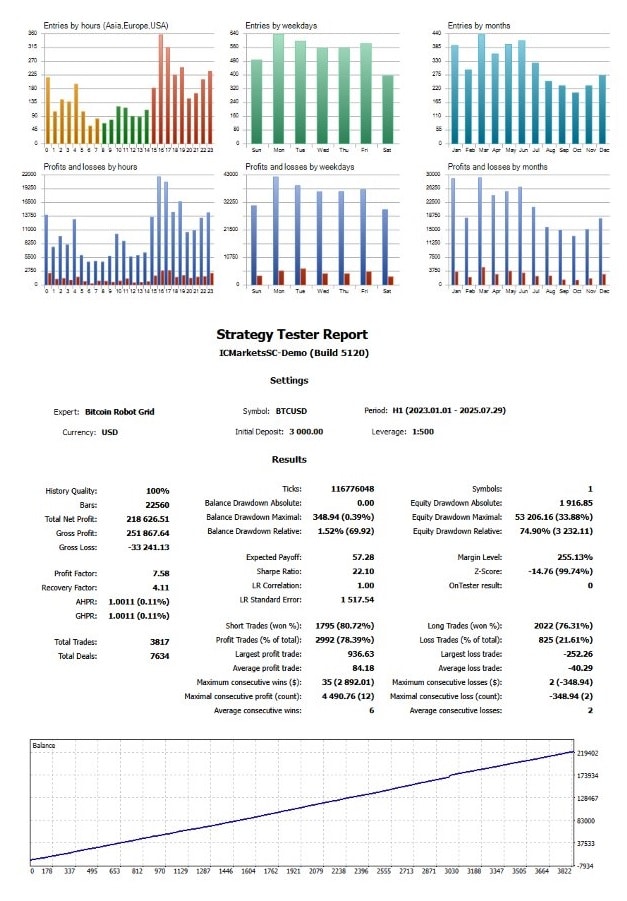
- Profit Factor – Anything above 1.3 is typically solid for grid strategies.
- Max Drawdown – Compare against your risk comfort.
- Trade Count – More trades can mean better statistics but also higher commissions.
Risk Management Best Practices
- Start Small – Use the lowest lot size until you understand the EA’s behavior.
- Monitor MaxDD % – Keep the limit realistic; 20-30 % is common for Bitcoin grids.
- Withdraw Profits – Move gains to a separate wallet periodically.
- Use a VPS – Platform disconnects can ruin a grid sequence.
- Diversify – Do not run the EA on your entire capital; allocate a portion.
- Regularly Update – Free updates may improve filters and performance.
Choosing a Broker, VPS, and Account Type
Broker Checklist
- Tight BTCUSD spread (under $50).
- Leverage options from 1:30 to 1:1000.
- Permission for expert advisors.
- No dealing-desk or fast execution.
Popular brokers that meet these criteria often offer Raw, ECN, or Zero accounts. Always verify with a small deposit first.
VPS Guidelines
- Ping to broker under 100 ms.
- At least 1 GB RAM and 1 CPU core.
- 99.9 % uptime guarantee.
Pros and Cons Summary of Bitcoin Robot Grid EA
Pros
- Fully automated Bitcoin grid trading.
- Built-in news and ADX filters reduce unnecessary entries.
- Free lifetime updates.
- Detailed multilingual manual.
- Runs on both MT4 and MT5.
Cons
- Requires a minimum deposit of about $1 000 for meaningful results.
- Grid strategies can face larger drawdowns in strong one-way trends.
- Must stay connected 24/7, so a VPS is almost mandatory.
Frequently Asked Questions Regarding Bitcoin Robot Grid EA
Q 1. Does Bitcoin Robot Grid EA trade other pairs?A: The robot is optimized for BTCUSD on the H1 chart. You can attach it to other symbols, but results are not guaranteed.
Q 2. Can I set it to trade only during Asian hours?A: Yes. Use the Trading Days and Hours input to specify any window.
Q 3. What happens during big Bitcoin news?A: With the News Filter turned on, the EA will not open new trades 60 minutes before or after the event.
Q 4. How many positions open at one time?A: The default logic opens a single new order per grid level, but you can cap daily totals with Max Positions per Day.
Q 5. Are updates really free?A: Yes. When the developers release a new version, log into your marketplace account and download it at no cost.
Final Thoughts & Call to Action For Bitcoin Robot Grid EA
Bitcoin Robot Grid EA offers a practical way to take part in Bitcoin’s volatility without sitting at the screen all day. By combining a proven grid strategy with safety tools such as ADX and news filters, the robot can fit into many trading plans. Remember to start on a demo account, tweak the three primary inputs, and run the EA on a stable VPS for best results.
Ready to give it a try?Buy Bitcoin Robot Grid EA here → send your confirmation screenshot → join the private group → and start your first fully automated Bitcoin grid session today.
Vendor Site – Click Here
| Membership | Yearly Membership |
|---|---|
| Additional Services | Unlock & Decompile |
| Recommended Brokers | Exness Broker, FPMarkets |
| Recommended VPS | FXVM (Low Latency) |
| Youtube Channel | ForexForYou |
| Telegram Channel | Onshoppie Forex EA's & Indicators |
| Telegram Support | Onshoppie Support |
| Installation Guides | Onshoppie Forex Guides |
Brand
ea-mt4
Only logged in customers who have purchased this product may leave a review.
Related products



Products
-
 Perceptrader AI EA MT5 V2.43 + Setfiles For Build 5836+
Original price was: $2,800.00.$14.95Current price is: $14.95.
Perceptrader AI EA MT5 V2.43 + Setfiles For Build 5836+
Original price was: $2,800.00.$14.95Current price is: $14.95.
-
 Quantum Emperor EA MT5 V7.5 For Build 5836+
Original price was: $799.00.$14.95Current price is: $14.95.
Quantum Emperor EA MT5 V7.5 For Build 5836+
Original price was: $799.00.$14.95Current price is: $14.95.
-
 Quantum King EA MT5 V3.1 For Build 5836+
Original price was: $649.00.$14.95Current price is: $14.95.
Quantum King EA MT5 V3.1 For Build 5836+
Original price was: $649.00.$14.95Current price is: $14.95.
-
 Bitcoin Robot Grid EA MT4 V6.0 For Build 1473+
Original price was: $899.00.$14.95Current price is: $14.95.
Bitcoin Robot Grid EA MT4 V6.0 For Build 1473+
Original price was: $899.00.$14.95Current price is: $14.95.
-
 IS PI Scalper EA Virtual Level Final MT4 + SetFiles
$14.95
IS PI Scalper EA Virtual Level Final MT4 + SetFiles
$14.95
-
 ArtQuant Gold EA MT5 V3.0 For Build 5836+
Original price was: $700.00.$14.95Current price is: $14.95.
ArtQuant Gold EA MT5 V3.0 For Build 5836+
Original price was: $700.00.$14.95Current price is: $14.95.
-
 Gold Trap EA MT5 V4.2.3 + Setfiles For Build 5836+
Original price was: $499.00.$19.95Current price is: $19.95.
Gold Trap EA MT5 V4.2.3 + Setfiles For Build 5836+
Original price was: $499.00.$19.95Current price is: $19.95.
-
 AI X HFT VIP EA MT4 V14 With DLL 1473
$14.95
AI X HFT VIP EA MT4 V14 With DLL 1473
$14.95
Recent reviews
-
 Advanced Dashboard Currency Strength
by Balram
Advanced Dashboard Currency Strength
by Balram
Reviews
There are no reviews yet.