


FX Profitude Trading System MT4 For Build 1455+
$9.95
Discover the ultimate FX Profitude Trading System secrets that will mind-blow your expectations. Expert strategies for profitable trading success await you.





Description
FX Profitude Trading System: A Down-to-Earth Guide for Everyday Traders
FX Profitude Trading System – How It Uses Four Indicators to Simplify Forex Decisions
Table of Contents
- Introduction: What Makes the FX Profitude Trading System Different?
- Why Trend Direction Matters in Forex
- The Four Core Indicators Inside FX Profitude
- 3.1 The Array: A One-Glance Trend Road-Sign
- 3.2 The Arrows: Pinpointing Possible Entries
- 3.3 The Validator: A Second Opinion Built-In
- 3.4 The Trend Indicator: The System’s Heartbeat
- Installing the FX Profitude Trading System
- Reading the Screen Step by Step
- Risk Management: Keeping Losses Small
- Real-World Example Trades
- Benefits and Possible Drawbacks
- FX Profitude vs. Other Forex Trading Systems
- Frequently Asked Questions
- Final Thoughts & Next Steps
1. Introduction: What Makes the FX Profitude Trading System Different?
Most forex tools promise clearer charts or quicker trades, yet many still leave traders staring at conflicting signals. The FX Profitude Trading System seeks to solve that problem by combining four straightforward indicators into one screen. Instead of juggling eight oscillators or guessing when to buy or sell, users look at an Array, a set of Arrows, a Validator, and a color-coded Trend indicator.
Throughout this guide you will see how each part works, how to install the template on MetaTrader 4, and how to decide whether it fits your personal trading style. Feel free to skim to any section in the Table of Contents if you prefer a quick answer.
2. Why Trend Direction Matters in Forex
If price is drifting sideways, a simple range strategy can work. Once price begins to trend, however, range trades often fail. That is why market veterans start by asking one question:
“Is the trend up, down, or flat?”
Trading in the direction of the broader move can improve win rates and reduce emotional stress. Reliable trend assessment can:
- Keep you out of counter-trend traps.
- Allow smaller stop-loss distances because you are not fighting momentum.
- Help you ride profitable moves longer.
The FX Profitude Trading System addresses this first task with its Trend indicator and Array, then layers on entry and confirmation logic. Before diving into the four tools, let’s look at the framework behind them.
For an overview of trend analysis, Investopedia offers a useful primer: Trend Trading Definition.
3. The Four Core Indicators Inside FX Profitude
FX Profitude installs four custom indicators. Each serves a single purpose so the chart stays clear instead of cluttered.
3.1 The Array: A One-Glance Trend Road-Sign
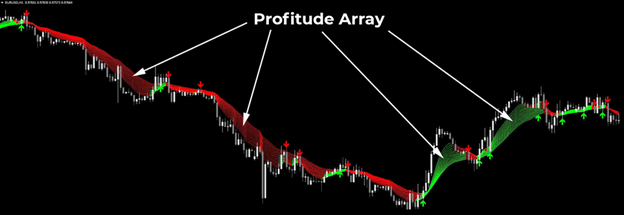
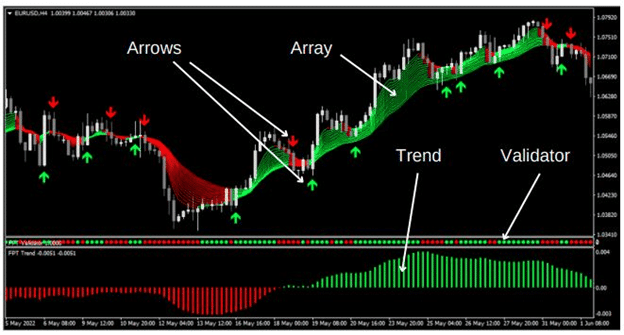
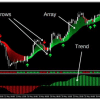
Imagine wanting to know traffic flow on multiple highways at the same time. That is what the Array does for forex pairs and time frames:
| Feature | How It Helps |
|---|---|
| Color-coded boxes | Green signals upward bias; red suggests downward bias. |
| Multiple rows | Displays several time frames (e.g., M5, M15, H1, H4, D1). |
| Alignment | When rows line up in one color, trend conviction is higher. |
Because the Array groups information visually, traders spend less time scrolling through charts. A quick scan reveals whether most periods agree on direction.
3.2 The Arrows: Pinpointing Possible Entries
A common complaint among new traders is “I see the trend, but when do I jump in?” The Arrows try to answer:
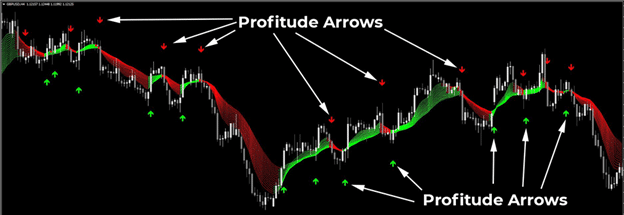
- A green arrow appears below price when the system spots conditions for a possible buy.
- A red arrow plots above price when selling pressure may ramp up.
The Arrows alone are not a green light. They work alongside the Validator for confirmation, reducing false starts.
3.3 The Validator: A Second Opinion Built-In
Any indicator can print an arrow; the key is verifying it. The Validator fills this role:
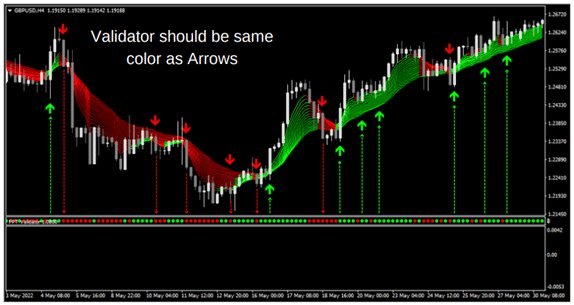
- If a green arrow forms, the Validator bar also turns green only when momentum measurements line up.
- If a red arrow appears, the Validator bar changes to red when bearish factors agree.
When both arrow and Validator match, traders gain extra confidence. In practice, the Validator reduces “double guessing,” a habit that causes many small losses.
3.4 The Trend Indicator: The System’s Heartbeat
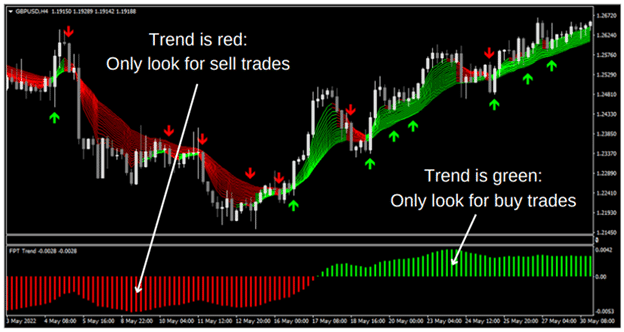
Finally, the Trend indicator spans the bottom of the chart as a thick bar:
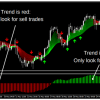
- Green bar = bullish trend. Only look for buys.
- Red bar = bearish trend. Only look for sells.
Because the Trend bar summarizes the market’s current path, it helps you avoid the mistake of taking every arrow you see. You may skip otherwise tempting signals if they go against the main color.
4. Installing the FX Profitude Trading System
Follow these steps on MetaTrader 4 (the most common platform, though steps are similar in MetaTrader 5):
- Download the indicator files (.ex4) and the template (.tpl) from the official vendor or member area.
- In MetaTrader, click File » Open Data Folder.
- Navigate to MQL4 » Indicators and paste the four indicator files.
- Back in the Data Folder, move the template into Templates.
- Restart MetaTrader 4 so it reads the new files.
- Open a chart of your preferred pair (EUR/USD is fine for practice).
- Right-click on the chart, select Template, then choose FX Profitude.
Your screen should now display:
- A color bar at the bottom (Trend indicator).
- A small multi-time-frame grid (Array).
- Occasional arrows above or below candles (Arrow indicator).
- A matching colored bar near the arrow (Validator).
Tip: Keep default settings first, trade on a demo account, then adjust input values only after you understand how signals appear under normal conditions.
5. Reading the Screen Step by Step
Below is a stepwise routine many users follow:
- Check the Trend bar
- Green? Only consider buys.
- Red? Only consider sells.
- Glance at the Array
- Are most time frames green (or red)?
- If mixed, wait for clearer alignment to avoid choppy moves.
- Wait for an Arrow in Trend direction
- Example: Green arrow while Trend bar is green.
- Look at the Validator
- Does the Validator bar switch to the same color as the arrow?
- If yes, move to entry planning.
- Define entry, stop-loss, and take-profit
- Place stop-loss a few pips below (or above) the recent swing.
- Aim for at least 1.5x or 2x risk as the initial target.
- Monitor trade
- Move stop-loss to break-even after price covers risk distance.
- Trail the stop below (or above) new swings if you plan to capture longer trends.
Because the four tools overlap, a full signal set does not appear every hour on every pair. That is by design—quality over quantity.
6. Risk Management: Keeping Losses Small
Any system, including FX Profitude, can string together losing trades during abnormal markets, news spikes, or low-liquidity periods. The following basic rules can help protect your capital:
- Risk per trade: Many retail traders risk 1 %–2 % of account balance per position.
- Position sizing: Calculate lot size so that the distance to the stop-loss multiplied by pip value equals your chosen risk.
- Avoid stacking: Do not open five trades in the same direction on correlated pairs.
- Mark calendars: Major news like Non-Farm Payrolls can whipsaw price. Step aside or reduce positions during releases.
7. Real-World Example Trades
Below are two simplified snapshots to illustrate entries (charts not shown in text form).
Example 1: EUR/USD Buy on the 1-Hour Chart
- Trend bar: Green for the past six hours.
- Array: M15, M30, H1 rows all green; H4 just turned green.
- Arrow: Green arrow pops under current candle.
- Validator: Instantly switches to green.
- Entry: Buy at market 1.0740.
- Stop-loss: 1.0720 (20 pips).
- Target: 1.0780 (40 pips).
- Outcome: Price hits 1.0780 after three hours. Risk-to-reward 1:2.
Example 2: GBP/JPY Sell on the 30-Minute Chart
- Trend bar: Solid red for four hours.
- Array: Multiple time frames red, but D1 is mixed.
- Arrow: Red arrow appears at 183.50.
- Validator: Delays one candle, then turns red—signal confirmed.
- Entry: Sell 183.35.
- Stop-loss: 183.90 (55 pips).
- Target: 182.25 (110 pips).
- Outcome: Price drops to 182.60, bounces, closes manually at 182.60 for 75 pips. R:R approx. 1:1.4.
These examples highlight the patience required to wait for full confirmation.
8. Benefits and Possible Drawbacks With FX Profitude Trading System
Benefits
- Clarity: Only four indicators; each plays a defined role.
- Speed: The Array shows multi-time-frame alignment at a glance.
- Bias filter: Trend bar stops trades against overall direction.
- Confirmation: Validator adds extra screen before entry.
Possible Drawbacks
- Fewer signals: Traders used to scalping every five minutes might find it slow.
- Lag: Like most trend tools, the signals rely on historical data, so turning points may come a bit late.
- Platform lock-in: Designed for MetaTrader; not native to TradingView or cTrader.
- Cost: Licensed software means extra expense compared with free indicators.
Balanced expectations prevent disappointment. If you want a high-frequency method, FX Profitude may not be ideal; if you value clearer rules, it could fit.
9. FX Profitude Trading System vs. Other Forex Trading Systems
| Feature | FX Profitude | Moving-Average-Only Strategy | Ichimoku Cloud | Price Action (Naked Chart) |
|---|---|---|---|---|
| Trend Filter | Dedicated Trend bar + Array | One or two average lines | Cloud thickness & color | Visual swing highs/lows |
| Entry Signal | Arrows + Validator | Crossover of lines | Tenkan/Kijun cross | Candlestick patterns |
| Confirmation | Validator alignment | Secondary MA or oscillator | Confirmation from Chikou span | Higher-time-frame bias |
| Screen Clutter | Low | Medium | High | Very low |
| Learning Curve | Moderate | Low | Higher | High |
| Signal Frequency | Medium | Medium | Low–Medium | Depends on trader |
Takeaway: FX Profitude sits between pure price action (which can be subjective) and heavy indicator stacks (which can confuse). It aims for simplicity without losing structure.
10. Frequently Asked Questions Regarding FX Profitude Trading System
Q1. Can I trade the FX Profitude Trading System on crypto pairs?A: Yes in principle, but crypto volatility is higher, and price gaps more often. Practice on demo first.
Q2. What time frame works best?A: Many users stick to M15, M30, H1, and H4 to balance noise and swing capture. Lower than M15 may yield too many whipsaws.
Q3. Does the system repaint?A: The indicators lock in once the candle closes, so you will not see arrows disappear after the fact.
Q4. How many pairs should I follow?A: Three to five major pairs are manageable: EUR/USD, GBP/USD, USD/JPY, AUD/USD, and one cross like EUR/JPY.
Q5. Should I combine it with fundamental analysis?A: Fundamental awareness (e.g., central-bank meetings) can avoid unpleasant surprises, even if you trade technically.
11. Final Thoughts & Next Steps For FX Profitude Trading System
The FX Profitude Trading System centers on a simple idea: decide the trend first, then confirm entries with clear markers. By relying on the Array, Arrows, Validator, and Trend indicator, you spend less energy guessing and more time managing risk.
If you already have trading rules that work, use this guide as inspiration; adopt parts that suit you, discard parts that don’t. If you are new and overwhelmed by conflicting indicators, give the system a spin on a demo account for at least four weeks. Track every trade in a journal, noting which signals felt strongest and why.
Good luck, and trade safely with clear trend direction every time you open a chart!
| Membership | Yearly Membership |
|---|---|
| Additional Services | Unlock & Decompile |
| Recommended Brokers | Exness Broker, FPMarkets |
| Recommended VPS | FXVM (Low Latency) |
| Youtube Channel | ForexForYou |
| Telegram Channel | Onshoppie Forex EA's & Indicators |
| Telegram Support | Onshoppie Support |
| Installation Guides | Onshoppie Forex Guides |
Brand
Indicator-mt4
Only logged in customers who have purchased this product may leave a review.
Related products

Products
-
 Yuvi Nexora EA MT5 v1.4 For Build 5660+
$24.95
Yuvi Nexora EA MT5 v1.4 For Build 5660+
$24.95
-
Bakhron EA MT5 + SetFiles For Build 5660+
$14.95
-
Gann Gold EA MT4 v1.8 For Build 1460+
Original price was: $199.00.$14.95Current price is: $14.95.
-
BARYONYX Robot Trading MT4 + SetFiles For Build 1460+
$14.95
-
Alpha Striker F1 MT5 2026 Single Entry EA For Build 5640+
$14.95
-
Local Trade Copier EA MT5 For All Builds
Original price was: $50.00.$14.95Current price is: $14.95.
-
Local Trade Copier EA MT4 For All Builds
Original price was: $50.00.$14.95Current price is: $14.95.
-
Adapt EA MT4 v1.13 For Build 1455+
$14.95


Recent reviews
-
 Advanced Dashboard Currency Strength
by Balram
Advanced Dashboard Currency Strength
by Balram

Reviews
There are no reviews yet.