







EURUSD Robot EA MT4 With DLL 1444
$9.95
Discover the ultimate EURUSD Robot EA with mind-blowing performance. Get proven trading results and transform your forex strategy today with our guide.



Description
EURUSD Robot EA: In-Depth Guide to a Trendline-Based Expert Advisor
EURUSD Robot EA – Everything You Need to Know Before You Install It
Table of Contents
- Quick Introduction
- What Is EURUSD Robot EA?
- Installation and Setup
- Pros and Cons
- Who Might Like (or Dislike) This EA
- Frequently Asked Questions
- Final Thoughts
Quick Introduction
If you have been looking for an automated way to trade the world’s most followed currency pair, the EURUSD Robot EA could be a practical option. This Expert Advisor for MetaTrader 4 (often called EURUSD ROBOT MT4) focuses on one task only: spotting clear trendlines on the EURUSD chart and trading around them. By concentrating on structure rather than noise, it aims for steady growth and small drawdowns—two qualities most traders value.
What Is EURUSD Robot EA?
EURUSD Robot EA is an automated trading system (Expert Advisor) coded for MT4. It is not a multi-pair or grid system; it concentrates on EURUSD and runs best on the H4 timeframe. Below is a brief overview:
| Feature | Detail |
|---|---|
| Platform | MetaTrader 4 |
| Pair | EURUSD only |
| Timeframe | H4 (four-hour) |
| Core method | Automatic trendline detection and breakout-based exits |
| Trade types | Both buy and sell, symmetry between long and short |
| Manual input | Lot size, risk %, max spread, max slippage |
| Goal | Consistent gains with limited drawdown |
Unlike scalpers that rely on low-latency execution or martingale robots that double down, this EA places each trade where the chart shows clear support or resistance lines created by price. It then exits at the very moment the trendline breaks, closing profitable trades and limiting losers early.
Installation and Setup
Setting up the EURUSD Robot EA in MT4 takes around five minutes:
- Copy the .ex4 fileFrom the download folder, copy it to:
MQL4 > Experts - Restart MetaTrader 4
- Enable AutoTradingClick the green “AutoTrading” button on the toolbar.
- Attach to EURUSD H4 chart• Open a EURUSD chart• Set timeframe to H4• Drag the EA onto the chart
- Check smiley iconA smiley at the top-right corner confirms the EA is live.
- Monitor the first few tradesVerify ticket sizes, entry levels, and exit logic.
Pros and Cons
| Pros | Cons |
|---|---|
| Low historical drawdown (≈ 2 %) | Single-pair focus means limited diversification |
| Simple, transparent logic | Will miss sudden breakouts that do not respect trendlines |
| Runs on common MT4 platform | Performance depends on broker’s spread and slip |
| No martingale, grid, or hedge | Fewer trades compared with scalpers |
| Works on a higher timeframe (H4) so less noise | Patience needed: some weeks may see few or no trades |
Who Might Like or Dislike This EA
Likely to appreciate
- Traders who want low stress and few trades rather than high-frequency action
- Investors worried about big drawdowns
- Part-time traders who cannot watch charts all day
- Fans of rule-based technical strategies
Might prefer another tool
- Traders aiming for rapid account growth at the cost of higher risk
- People who enjoy discretionary decision making
- Scalpers who focus on the M1 or M5 timeframe
- Those who want a multi-pair portfolio in one EA
Frequently Asked Questions Regarding EURUSD Robot
Q 1. Does EURUSD Robot EA use stop loss or just trendline closes?A stop loss equal to the distance between the entry and trendline is placed, so you remain protected if MetaTrader disconnects.
Q 2. How many trades per month can I expect?Roughly 2-4 trades on average. In volatile quarters it can be higher; in slow periods, fewer.
Q 3. Will it work on MT5?No. The current file type is .ex4, built for MT4. A separate build would be required for MT5.
Q 4. Does the strategy violate any broker rules?It follows standard order placement and uses no latency or arbitrage exploits, so most brokers allow it.
Q 5. How long should I forward test?A minimum of four weeks or 20 trades, whichever comes later, is a sensible baseline before scaling up lot size.
Final Thoughts About EURUSD Robot
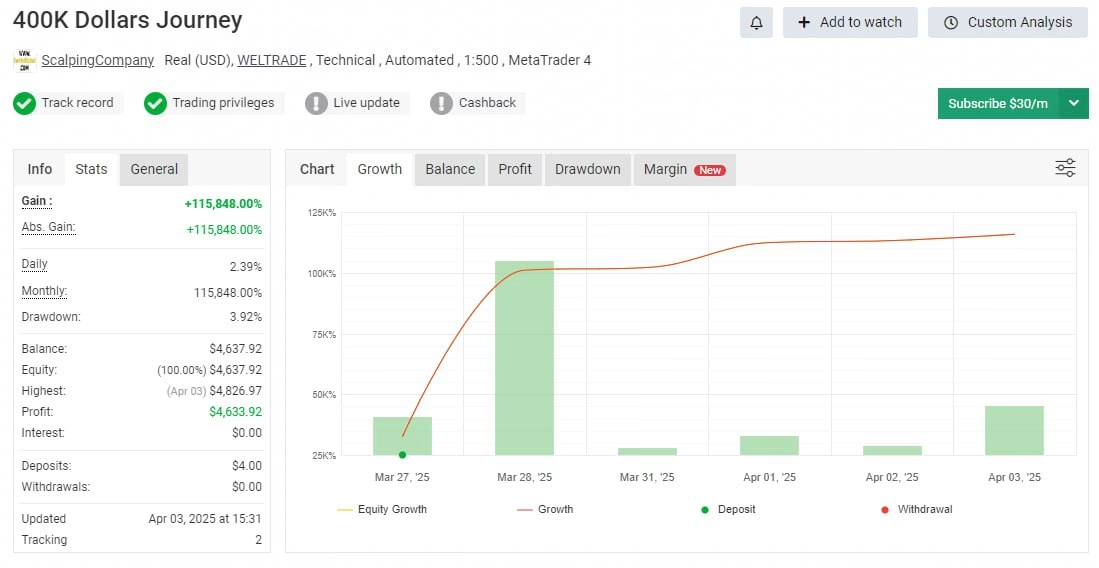
EURUSD Robot EA offers a disciplined approach to trading EURUSD on a higher timeframe. The trendline method may sound simple, yet historical data show it can capture clear moves while keeping drawdowns at a level many traders find acceptable. As with any automated system, real-world performance may differ from back tests, so keep risk small at the start and monitor results.
If you value technical structure, a calm trading rhythm, and the convenience of automation, this Expert Advisor deserves a spot on your shortlist.
Results – Click Here
Vendor Site – Click Here
| Membership | Yearly Membership |
|---|---|
| Additional Services | Unlock & Decompile |
| Recommended Brokers | Exness Broker, FPMarkets |
| Recommended VPS | FXVM (Low Latency) |
| Youtube Channel | ForexForYou |
| Telegram Channel | Onshoppie Forex EA's & Indicators |
| Telegram Support | Onshoppie Support |
| Installation Guides | Onshoppie Forex Guides |
Brand
ea-mt4
Only logged in customers who have purchased this product may leave a review.
Related products



Products
-
 Aurus Gold EA MT4 v1.11 For Build 1444+
Original price was: $967.00.$19.95Current price is: $19.95.
Aurus Gold EA MT4 v1.11 For Build 1444+
Original price was: $967.00.$19.95Current price is: $19.95.
-
Chinese UAV EA MT4 For Build 1444+
$9.95
-
Trade Vantage V4 MT4 v5.0 For Build 1444+
Original price was: $1,399.00.$19.95Current price is: $19.95.
-
Gold Or MT4 EA v1.10 + SetFiles For Build 1444+
Original price was: $399.00.$14.95Current price is: $14.95.
-
Alpha Trade Signal Pro MT5 For Build 5488+
$14.95
-
EA Legendary Scalper MT4 v151.98 + SetFiles For Build 1444+
Original price was: $299.00.$19.95Current price is: $19.95.
-
EA RTX-TERONGBUSUK MT5 + SetFiles With DLL 5430
Original price was: $50.00.$29.95Current price is: $29.95.
-
MFXT GOLD AI X1 EA MT5 With DLL 5488
$49.95








Recent reviews
-
 Advanced Dashboard Currency Strength
by Balram
Advanced Dashboard Currency Strength
by Balram

Reviews
There are no reviews yet.