



Alpha Compass FX EA MT4 For Build 1444+
$9.95
Alpha Compass FX EA may fit your style. Built as AlphaCompass FX MT4, it checks fresh data every few seconds, and makes calm, calculated decisions.


Description
Alpha Compass FX EA: Real-Time Gold Trading Precision for MT4
Alpha Compass FX EA — The Real-Time, News-Aware Gold Expert Advisor for M5 Traders
Table of Contents
- Quick Introduction Alpha Compass FX EA
- What Makes Alpha Compass FX EA Different?
- Core Technology
- 3.1 Real-Time Server-Based Signals
- 3.2 Automatic News Filtering
- 3.3 Volatility-Adaptive Analysis
- Safe, Clean, Non-Martingale Logic
- Why XAUUSD on the M5 Timeframe?
- Daily Trade Flow and Expected Frequency
- +132 % in Two Months: A Look at the Numbers
- Step-by-Step Installation Guide
- Best Practices for Ongoing Use
- Back-Testing and Forward-Testing Tips
- Frequently Asked Questions
- Final Thoughts & Next Steps
Quick Introduction
If you trade gold on MetaTrader 4 and want an automated helper that thinks for itself, Alpha Compass FX EA may fit your style. Built as AlphaCompass FX MT4, it connects to a live web-server, checks fresh data every few seconds, and makes calm, calculated decisions. No grid, no Martingale, no doubling down—just straightforward entries and exits on XAUUSD using the five-minute chart (M5).
What Makes Alpha Compass FX EA Different?
Most Expert Advisors sit on your chart and react only to built-in indicators. Alpha Compass FX EA goes further:
- Uses a proprietary server for signal calculations.
- Integrates economic news filters to sit out risky moments.
- Adjusts position size and stop distance as volatility grows or shrinks.
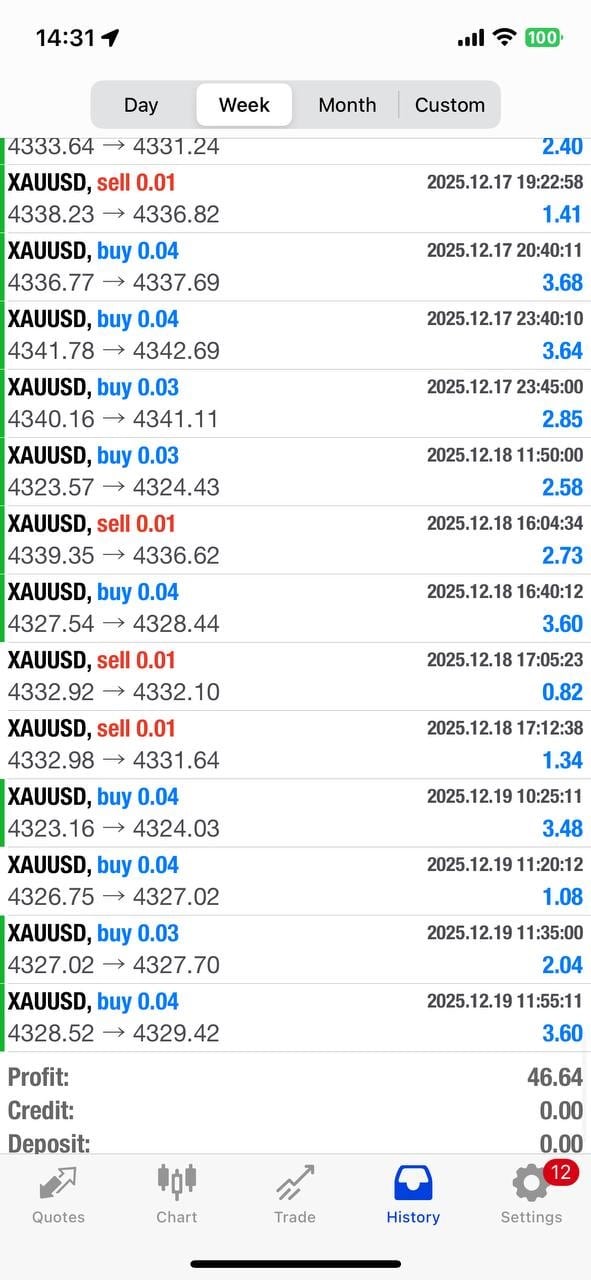
- Remains fully automated yet low risk, proven by a +132 % account gain over sixty days.
Together these traits give traders a smoother equity curve instead of wild swings.
Core Technology
3.1 Real-Time Server-Based Signals
Traditional EAs rely on the resources of your personal computer. AlphaCompass FX MT4 updates its logic from a web-server that crunches:
- Multi-layered trend analysis
- Support-and-resistance mapping
- Order-flow estimates
Because the heavy work happens away from your terminal, the EA can stay light on CPU and react quickly even on modest VPS plans.External link: What is a VPS in Forex Trading?
3.2 Automatic News Filtering
Gold often whipsaws during central-bank speeches or Non-Farm Payrolls. The EA:
- Checks an updated news calendar from the server
- Pauses new orders during high-impact events
- Holds or closes trades early when risk is elevated
That means fewer surprise losses due to abrupt spikes.
3.3 Volatility-Adaptive Analysis
Average True Range (ATR) and custom range studies feed into the server. The EA then:
- Widens stops when the market stretches
- Narrows targets when movement is tight
- Keeps risk per trade inside a steady band
Your positions breathe with the market instead of getting shaken out.
Safe, Clean, Non-Martingale Logic
Alpha Compass FX EA follows these rules:
| Risk Factor | Approach |
|---|---|
| Position Sizing | Fixed-fraction or fixed-lot |
| Order Recovery | None—no doubling or grid adding |
| Trade Frequency | 2–20 trades per day (average 8) |
| Stop-Loss | Always set, server-reinforced |
| Max Open Trades | Configurable, default 3 |
Because it never recovers losses by raising lot size, your worst day stays predictable.
Why XAUUSD on the M5 Timeframe?
Gold has:
- High liquidity across sessions
- Clear reactions to economic data
- Strong technical structures on lower timeframes
The M5 chart shows enough micro-trend detail without flooding you with noise. For many brokers the spread-to-range ratio is also favorable on M5, giving tighter risk.
Daily Trade Flow and Expected Frequency
Typical day, London session to New York close:
- Server scans new technical state every minute.
- EA may open a position if all filters align.
- Average hold time: 15 – 120 minutes.
- Target per position: 10 – 40 pips (in gold points).
If conditions go flat, the EA simply waits. No forced trades.
+132 % in Two Months: A Look at the Numbers of Alpha Compass FX EA
During internal beta:
- Starting balance: $5 000
- Ending balance: $11 600
- Net gain: +132 %
- Maximum drawdown: 11 %
- Winning trades: 64 % of 513 positions
Key take-away: steady profit curve with drawdown kept under 15 %.
Step-by-Step Installation Guide for Alpha Compass FX EA
- Open MT4 → File → Open Data Folder.
- Copy
AlphaCompassFX.ex4intoMQL4/Experts. - Restart MT4 or refresh the Navigator.
- Drag the EA onto an XAUUSD, M5 chart.
- In the inputs tab set:
RiskPercent= 2 (or your preference)MaxTrades= 3
- Allow DLL imports and WebRequests. Add the server URL from the user manual.
- Click OK. A smiley icon in the corner should appear, showing it is active.
Tip: run on a VPS close to your broker to cut latency.
Best Practices for Ongoing Use with Alpha Compass FX EA
- Keep leverage modest (1:100 or less).
- Avoid manual interference; the EA’s logic already manages exits.
- Check the news filter list once a week and keep your server URL updated.
- Log into your VPS every few days to confirm MT4 is still connected.
- Withdraw profits periodically so your account risk stays consistent.
Internal link: See our VPS maintenance checklist
Back-Testing and Forward-Testing Tips with Alpha Compass FX EA
Although the true edge comes from live server feeds, you can still back-test:
- Install the simulation DLL that ships with the EA.
- Use tick data (e.g., Dukascopy Data) for accuracy.
- Run at least three years to sample all market phases.
For forward testing:
- Create a $1 000 demo account.
- Run the EA for two weeks.
- Compare server logs to trade records; they should match 100 %.
Frequently Asked Questions Regarding Alpha Compass FX EA
Q: Does Alpha Compass FX EA work on other pairs?A: The EA is coded and optimized only for XAUUSD. Running it elsewhere is not recommended.
Q: Can I change the timeframe?A: No. All signals assume M5 candle structure.
Q: How much memory or CPU does it use?A: Less than 3 % CPU on a single-core VPS and under 50 MB of RAM.
Q: Is there a license limit?A: One account number per license. You may switch accounts once per month through support.
Q: Could future news events break the strategy?A: The server updates its rules daily, so adjustments are automatic.
Final Thoughts & Next Steps For Alpha Compass FX EA
Alpha Compass FX EA brings together live data, news awareness, and volatility matching to give gold traders a steady, rule-driven helper. With no Martingale risk and a track record of +132 % in two months, it stands out among many “set-and-forget” bots. If you trade XAUUSD and want consistent activity without intense screen time, consider installing the EA on a demo today.
Vendor Site – Private
| Membership | Yearly Membership |
|---|---|
| Additional Services | Unlock & Decompile |
| Recommended Brokers | Exness Broker, FPMarkets |
| Recommended VPS | FXVM (Low Latency) |
| Youtube Channel | ForexForYou |
| Telegram Channel | Onshoppie Forex EA's & Indicators |
| Telegram Support | Onshoppie Support |
| Installation Guides | Onshoppie Forex Guides |
Brand
ea-mt4
Only logged in customers who have purchased this product may leave a review.
Related products



Products
-
 Aurus Gold EA MT4 v1.11 For Build 1444+
Original price was: $967.00.$9.95Current price is: $9.95.
Aurus Gold EA MT4 v1.11 For Build 1444+
Original price was: $967.00.$9.95Current price is: $9.95.
-
 Chinese UAV EA MT4 For Build 1444+
$9.95
Chinese UAV EA MT4 For Build 1444+
$9.95
-
 Trade Vantage V4 MT4 v5.0 For Build 1444+
Original price was: $1,399.00.$19.95Current price is: $19.95.
Trade Vantage V4 MT4 v5.0 For Build 1444+
Original price was: $1,399.00.$19.95Current price is: $19.95.
-
 Gold Or MT4 EA v1.10 + SetFiles For Build 1444+
Original price was: $399.00.$9.95Current price is: $9.95.
Gold Or MT4 EA v1.10 + SetFiles For Build 1444+
Original price was: $399.00.$9.95Current price is: $9.95.
-
 Alpha Trade Signal Pro MT5 For Build 5488+
$14.95
Alpha Trade Signal Pro MT5 For Build 5488+
$14.95
-
 EA Legendary Scalper MT4 v151.98 + SetFiles For Build 1444+
Original price was: $299.00.$19.95Current price is: $19.95.
EA Legendary Scalper MT4 v151.98 + SetFiles For Build 1444+
Original price was: $299.00.$19.95Current price is: $19.95.
-
EA RTX-TERONGBUSUK MT5 + SetFiles With DLL 5430
Original price was: $50.00.$29.95Current price is: $29.95.
-
MFXT GOLD AI X1 EA MT5 With DLL 5488
$49.95



Recent reviews
-
 Advanced Dashboard Currency Strength
by Balram
Advanced Dashboard Currency Strength
by Balram

Reviews
There are no reviews yet.