


Adapt EA MT4 v1.13 For Build 1455+
$14.95
Adapt EA fits that need. It is an automated trading system for MetaTrader 4 (MT4) puts trend recognition, timing filters, and strict risk control.




Description
Adapt EA: A Smart Adaptive Trading Robot for MT4
Alternative Title: Adapt EA – The Fully Automated Expert Advisor That Trades 5 Major Currency Pairs with Built-In Drawdown Control
Table of Contents
- What Is Adapt EA?
- Supported Currency Pairs & Why They Matter
- Step-by-Step Setup Guide
- Final Thoughts & Next Steps
What Is Adapt EA?
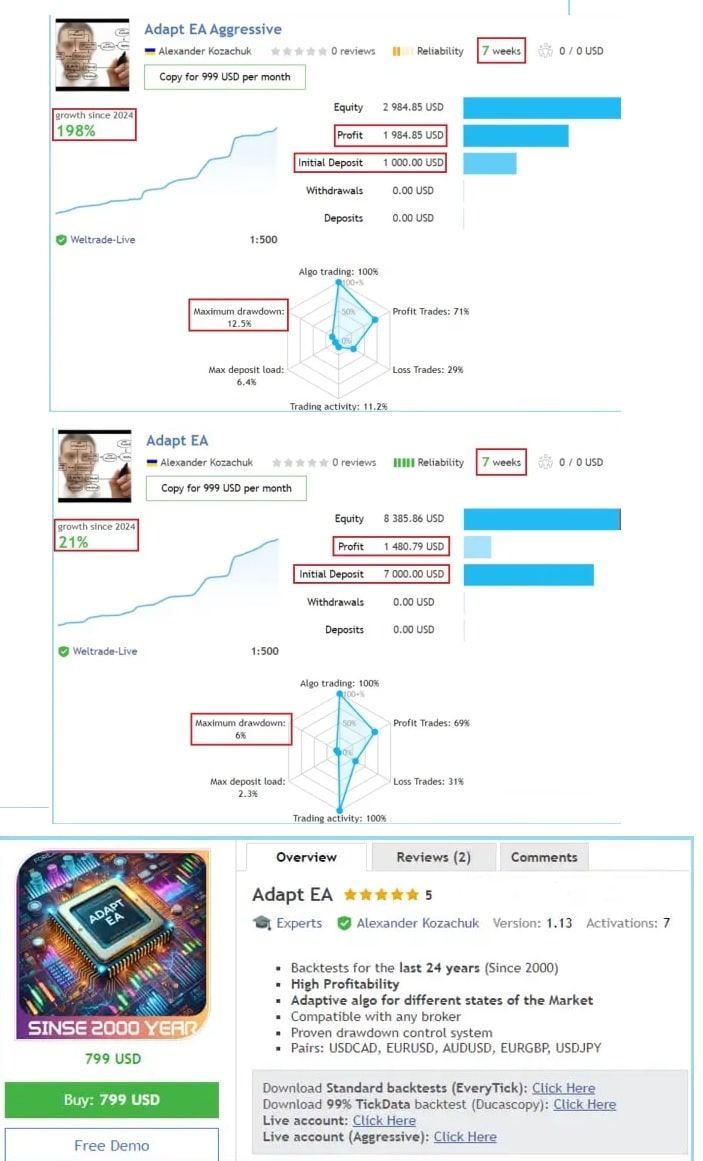
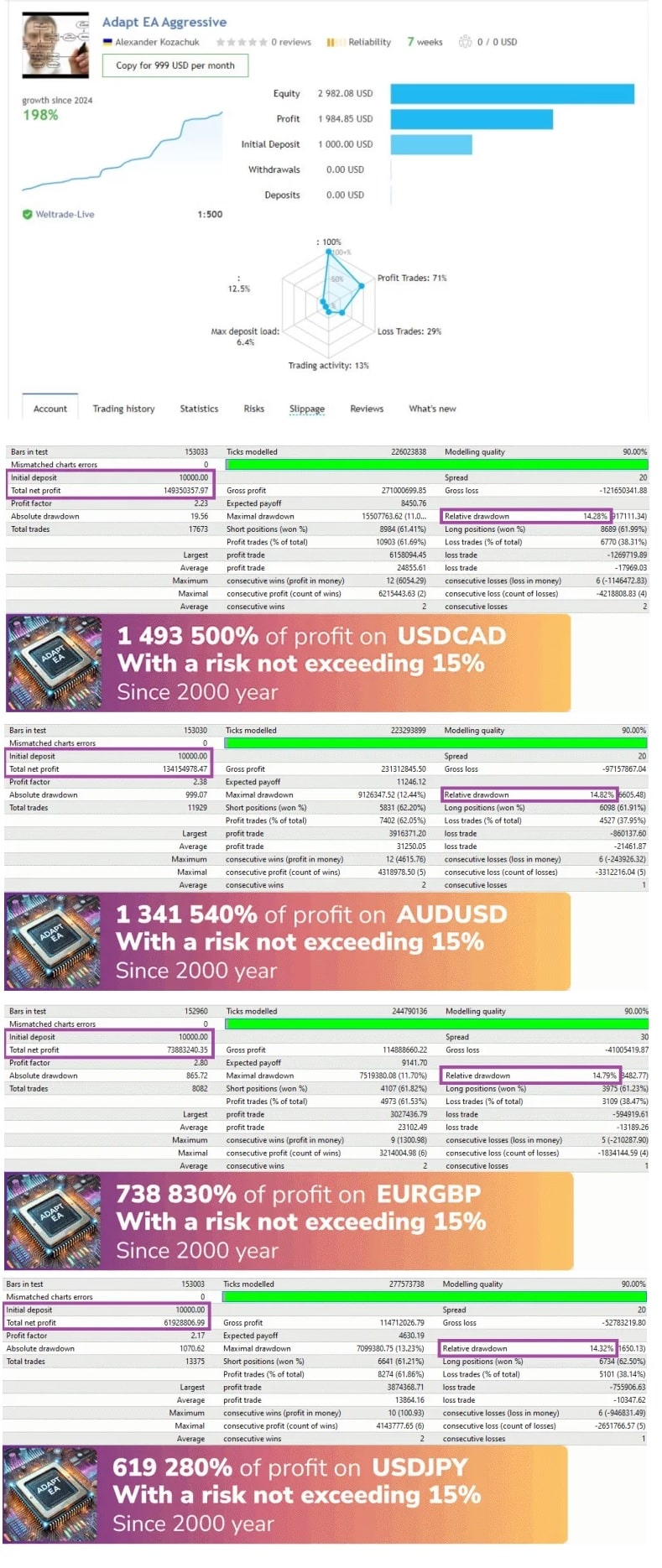
Adapt EA is a fully automated Expert Advisor for MetaTrader 4 that trades USDCAD, EURUSD, AUDUSD, EURGBP, and USDJPY. Powered by a real-time adaptive algorithm, it changes its trade logic as market conditions shift. Unlike many robots that rely on fixed parameters, this EA monitors volatility, volume, and price action to stay aligned with the current trend or range.
In short, this EA aims to give traders a profitable yet controlled experience, even during volatile sessions.
Supported Currency Pairs & Why They Matter
| Pair | Typical Spread* | Session Activity | Why Adapt EA Likes It |
|---|---|---|---|
| USDCAD | 1.0–1.4 | Overlaps US & Canada hours | Good mix of range & breakout moves |
| EURUSD | 0.6–1.0 | European & US sessions | Deep liquidity, low cost |
| AUDUSD | 0.8–1.2 | Asian & US overlap | Responsive to commodity news |
| EURGBP | 1.0–1.6 | European session | Often ranges; adapts to mean reversion |
| USDJPY | 0.7–1.1 | Asian hours | Clear reaction to risk-on / risk-off |
*Typical spread on a standard ECN account.
By spreading risk across five pairs, this EA reduces the chance that one bad market phase will wipe out gains.
Step-by-Step Setup Guide for Adapt EA
Total time: About 10 minutes
1. Install the EA
- Download the EA (ex4 file) from onshoppie.
- Copy the file into
MQL4/Experts/inside your MT4 data folder. - Restart MetaTrader 4.
2. Attach to Charts
- Open five charts: USDCAD, EURUSD, AUDUSD, EURGBP, USDJPY.
- Select the M5 or M15 timeframe (recommended).
- Drag Adapt EA onto each chart.
3. Enable AutoTrading
- Make sure the “AutoTrading” button in MT4 is green.
- A smiling face icon should now appear in the upper-right corner of each chart.
Final Thoughts & Next Steps For Adapt EA
This EA offers an auto-adaptive approach to trading five major currency pairs on MT4 while keeping drawdown in check. Its smart risk control and simple setup make it a solid choice for traders who want to automate part of their strategy without constant tweaking.
Happy trading!
Vendor Site – Click Here
| Membership | Yearly Membership |
|---|---|
| Additional Services | Unlock & Decompile |
| Recommended Brokers | Exness Broker, FPMarkets |
| Recommended VPS | FXVM (Low Latency) |
| Youtube Channel | ForexForYou |
| Telegram Channel | Onshoppie Forex EA's & Indicators |
| Telegram Support | Onshoppie Support |
| Installation Guides | Onshoppie Forex Guides |
Brand
ea-mt4
Only logged in customers who have purchased this product may leave a review.
Related products


Products
-
 The Gold Reaper EA MQ4 V4.1 Source Code
Original price was: $599.00.$24.95Current price is: $24.95.
The Gold Reaper EA MQ4 V4.1 Source Code
Original price was: $599.00.$24.95Current price is: $24.95.
-
 Algo Gold Scalper MT4 EA For Build 1470+
$14.95
Algo Gold Scalper MT4 EA For Build 1470+
$14.95
-
 ZYPHRON EA MT5 For Build 5660+
$14.95
ZYPHRON EA MT5 For Build 5660+
$14.95
-
 Currency Pros Gold EA MT5 v1.03 For Build 5660+
Original price was: $1,497.00.$44.95Current price is: $44.95.
Currency Pros Gold EA MT5 v1.03 For Build 5660+
Original price was: $1,497.00.$44.95Current price is: $44.95.
-
 Pip Club Profit Max Pro EA MT5 v2.0 For Build 5739+
Original price was: $699.00.$14.95Current price is: $14.95.
Pip Club Profit Max Pro EA MT5 v2.0 For Build 5739+
Original price was: $699.00.$14.95Current price is: $14.95.
-
 Hand of God EA V4.5 MQ4 Source Code 1470+
$14.95
Hand of God EA V4.5 MQ4 Source Code 1470+
$14.95
-
Hand of God EA V4.5 MT4 + SetFiles For Build 1470+
$14.95
-
 Askaitrade EA MT5 v3.0 For Build 5660+
Original price was: $599.00.$14.95Current price is: $14.95.
Askaitrade EA MT5 v3.0 For Build 5660+
Original price was: $599.00.$14.95Current price is: $14.95.
Recent reviews
-
 Advanced Dashboard Currency Strength
by Balram
Advanced Dashboard Currency Strength
by Balram
Reviews
There are no reviews yet.