















WallStreet Recovery PRO EA MT4 V1.7 For Build 1444+
Original price was: $157.00.$9.95Current price is: $9.95.
Get exclusive access to WallStreet Recovery PRO! This thrilling new way to recover losses will change your trading approach forever. Start today!



Description
WallStreet Recovery PRO Review: A Practical Look at the Advanced Recovery System
Alternative Title
WallStreet Recovery PRO – A Deep Dive into the Fully Automated Trading System Built on the WallStreet Forex Robot Core
Table of Contents
- Introduction
- What Is WallStreet Recovery PRO?
- How the Core Strategy Works
- Key Features at a Glance
- Advanced Recovery System Explained
- Why Traders Choose WallStreet Recovery PRO
- Supported Pairs and Timeframes
- Simple Setup Guide
- Back-Testing and Forward Testing Tips
- Prop Firm Compatibility and Risk Control
- Best Practices for Daily Use
- Frequently Asked Questions
- Final Thoughts
Introduction
Forex trading can move from calm to chaotic in seconds. Even a strong plan can struggle when price spikes catch you off guard. WallStreet Recovery PRO steps in here. Built on the legendary WallStreet Forex Robot core, this fully automated trading system adds a smart Recovery Algorithm to reduce drawdowns and aim for steady results.
What Is WallStreet Recovery PRO?
WallStreet Recovery PRO is an Expert Advisor (EA) for MetaTrader 4 and MetaTrader 5. It combines the proven entry logic of WallStreet Forex Robot with an upgraded, intelligent trade-management module. The goal is simple:
- Spot high-probability setups
- Enter with measured position sizes
- Recover temporary losses through a mathematical, non-martingale process
- Close trading cycles in net profit whenever possible
Because the robot is plug-and-play, most settings are optimized out of the box. Traders who enjoy tweaks will still find detailed inputs such as spread limits, slippage filters, and time controls.
How the Core Strategy Works
1. Market Scan
The EA monitors seven major pairs on the M15 chart:
- EURUSD
- GBPUSD
- USDJPY
- AUDUSD
- USDCHF
- USDCAD
- NZDUSD
2. High-Probability Entry
When the strategy detects alignment between price action and proprietary indicators, it opens a position. Entries are filtered by:
- Current spread
- Recent volatility
- Upcoming high-impact news
3. Intelligent Money Management
Position size adjusts automatically based on account balance and risk profile. The Advanced Money Management System keeps risk in check on every trade.
4. Recovery Logic
If the first trade moves against you, the EA may add controlled positions in the same direction—but never with a reckless lot jump. This is not a classic martingale. Instead, the algorithm:
- Measures distance between trades
- Caps the number of recovery steps
- Aims to close the full basket once the combined position returns to profit
5. Dynamic Exit
Stop-loss and take-profit levels adapt to live volatility. Once a trade is in the green, the Profit Protection System kicks in to secure gains.
Key Features at a Glance
| Feature | Purpose |
|---|---|
| Advanced Money Management | Sets lot size based on balance & chosen risk |
| High-Impact News Filter | Pauses trading before major events |
| Drawdown Protection System | Limits account-wide risk in real time |
| Broker SPY Module | Detects hostile broker behavior |
| Dynamic SL & TP | Adjusts exits to current volatility |
| Slippage & Spread Guard | Blocks trades in poor conditions |
| Time Management | Allows trading only in specified sessions |
| Stealth Mode | Hides SL/TP from broker’s server |
| Recovery Algorithm | Converts temporary loss into potential profit |
Advanced Recovery System Explained
Traditional grid or martingale methods often double lot sizes until the market finally turns. That approach can sink an account during a sharp trend. WallStreet Recovery PRO takes a different route:
- Measured Lot Increase – Each extra order is calculated, not doubled.
- Fixed Number of Steps – The strategy caps how many positions it can open.
- Distance Control – Trades are placed at logical price intervals, avoiding tight clusters.
- Cycle Close Rule – When combined P/L turns positive, the EA exits the whole basket.
Because every step is ruled by math rather than hope, the system remains calm under stress and aims to keep drawdown within realistic limits.
Why Traders Choose WallStreet Recovery PRO
- Consistency – Years of live data on the WallStreet codebase show dependable behaviour.
- Automation – No need to monitor charts 24/7.
- Low Maintenance – Default settings are tuned for all supported pairs.
- News Awareness – Built-in filter helps avoid surprise spikes.
- Prop Firm Friendly – Drawdown controls respect strict funding rules.
Supported Pairs and Timeframes
| Currency Pair | Recommended Chart | Typical Spread Limit |
|---|---|---|
| EURUSD | M15 | ≤ 15 points |
| GBPUSD | M15 | ≤ 20 points |
| USDJPY | M15 | ≤ 15 points |
| AUDUSD | M15 | ≤ 20 points |
| USDCHF | M15 | ≤ 20 points |
| USDCAD | M15 | ≤ 20 points |
| NZDUSD | M15 | ≤ 25 points |
If you are short on disk space or time, you can test using M1 Open-Prices. For best quality, use M15 Every Tick.
Simple Setup Guide
Estimated time: 10–15 minutes
- Download & Install
- Place the EA in your MetaTrader
/Expertsfolder and restart the terminal. - For MT5 users, download the separate version from the official MQL5 page.
- Place the EA in your MetaTrader
- Enable Algo Trading
- Click the
Algo Tradingbutton at the top of MetaTrader.
- Click the
- Attach to Chart
- Open an M15 chart for each supported pair.
- Drag WallStreet Recovery PRO onto the chart.
- Check Inputs
- Leave default values if you are new.
- Optional tweaks:
- Lower
Risk_Percentfor conservative style. - Edit
Magicnumbers if multiple EAs run on the same account.
- Lower
- Allow Live Trading
- In the Common tab, tick “Allow live trading” and “Allow DLL imports.”
- Press OK
- The info panel appears in the top-left corner, showing status, spread, and profit.
Back-Testing and Forward Testing Tips
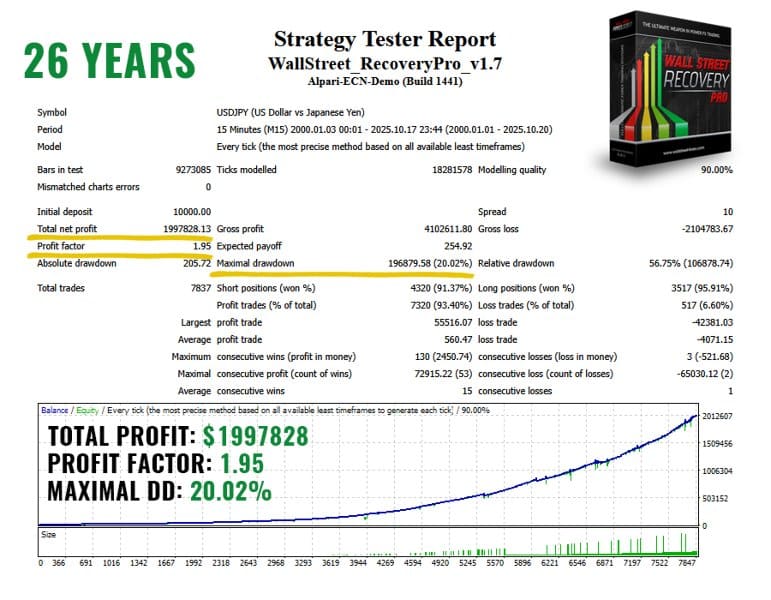
- Use 99% modeling quality data for reliable results.
- Match your broker’s GMT offset; otherwise, session filters may act at wrong hours.
- Run the tester with the strategy’s default risk, then repeat with a fixed lot to separate strategy edge from money management edge.
- Forward test on a small live or demo account for at least four weeks before scaling up.
- Compare stats: profit factor, drawdown, trade count, and recovery length.
Prop Firm Compatibility and Risk Control with WallStreet Recovery PRO
Many funded programs such as FTMO, MyForexFunds, and The5ers limit daily drawdown or maximum loss. WallStreet Recovery PRO supports these rules in two ways:
- Drawdown Protection System
- Sets a soft cap on account-wide loss.
- If equity drops to the limit, the EA pauses new entries and can close open trades if required.
- Advanced Money Management
- Position size scales with balance, so risk stays proportional.
- You can set an even lower
Max_Lotto pass the challenge safely.
Tip: Keep overall risk per cycle below 2–3 % of the account to stay within most firm guidelines.
Best Practices for Daily Use with WallStreet Recovery PRO
- Keep VPS or PC Online
- Disconnects disable Stealth Stop-Loss. A reliable VPS avoids that.
- Update News List Weekly
- Refresh the calendar file so the News Filter blocks risky events.
- Check Broker Conditions
- Select an ECN/STP broker with low spread and no interference.
- Set Reasonable Risk
- Even a strong EA can fail if risk is set too high.
- Maintain Separate Log
- Record entry time, pair, outcome, and comments. Patterns will appear over months.
- Avoid Manual Interference
- Let the algorithm finish its recovery cycle. Manual closes break the math.
Frequently Asked Questions Regarding WallStreet Recovery PRO
Q1: Is WallStreet Recovery PRO a scalper?A: It opens trades that may last minutes to days, so it is not a pure scalping system.
Q2: Does it use martingale?A: No. It increases lot sizes in small, pre-defined steps that stay within account risk limits.
Q3: Can I run it on a VPS?A: Yes. A VPS with < 30 ms latency is ideal.
Q4: What account size do I need?A: The EA works on micro, mini, and standard accounts; $500 or more is common, though smaller balances are possible with cent accounts.
Q5: Does it work with crypto or indices?A: The robot is optimised for the seven listed Forex pairs. Other symbols are not supported.
Final Thoughts About WallStreet Recovery PRO
WallStreet Recovery PRO stands out because it blends a time-tested entry logic with an Advanced Recovery System that aims to close trading cycles in profit without aggressive lot doubling. With sensible risk settings, a reliable broker, and a stable VPS, traders gain a steady, rules-based partner in the fast-moving Forex market.
Click here to check full list of available parameters!
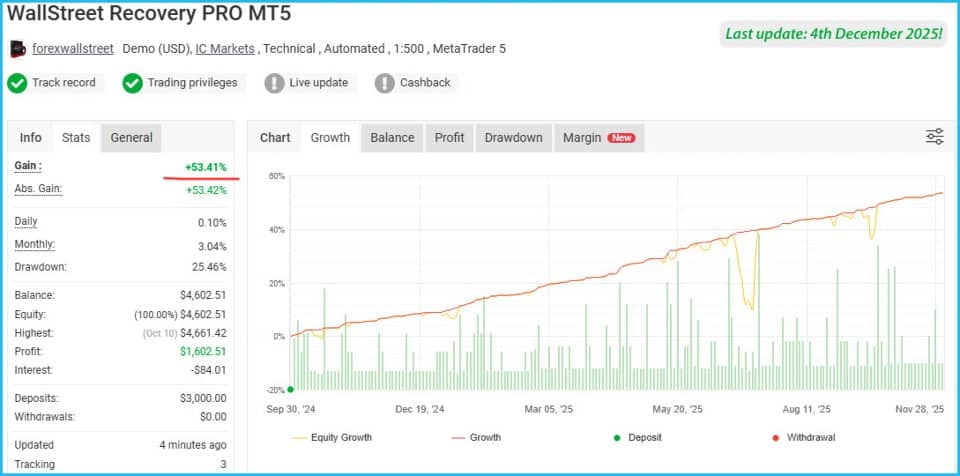
WallStreet Recovery PRO Live Results: https://www.mql5.com/en/signals/2331815
Vendor Site – Click Here
| Membership | Yearly Membership |
|---|---|
| Additional Services | Unlock & Decompile |
| Recommended Brokers | Exness Broker, FPMarkets |
| Recommended VPS | FXVM (Low Latency) |
| Youtube Channel | ForexForYou |
| Telegram Channel | Onshoppie Forex EA's & Indicators |
| Telegram Support | Onshoppie Support |
| Installation Guides | Onshoppie Forex Guides |
Brand
ea-mt4
Only logged in customers who have purchased this product may leave a review.
Related products


Products
-
 JS Hedging Pro EA MT5 + Setfiles For Build 5430+
$9.95
JS Hedging Pro EA MT5 + Setfiles For Build 5430+
$9.95
-
WallStreet Recovery PRO EA MT4 V1.7 For Build 1444+
Original price was: $157.00.$9.95Current price is: $9.95.
-
Radar Signal Indicator MT4 For Build 1444+
Original price was: $400.00.$9.95Current price is: $9.95.
-
Euro AI EA MT5 + Setfiles For Build 5430+
$9.95
-
Gold ISIS EA MT5 + Setfiles For Build 5430+
$19.95
-
DARKER EA MT4 V1.0 Guide to Stress-Free Forex Trading
Original price was: $4,750.00.$49.99Current price is: $49.99.
-
Gold BO ATR EA MT5 v2.0 + SetFiles For Build 5430+
$9.95
-
SIGMA TREND PROTOCOL EA STP MT4 + Setfiles For Build 1444+
Original price was: $25,000.00.$29.95Current price is: $29.95.







Recent reviews
-
 Advanced Dashboard Currency Strength
by Balram
Advanced Dashboard Currency Strength
by Balram

Reviews
There are no reviews yet.