
$77.69 Original price was: $77.69.$15.00Current price is: $15.00.
SMC FUSION ULTIMATE is an MT5 Smart Money Concepts indicator with 17 SMC models, confluence scoring, multi-timeframe analysis and alerts.
SMC FUSION ULTIMATE MT5 is a Smart Money Concepts (SMC) and ICT-inspired indicator for MetaTrader 5. It brings 17 analytical models into one framework to help traders review market structure, liquidity behaviour, Order Blocks, Fair Value Gaps and potential entry areas.
The indicator combines configurable confluence scoring, optional VWAP and FVG filters, multi-timeframe analysis, and ATR-based Entry, Stop Loss and Take Profit calculations. It is designed for use across supported Forex, Gold, index, cryptocurrency and synthetic instruments, subject to broker and instrument compatibility.
The Fusion Engine combines multiple price-action models, each examining a different market feature and potentially contributing to the overall confluence score:
The Fusion Engine evaluates agreement between configured models using adjustable weights and a confirmation score. Traders can set a minimum threshold according to their preferred signal frequency and selectivity.
Lower thresholds may produce more signals, while higher thresholds require stronger agreement among selected conditions. A higher score represents greater agreement between configured models; it is not a probability of success or a guarantee of profit.
An optional Fair Value Gap confirmation filter can require qualifying FVG conditions before a signal is displayed. The indicator also detects Break of Structure (BOS) and Change of Character (CHoCH), with three operating modes: OFF, Display Only and Signal Filter. Market Structure Shift analysis adds another way to review potential directional changes.
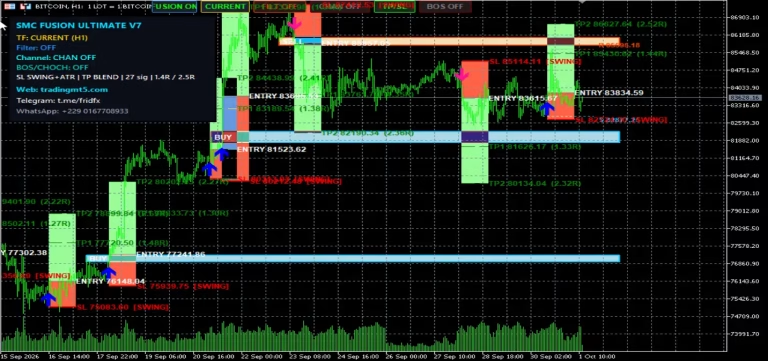
The indicator can calculate and display an Entry price, Stop Loss, Take Profit 1 (TP1) and Take Profit 2 (TP2). The supplied product information describes ATR-based calculations, with configurable logic that can adjust levels according to detected confluence strength.
Review generated levels in the context of current volatility, spreads, market structure and personal risk limits. Confirm the indicator’s calculation method before using displayed levels in live trading.
An optional Volume Weighted Average Price (VWAP) filter adds another condition to the signal framework. When enabled, it helps assess potential setups in relation to the configured VWAP logic; when disabled, signals can be evaluated without this additional filter. VWAP is a supporting analytical reference, not a standalone prediction of market direction.
SMC FUSION ULTIMATE supports source-timeframe analysis across:
Traders can choose a source timeframe while keeping the indicator attached to their preferred chart. For example, lower-timeframe entry analysis can be reviewed alongside H1 or H4 market structure.
The product specifications describe a closed-candle signal design intended to reduce changes to completed signals caused by movement in a still-forming candle. Verify the actual behaviour in MetaTrader 5, particularly after changing timeframes or loading historical data.
Additional signal-management features include:
The described active setup management can continue until the configured TP2 or Stop Loss condition is reached. These controls do not guarantee independent signals or prevent consecutive losses.
Notification options include MetaTrader 5 pop-up alerts, mobile push notifications and email notifications. Depending on the configured alert system, messages can include signal information, Entry, Stop Loss, TP1 and TP2. Mobile and email alerts may require additional configuration in MetaTrader 5.
The interactive chart panel provides access to key settings, including:
The indicator is designed to support MetaTrader 5 Strategy Tester visual testing. Traders can review signal frequency, timeframe differences, FVG and market-structure confirmation, Entry/SL/TP placement, cooldown behaviour and responses across different instruments and volatility conditions.
Supported market categories described by the product provider include:
Each market has different volatility, spreads, liquidity and session characteristics. Evaluate settings independently for each instrument.
SMC FUSION ULTIMATE may be relevant to SMC and ICT traders, price-action traders, intraday traders, multi-timeframe analysts and systematic traders who want to review multiple predefined conditions within one chart-based interface. Understanding the underlying trading concepts remains important, particularly for developing traders.
Trading Forex, Gold, indices, cryptocurrencies and other leveraged financial instruments involves substantial risk. Losses can result from leverage, volatility, spreads, slippage and execution conditions. SMC FUSION ULTIMATE is an analytical and signal-generation indicator, not a guarantee of profitable trading. Confluence scores, historical signals and automatically calculated trade levels do not guarantee future results. Test the indicator on a demo account, verify its behaviour independently, use suitable position sizing and define risk limits before trading live.
Trading Forex, Gold, indices, cryptocurrencies, and other leveraged financial instruments involves substantial risk. Losses may exceed expectations due to leverage, volatility, spreads, slippage, and execution conditions.
Confluence scores, historical signals, and automated Take Profit or Stop Loss levels do not guarantee future results.
Always test the product on a demo account before using it in live markets. Use appropriate position sizing, define acceptable risk limits, and make trading decisions based on your own analysis and financial circumstances.
| Resource | Link |
|---|---|
| Telegram Channel | Click Here |
| Top VPS | Click Here |
| Telegram Support | Click Here |
| ICMarkets broker | Click Here |
| Exness Broker | Click Here |
| Mail Support | Click Here |
No posts found!
Welcome Back
Sign in to access your account and continue where you left off.
Welcome To OnShoppie
Create your account to access everything you need.



Reviews
There are no reviews yet.